

The 2026 HMIS Crossroad
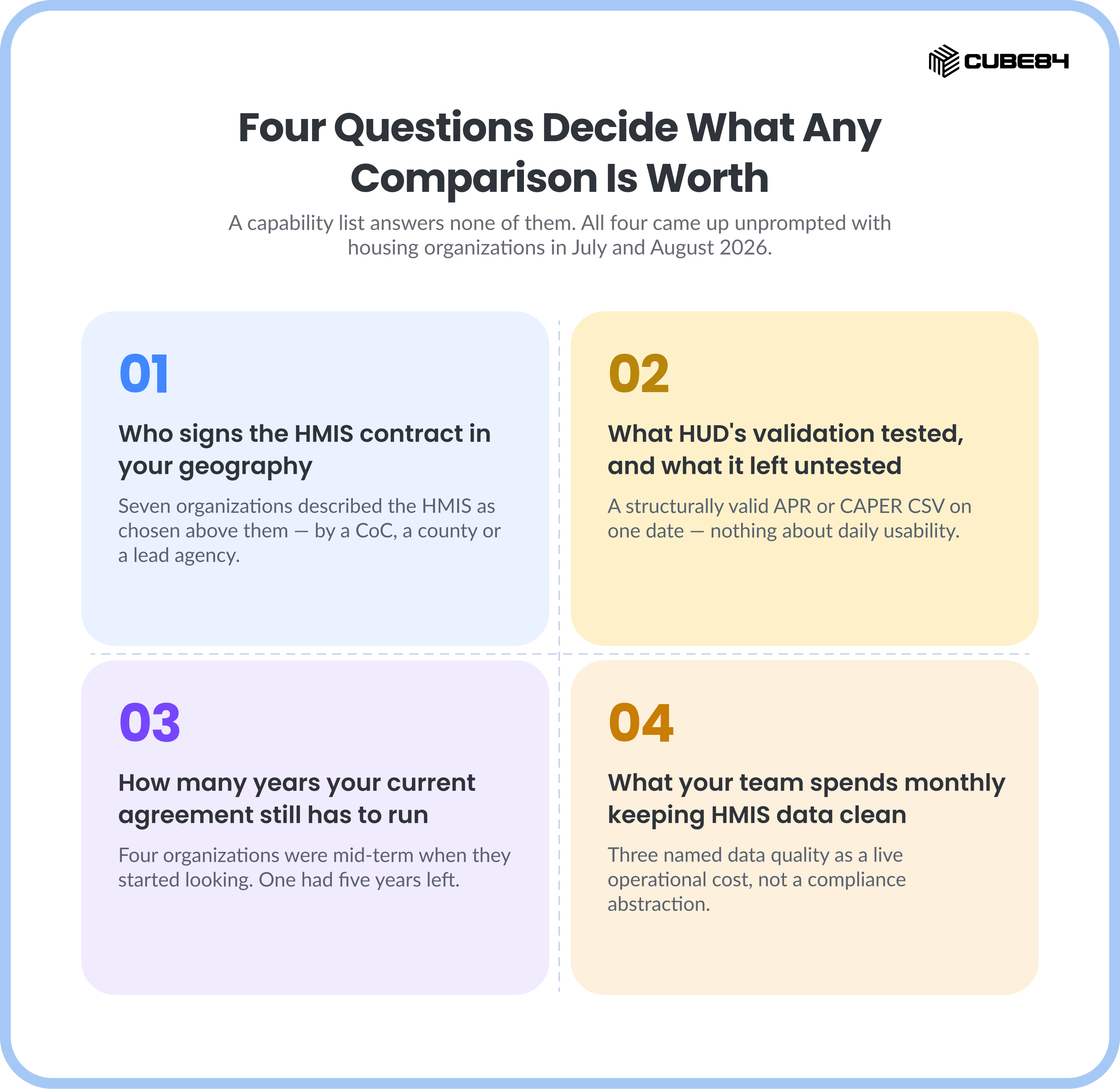
A vendor comparison is only useful to a reader who can act on it. Before the feature grid matters, four questions decide what any of this is worth to you, and a capability list answers none of them.
Who signs the HMIS contract in your geography. What HUD's validation actually tested, and what it left untested. How many years your current agreement still has to run. And what your team already spends every month keeping HMIS data clean enough to report on.
All four came up unprompted in conversations with housing and homeless services organizations during July and August 2026. Every count here counts organizations, so an agency making the same point across three calls is counted once, and the counts are per pattern: four inside a multi-year agreement, four whose HMIS is owned above the provider agency, three gated on regional CoC approval, and three naming data quality as a live operational cost.
The comparison of what each system does still follows. Read it inside the frame these four sections build, starting with whether the decision is yours at all.
Start With Who Actually Signs the HMIS Contract
Seven organizations described the HMIS as something chosen above them, four where the system is owned above the provider agency and three where a regional CoC approval gates the decision. A Continuum of Care made the call, or a county did, or a lead agency did, and the agency doing the casework participates in whatever came out of that. The roles saying it were county HMIS technicians and administrators, directors of housing services, CoC coordinators, and chief program officers, so this is not a junior misreading of an org chart.
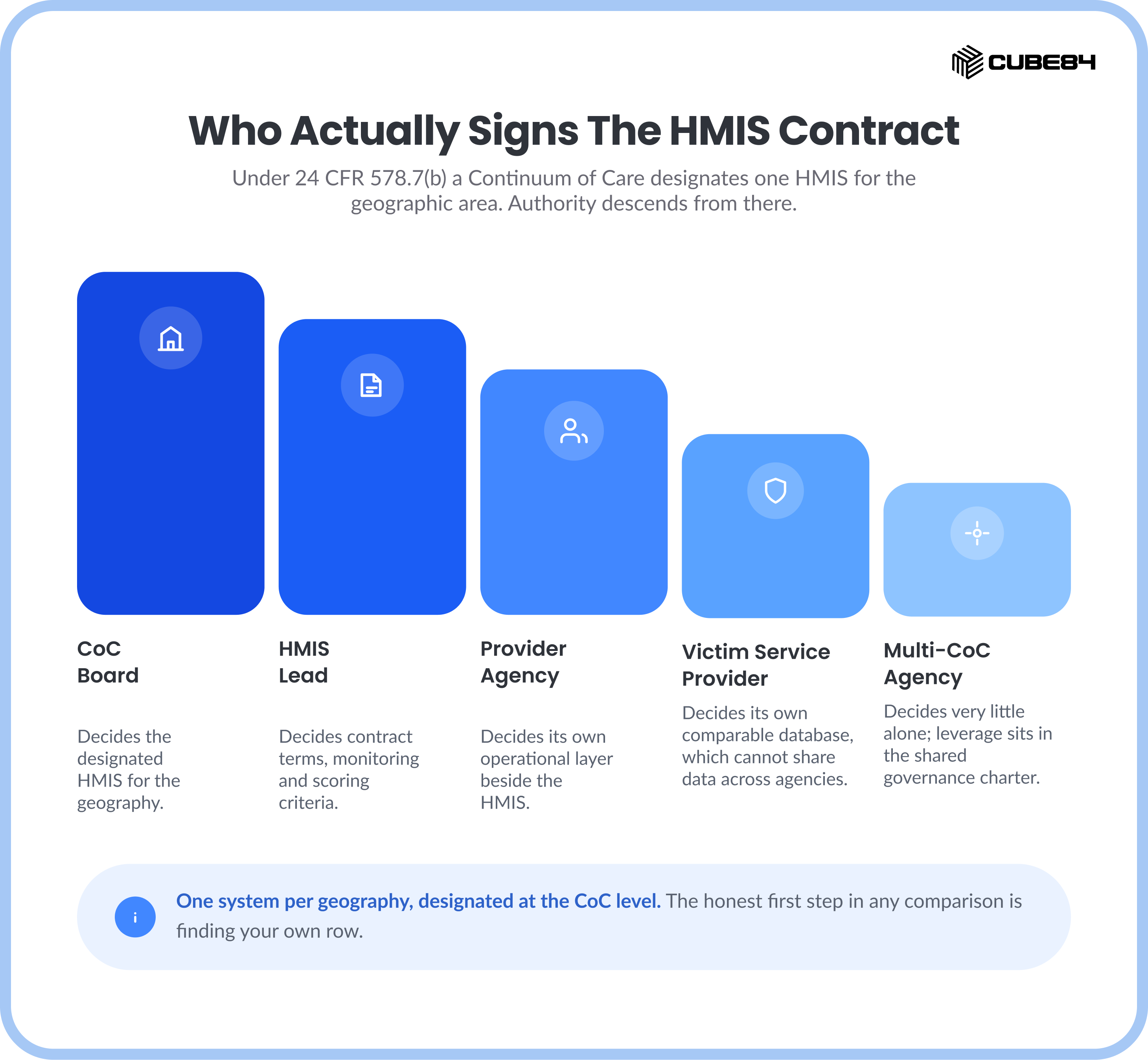
The regulation says the same thing in fewer words. Under 24 CFR 578.7(b), a Continuum of Care must "Designate a single Homeless Management Information System (HMIS) for the geographic area," must "Designate an eligible applicant to manage the Continuum's HMIS, which will be known as the HMIS Lead," and must "Ensure consistent participation of recipients and subrecipients in the HMIS." One system per geography, designated at the CoC level, with participation by everyone the CoC funds.
HUD's own contract management toolkit names the people in the room. Writing requirements involves the HMIS Lead, CoC leadership, HMIS project staff, HMIS-participating agencies and other interested stakeholders. Procurement and selection adds an HMIS Selection Committee and attorneys. Contract negotiation narrows to the HMIS Lead, CoC leadership and attorneys, per Tools for Contract Management, HUD Exchange, January 2021.
So the honest first step in any HMIS comparison is to locate your own seat.
The rows carry no order of importance, so read them as if-then paths. On the CoC board, the vendor comparison below is a procurement document and it belongs beside the checklist in the next section. As the HMIS Lead, the designation is not yours alone to make, and your leverage sits in the requirements document and the contract terms, which is where HUD points you too.
As a provider agency, the comparison is still worth your time for a different reason. You cannot swap the designated HMIS, and you can build the operational layer beside it: task management, referral chasing, document expiry, field access, and a client record that survives staff turnover. That is the distinction we drew in how Salesforce works alongside HMIS rather than replacing it.
Victim service providers work under one extra rule. HUD's guidance is that a comparable database "must generally meet the same functionality as an HMIS, except it cannot be a system that shares data across multiple agencies," and that single exception rules out most shared CoC implementations before any feature comparison starts.
The HMIS & Case Management Landscape
You've checked countless digital brochures and websites promising the world, all in good intent. But can they handle your specific housing and service delivery needs or fundraising goals? That’s why we’ve written this guide that lays out the core strengths and gaps of the widely used platforms in the housing and homelessness space.
Bitfocus Clarity HMIS

Who are they?
Bitfocus is best known for Clarity Human Services, an end-to-end HMIS built for CoC administrators and outreach teams. It is widely used by Continuums of Care (CoCs) around the U.S.
What do they offer?
Clarity’s HMIS with strong Coordinated Entry features and field outreach tools seamlessly integrates the entire intake-and-referral process into one workflow. For example, Clarity’s mobile-friendly app and location-aware mapping empower caseworkers to engage clients anywhere, on smartphones or tablets, and add GPS data to client records. The system also includes built-in assessment and prioritization tools. Its eligibility engine automatically matches clients to programs, and it computes vulnerability scores to prioritize the most at-risk individuals. The platform generates the required HUD reports automatically, freeing up many hours of manual work.
Where is it unique?
Clarity stands out for its outreach and CE focus. It offers customizable surveys and scoring rules, geospatial analysis, and community waitlist management – all optimized for HUD and CoC needs. Its robust mobile modules let teams do real-time data entry in the field.
What it doesn’t do?
Clarity is purpose-built for homeless services compliance. It does not include donor CRM or volunteer management. You would need a separate system for fundraising or broader constituent engagement. It also isn’t an innovation platform for unrelated programs (like workforce or childcare) and is tightly scoped to housing and homelessness data.
WellSky Community Services (HMIS)

Who are they?
WellSky is a health and human services technology firm. Their HMIS platform is an established and widely used system in the United States, favoured by large government entities and long-standing CoCs.
What do they offer?
WellSky’s HMIS emphasizes standardized data collection and reporting. Its software comes preloaded with HUD data standards and report templates, allowing agencies to complete HUD reports faster and meet federal compliance requirements right out of the box. The platform supports coordinated entry and tracks program outcomes, similar to other HMIS products.
Where is it unique?
WellSky leverages its healthcare and human-services background by including tools that are uniquely positioned to handle Social Determinants of Health (SDOH). They offer "closed-loop referrals" that connect a doctor’s office directly to a homeless shelter’s intake system.
Consequently, it is more helpful for an agency that serves both housing and clinical clients. Because of its integration with healthcare systems, it can align HMIS data with Medicaid, mental health, or aging services datasets. It also offers mobile assessment tools and robust case management features drawn from its wider portfolio, making it ideal for integrated health services with accurate funding justification.
What it doesn’t do?
Like other compliance-first HMIS, WellSky does not include built-in fundraising or donor management. Its focus is on the client’s housing/service record, not on constituent fundraising journeys. Customization is also a significant hurdle as the platform offers limited flexibility for programs that fall outside of standard HUD reporting frameworks. Again this too won't manage your donors, your volunteers, or your marketing efforts without a separate, third-party integration.
CaseWorthy

Who are they?
CaseWorthy provides a highly configurable case management platform built on CaseWorthy CORE, a centralized data hub. It is designed for large nonprofits and government agencies that need to manage a massive variety of integrated human services beyond just housing.
What do they offer?
CaseWorthy offers deep customization, allowing agencies to build their own internal apps and workflows. It supports a broader range of programs than almost any other vendor, including aging services, disability services, veteran programs, and domestic violence. Its HMIS+ Case Management solution handles all HUD-required fields and forms while allowing multi-service agencies to maintain a single client record across different departments. They also offer a specialized “Case Management + Aging Services” solution that integrates meal delivery and senior care tracking directly into the housing record
Where is it unique?
Its configurability is its strength. An agency can tailor forms, workflows, and eligibility rules for virtually any program mix. CaseWorthy’s focus on aging services (e.g., adult day care, meal programs) alongside homelessness is distinctive.
What it doesn’t do?
Like other specialists, it does not manage donors or fundraising within the same system. While it does handle mixed human services, it is narrower in scope than an all-in-one CRM. For example, it lacks AI-driven automation or built-in volunteer event management. Its core strength is as a HUD/HHS case data engine, not as a complete agency information hub.
Bonterra

Who are they?
Bonterra is a nonprofit-focused CRM and case management platform that helps organizations manage both service delivery and fundraising. It is used by nonprofits across the U.S., including housing programs, social services, and community-based initiatives.
What do they offer?
Bonterra combines case management with donor and volunteer management in a single platform. Housing and homelessness programs can track client intake, referrals, and outcomes, while also managing fundraising campaigns, grant applications, and volunteer schedules. The platform includes visual dashboards for reporting impact to funders, making it easy to see both service and funding performance in one place.
Where is it unique?
Bonterra stands out for integrating service delivery and fundraising. Unlike traditional HMIS tools, it allows agencies to connect client case data directly with donor management, so outcomes can be tied to funding. Its visual reports and interface are valuable for organizations that want to prioritize impact storytelling alongside their daily operations.
What it doesn’t do?
While Bonterra provides a database suitable for HUD reporting, it is not “HUD-native” in the way Bitfocus or WellSky are. It remains fully compliant but may need some additional configuration to stay aligned with evolving CoC requirements. Its focus differs from Bitfocus’s map-based outreach tools, and it does not offer the same open-ended extensibility available through platforms like the Salesforce AppExchange.
What HUD's Report Validation Actually Tests
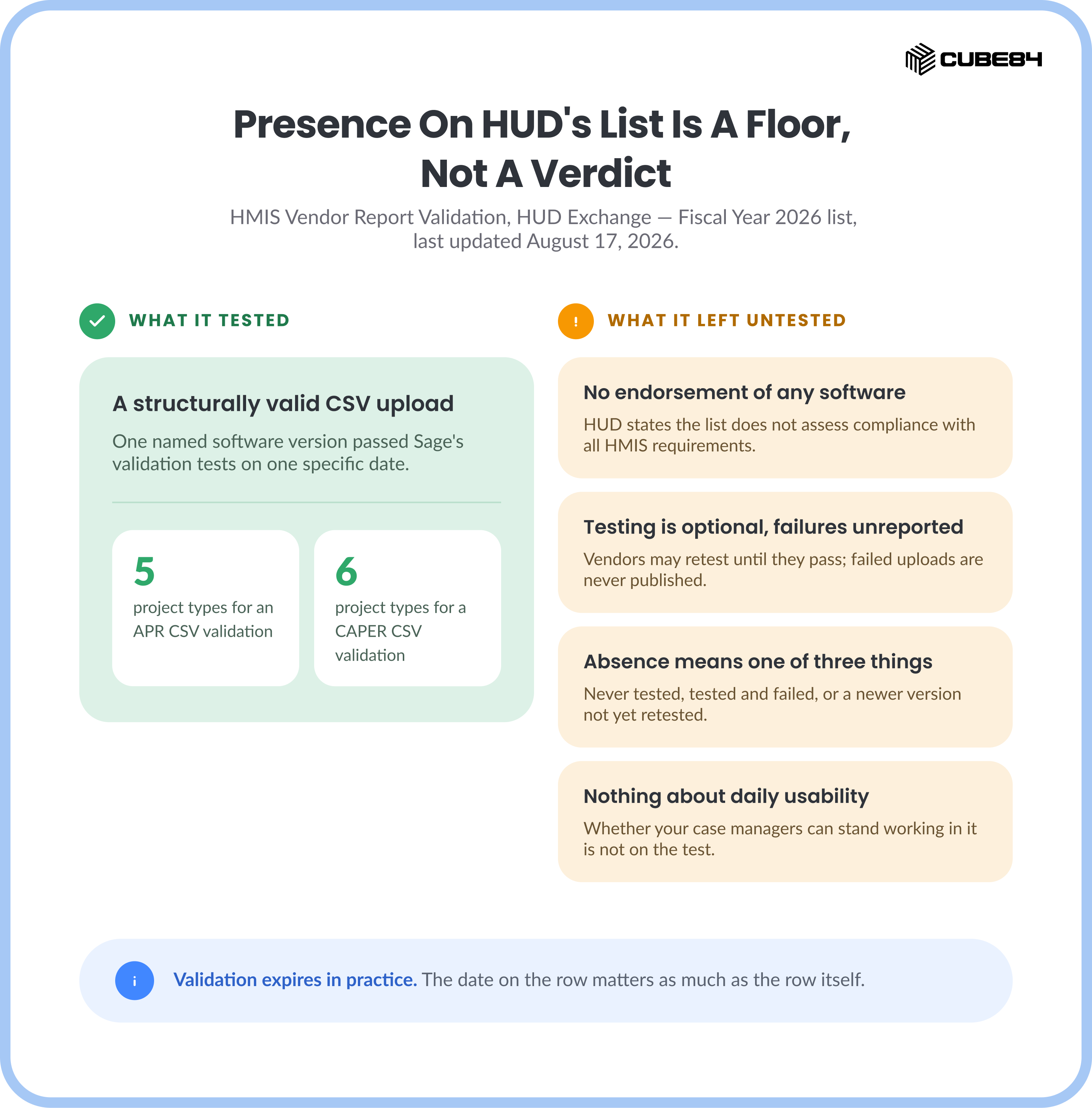
Every vendor above will tell you their system produces a HUD-compliant APR. HUD publishes a list that lets you check part of that claim yourself, and almost nobody comparing HMIS software opens it.
The page is called HMIS Vendor Report Validation, on HUD Exchange, and the Fiscal Year 2026 list carried a date last updated of August 17, 2026. To get an APR CSV validation, a vendor uploads a file to the vendor Testing User Portal inside Sage that passes the validation tests for five project types: Rapid Rehousing, Permanent Supportive Housing, Transitional Housing, Services Only, and Street Outreach. To get a CAPER CSV validation, the file has to pass for six: Entry/Exit Emergency Shelter, Night-by-Night Emergency Shelter, Transitional Housing, Street Outreach, Rapid Rehousing, and Homelessness Prevention.
Now the part that decides how much weight to put on it. HUD states plainly that it "does not endorse any specific HMIS or comparable database software nor does this list assess a vendor's compliance with all HMIS or comparable database requirements." Participation is optional, in HUD's words: "Vendors are not required to engage in this upload self-testing process." And HUD notes that vendors "may test files multiple times in order to resolve issues required for validation, failed uploads are not publicly reported."
Absence from the list means one of three things, and you cannot tell which from the outside: the vendor never tested, the vendor tested and did not pass, or a newer software version has not been retested yet. HUD updates the list within 30 days of a completed test.
Presence on the list is therefore a floor. It confirms that a specific software version produced a structurally valid APR or CAPER CSV for the required project types on a specific date. It says nothing about whether your case managers can stand working in the thing.
Here is where the vendors this guide compares stood.
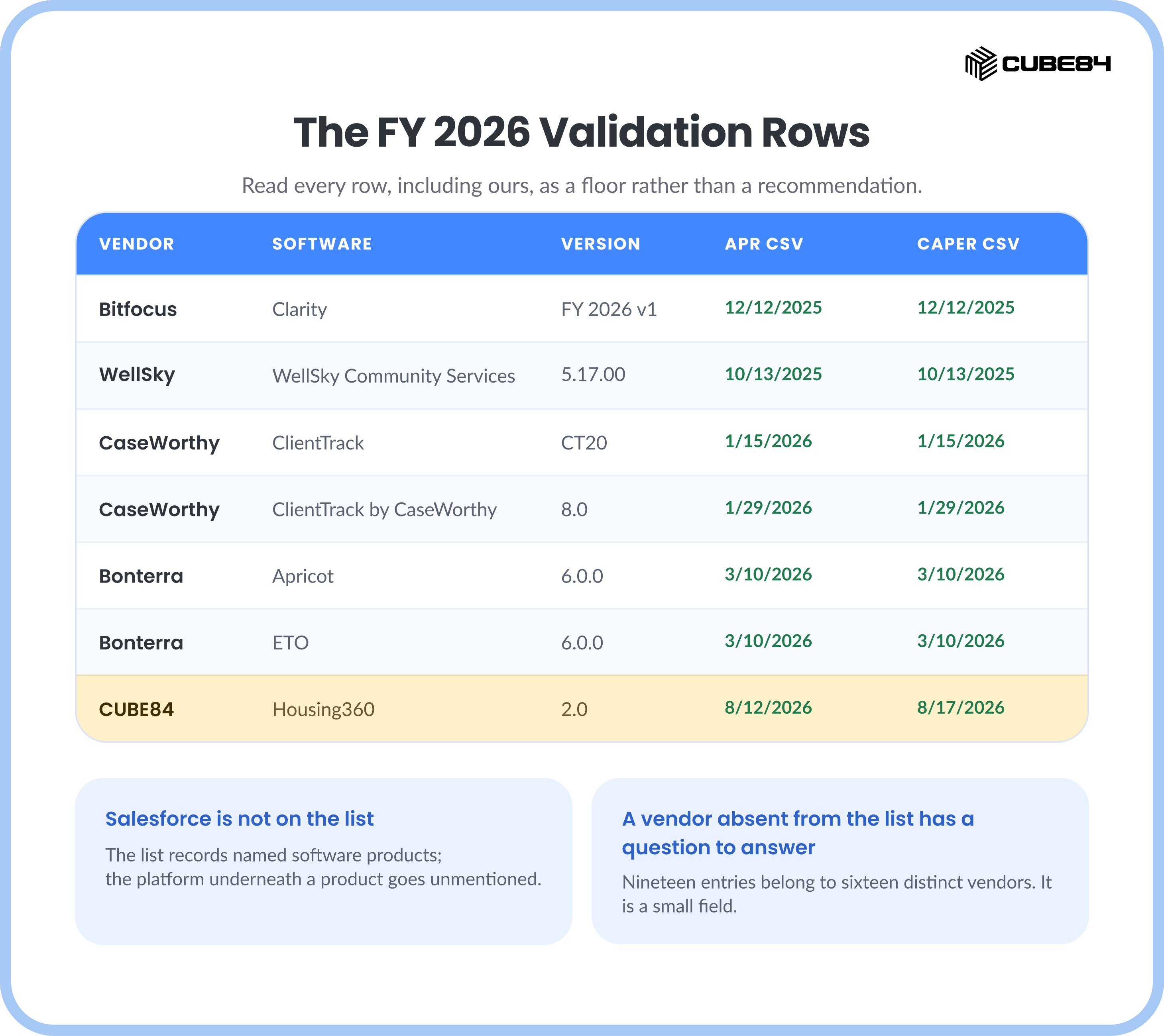
Across the whole list, most listed products cover both reports.
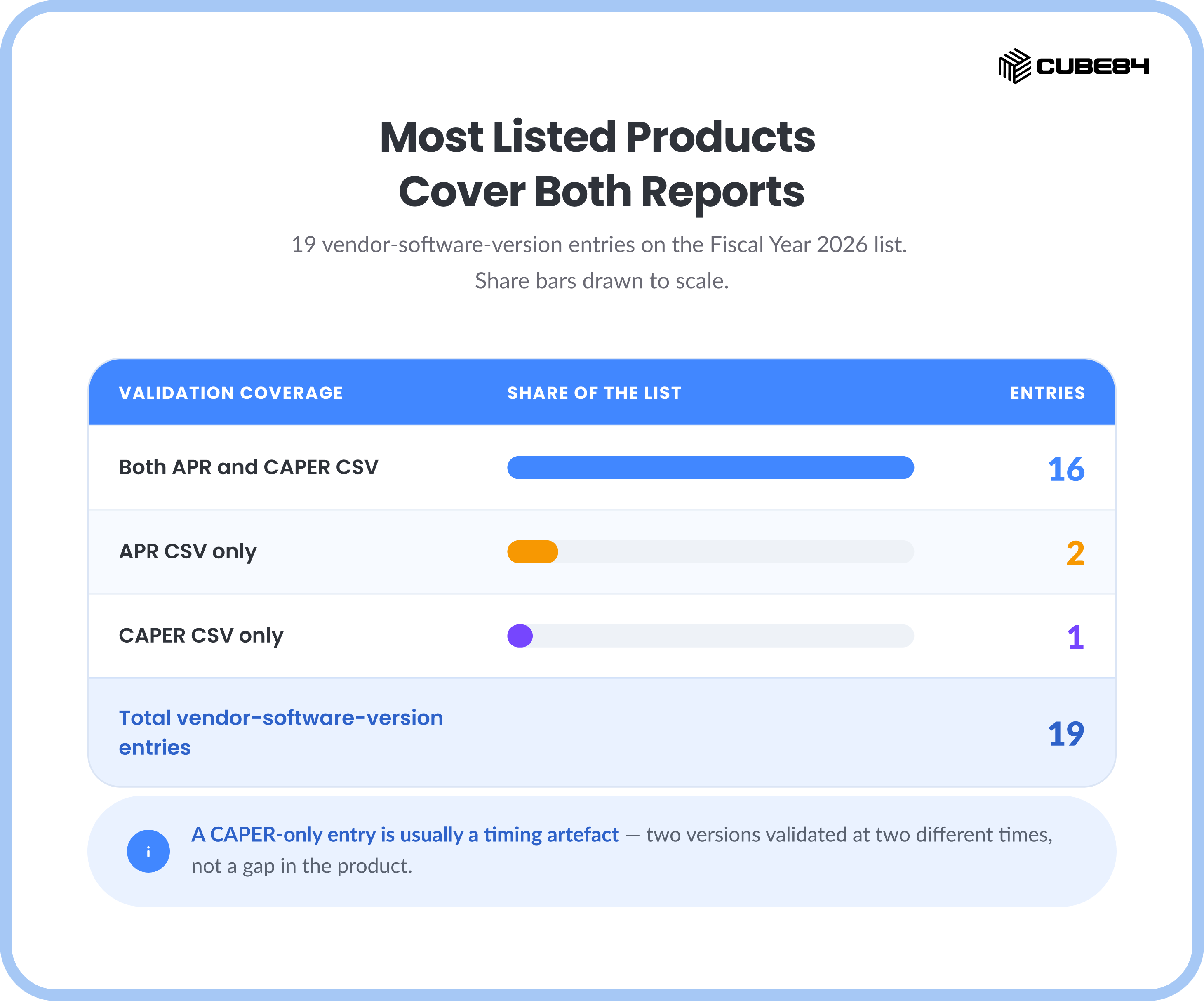
Counted from the Fiscal Year 2026 list on HUD Exchange's HMIS Vendor Report Validation page, date last updated August 17, 2026. The CUBE84 entry was corrected from a later reading of HUD's own listing, which moved it from APR-only into the both-validated group; the other eighteen entries are as counted on that date and were not re-counted.
Sixteen of the nineteen vendor-software-version entries on the Fiscal Year 2026 list carry both an APR CSV and a CAPER CSV validation. Two carry APR only, and one entry carries CAPER only, which happens when a vendor validates two different versions at two different times. Those nineteen entries belong to sixteen distinct vendors. That is a small field, and it is a useful sanity check on any shortlist: a vendor pitching you hard while absent from a list their competitors are on has a question to answer.
Validation also expires in practice. HUD expects vendors to run it again when the APR/CAPER Programming Specifications change, when the HMIS Data Standards change, or whenever a significant software update could affect reporting. So the date matters as much as the row. If APR and CAPER season is the pain driving your evaluation, we covered the mechanics of that cycle in what actually makes HUD APR and CAPER reporting slow, and where the time goes.
The 58-Item Checklist Your CoC Is Probably Already Holding
HUD publishes its own assessment sheet for this exact decision, and it will shape the outcome more than any vendor page will. The HMIS Software Vendor Capacity Checklist, published November 2020 as product nine of nine in the HMIS Lead Series, runs to 58 criteria. It is the sheet a CoC scores everybody on, including us.
Eight of those 58 criteria assess the vendor as an organization rather than the software as a product. A feature matrix cannot answer them and a reference call can, so they are worth lifting out whole.
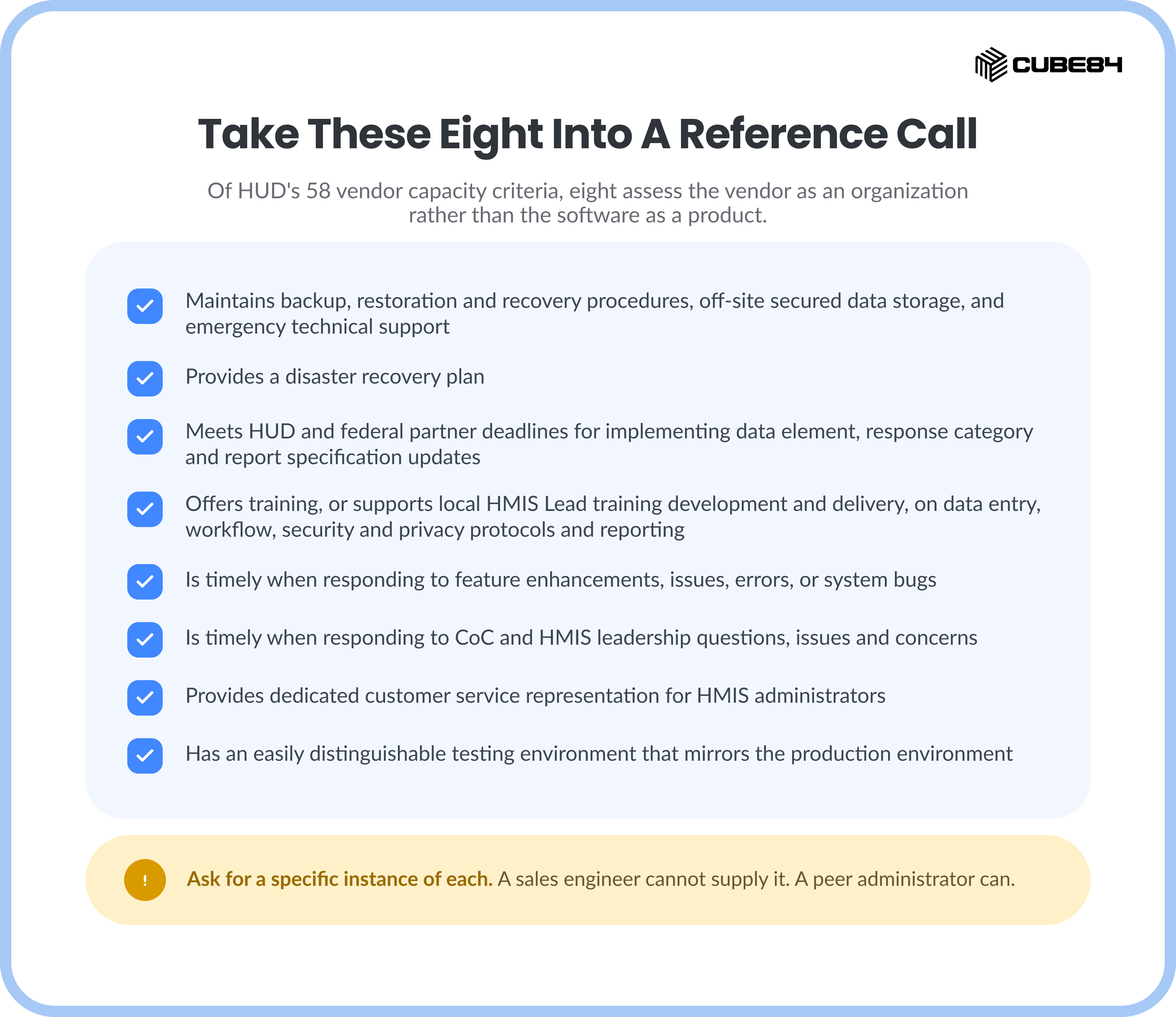
Maintains backup, restoration and recovery procedures, off-site secured data storage, and emergency technical support
Provides a disaster recovery plan
Meets HUD and federal partner deadlines for implementing data element, response category and report specification updates
Offers training, or supports local HMIS Lead training development and delivery, on data entry, workflow, security and privacy protocols and reporting
Is timely when responding to feature enhancements, issues, errors, or system bugs
Is timely when responding to CoC and HMIS leadership questions, issues and concerns
Provides dedicated customer service representation for HMIS administrators
Has an easily distinguishable testing environment that mirrors the production environment
Take that list into a reference call and ask for a specific instance of each. "Meets HUD deadlines for implementing report specification updates" has a checkable answer: when the FY 2026 specifications dropped, how many days did the customer wait, and what did they do meanwhile. A sales engineer cannot supply that. A peer administrator can.
Then there is the part of the checklist that reframes this entire comparison. Thirteen of the 58 criteria name case management, workflow, referrals, coordinated entry, alerts or document handling. That grouping is ours, HUD publishes no such category, and the categories overlap, so treat the number as a reading of the document and check it against the source. HUD asks whether the software "provides a tool for case management including, case notes, goal plans and housing plans," whether it "has logical workflow that eliminates redundant data entry and prevents wasted effort of data entry across multiple screens or modules," whether it "provides the ability to make eligibility-informed referrals and track referral outcomes," whether it carries bed and unit management feeding real-time vacancy, and whether it "produces e-mail notification for HMIS user level action items."
Those are operational requirements, sitting on a federal assessment sheet in HUD's own language alongside the reporting criteria. The daily care work is already something HUD expects an HMIS to support, which puts the workflow half of this comparison inside the compliance conversation, where the budget already sits.
One line from that checklist changes what a good outcome looks like. HUD writes: "HUD would prefer that a CoC exhaust all options before considering a transition from one HMIS Software Vendor to another." The document goes on to say that CoCs "have transitioned HMIS Software Vendors with mixed results," and names the reasons: CoC capacity to oversee the implementation, HMIS staff capacity to operate it, insufficient resources in staff, funding or skills, overly customized functionality, or providers undervaluing HMIS. HUD's summary of that list is blunt. "In other words, underlying issues may be related to the management and oversight of the HMIS Software rather than the software itself."
If that describes your situation, a new vendor will reproduce your current problem on a new schema.
All-in-One Platform vs Single-Tool Limits
The Problem with Adding More Tools
You are on this mission to serve as many people as possible, which means your data is only going to increase. So when you add more tools, it feels normal and like the right thing to do. You get one system for HMIS compliance, and then another for fundraising. To make work easy, you also get a separate tool for volunteers, maybe something else for reporting, and a mobile intake app on top of that.
Individually, each tool does its job well. But together? They rarely talk to each other the way you need them to. Now your team is exporting spreadsheets, reconciling reports manually, double-entering client information, and managing multiple licenses. So, costs go up, and so does complexity and risk.
This is where the idea of a unified platform starts to both make sense and actually help. Specialized software will always be strong in its niche, we agree, no denying that. But it is not designed to be the single source of truth for your entire organization.
What a Unified Platform Actually Changes
If the challenge is disconnected tools, we don’t think the answer is ever another tool. Rather, it is and should be consolidation. Instead of stitching together separate systems, you operate from a single integrated platform designed to fund, deliver, and measure impact.
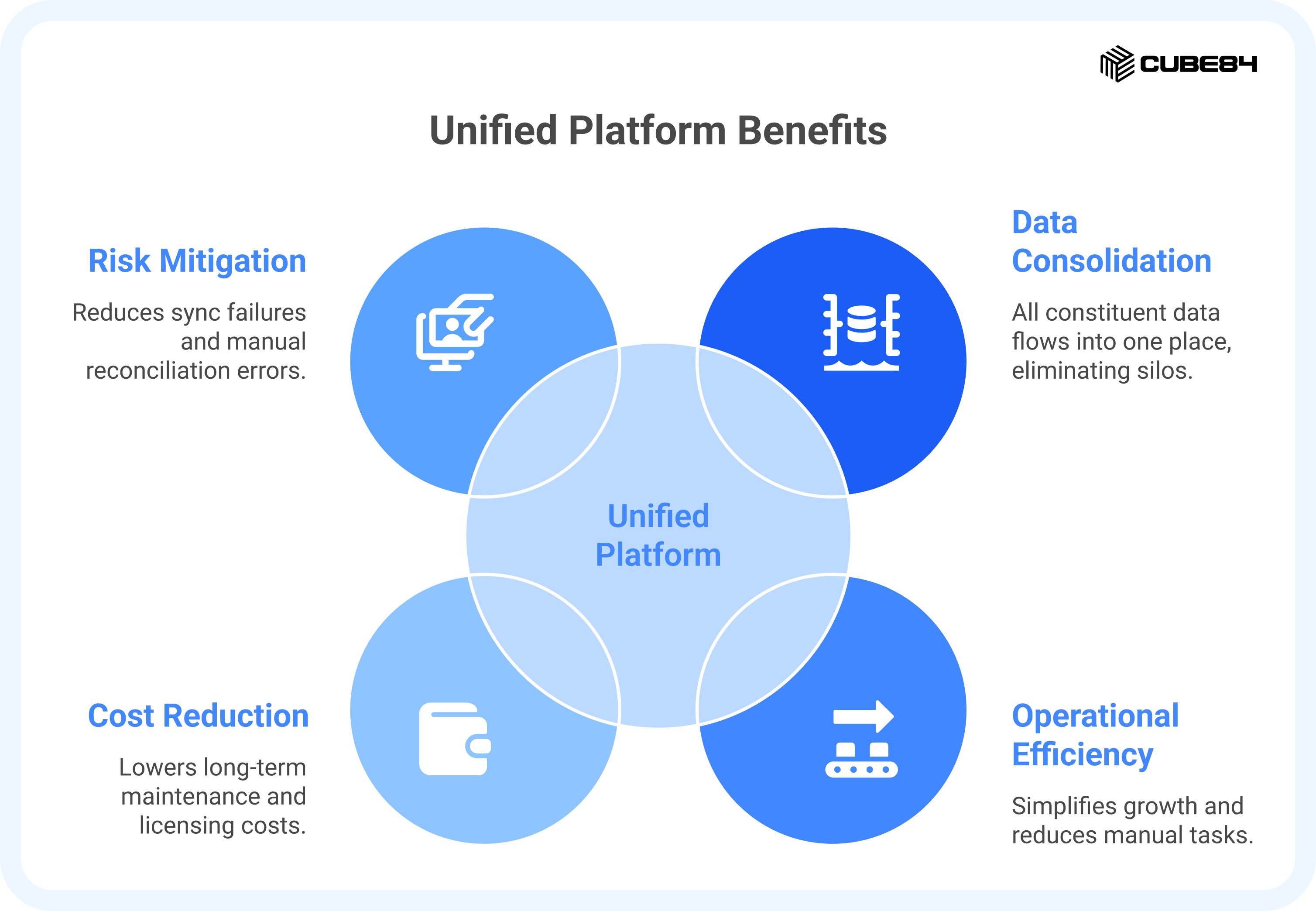
All your constituent data flows into one place. Your client records, donor history, volunteer activity, and program outcomes are no longer scattered across databases or trapped in separate logins. Don’t you think it’s better for leadership if they had fewer systems to oversee, fewer contracts to renew, and far clearer ownership of data? How easy it gets when you are no longer asking which spreadsheet is right or which system has the latest update, and there is just one source of truth!
And the best part is that this shift is more accessible for smaller organizations, too. Through Salesforce’s Power of Us program, eligible nonprofits can receive 10 free licenses. While the list price for Nonprofit Cloud starts at $60 per user per month, it is often available at discounted rates when certain nonprofit criteria are met.
Operationally, it simplifies growth. Adding a new service line or funding stream does not require purchasing and integrating another application because you only extend the existing platform. Because everything runs on the same data model, new programs connect naturally to what is already there. Since there are fewer integrations, you now have lower risk, less manual reconciliation, fewer sync failures, and lower long-term maintenance costs.
This is where Salesforce Nonprofit Cloud takes a different approach. Instead of managing separate systems that each solve one problem well, you move to a unified platform that connects everything from case management to AI in one environment. That said, Salesforce alone does not replace HMIS compliance out of the box. To generate HUD-required SAGE-ready APR and CAPER reports, organizations rely on the HMIS Accelerator along with CUBE84’s HUD Reporting Accelerator, which together enable compliant reporting with far less manual effort. You stay efficient and in control with a single system of record that supports your mission today and scales with you tomorrow.
AI and Agentforce: The Intelligent Edge
You came with a mission to help and serve, but as a frontline worker, inevitably, you spend your day buried in intake forms, case notes, and compliance reports. All of these administrative tasks slowly take over, leaving less time for actual service. This is where considering AI becomes practical.
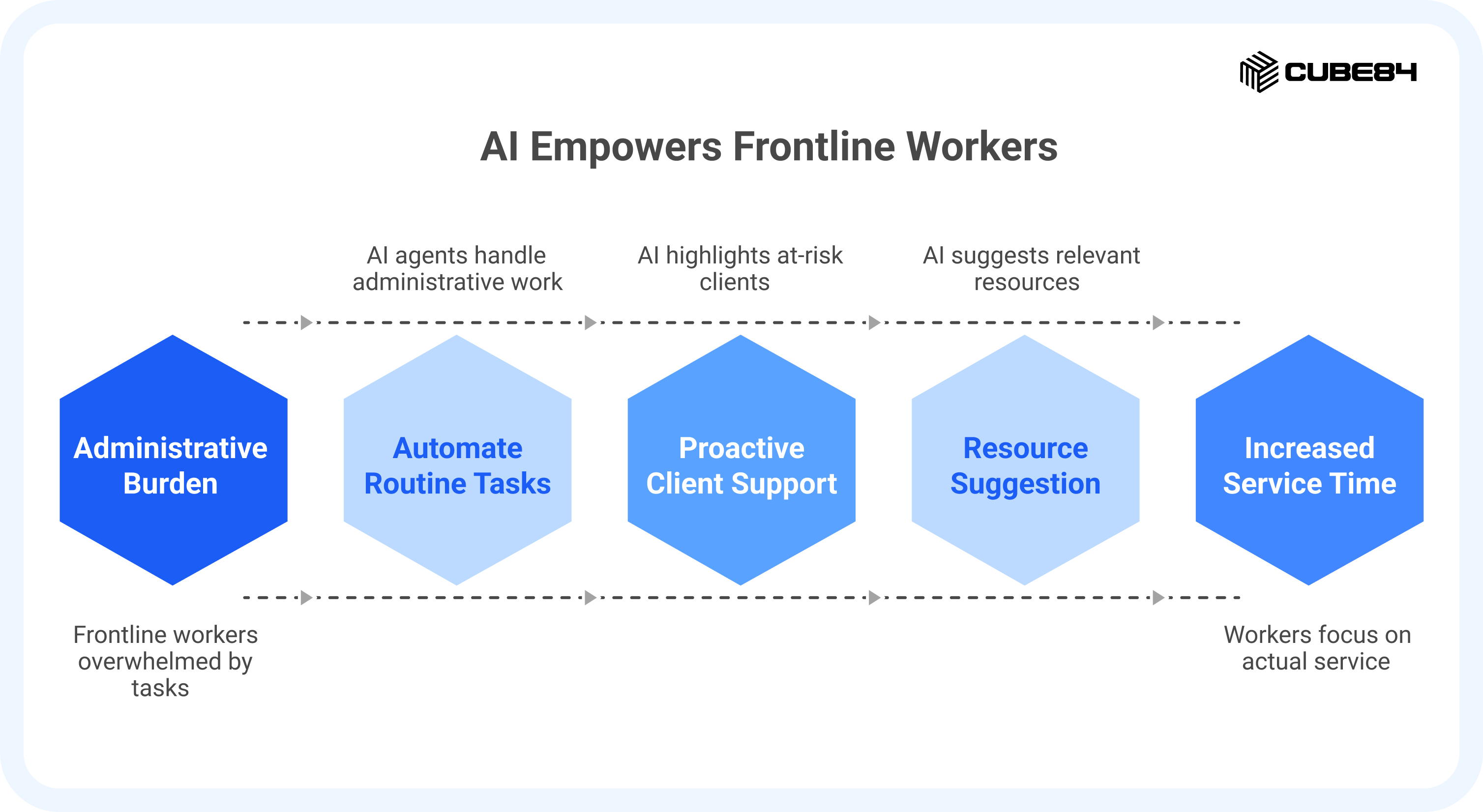
With Salesforce and Agentforce, automation is built into the platform. Routine steps that you think an intern could do, like summarizing case histories, drafting responses, pulling reports, or flagging overdue follow-ups, can be handled by AI agents in the background. Some organizations have reported significant reductions in administrative time by automating scheduling and standard inquiries alone.
The shift is important. A compliance system documents what already happened. But an intelligent platform helps you anticipate what should happen next. It can highlight at-risk clients earlier, suggest relevant resources, and surface insights without someone manually digging through data.
AI is only going to give you your time back and not replace you. And in housing and homelessness services, time is often your most limited resource.
Compliance Specialists vs Innovation Engine
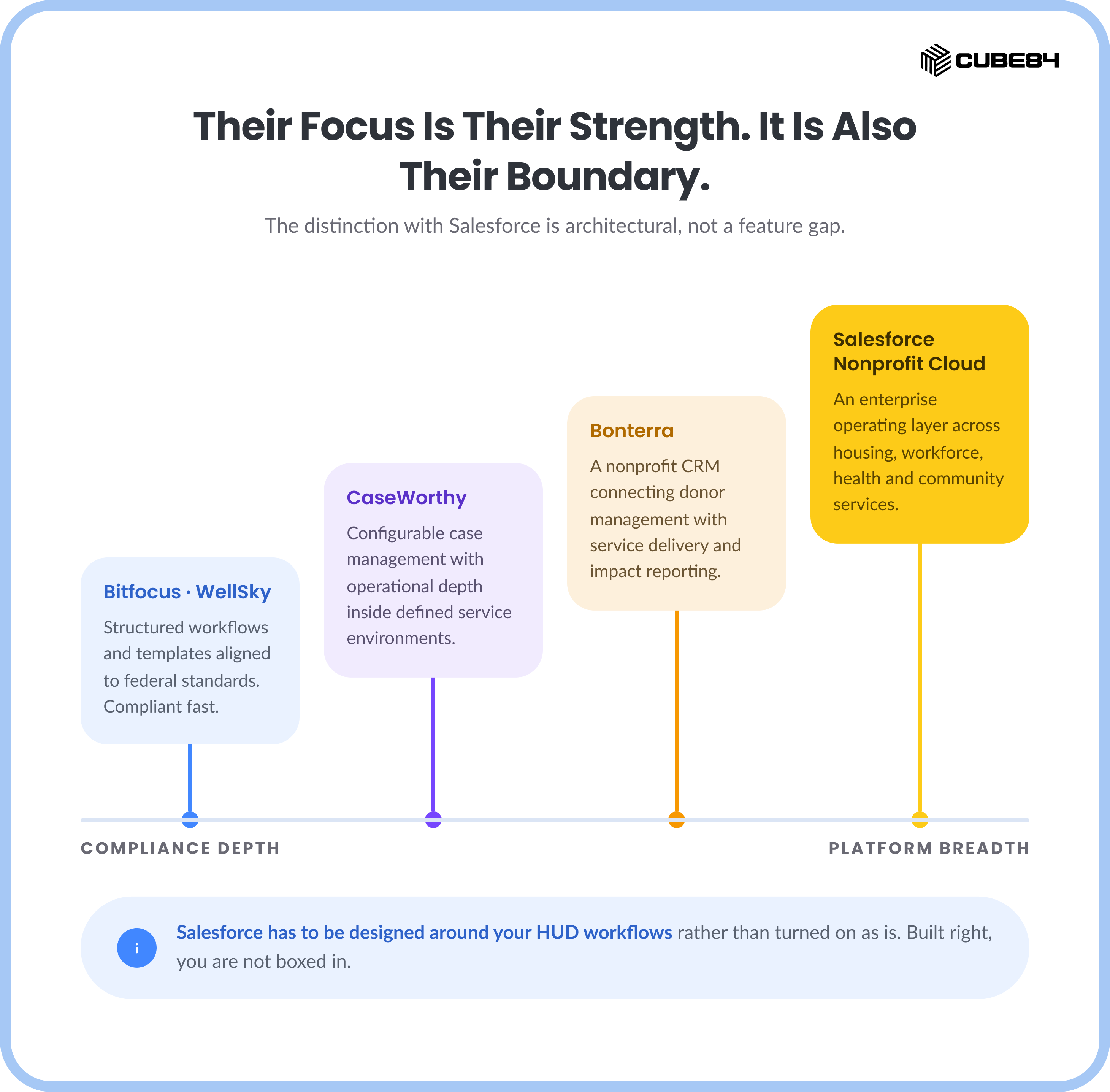
Each platform is built for solving a problem and with an objective, like to meet HUD requirements faster and more reliably. Tools like Bitfocus Clarity, WellSky HMIS come with structured workflows, predefined forms, and reporting templates aligned to federal standards. If your primary need is coordinated entry, shelter management, or HUD reporting, these systems can get you compliant fast.
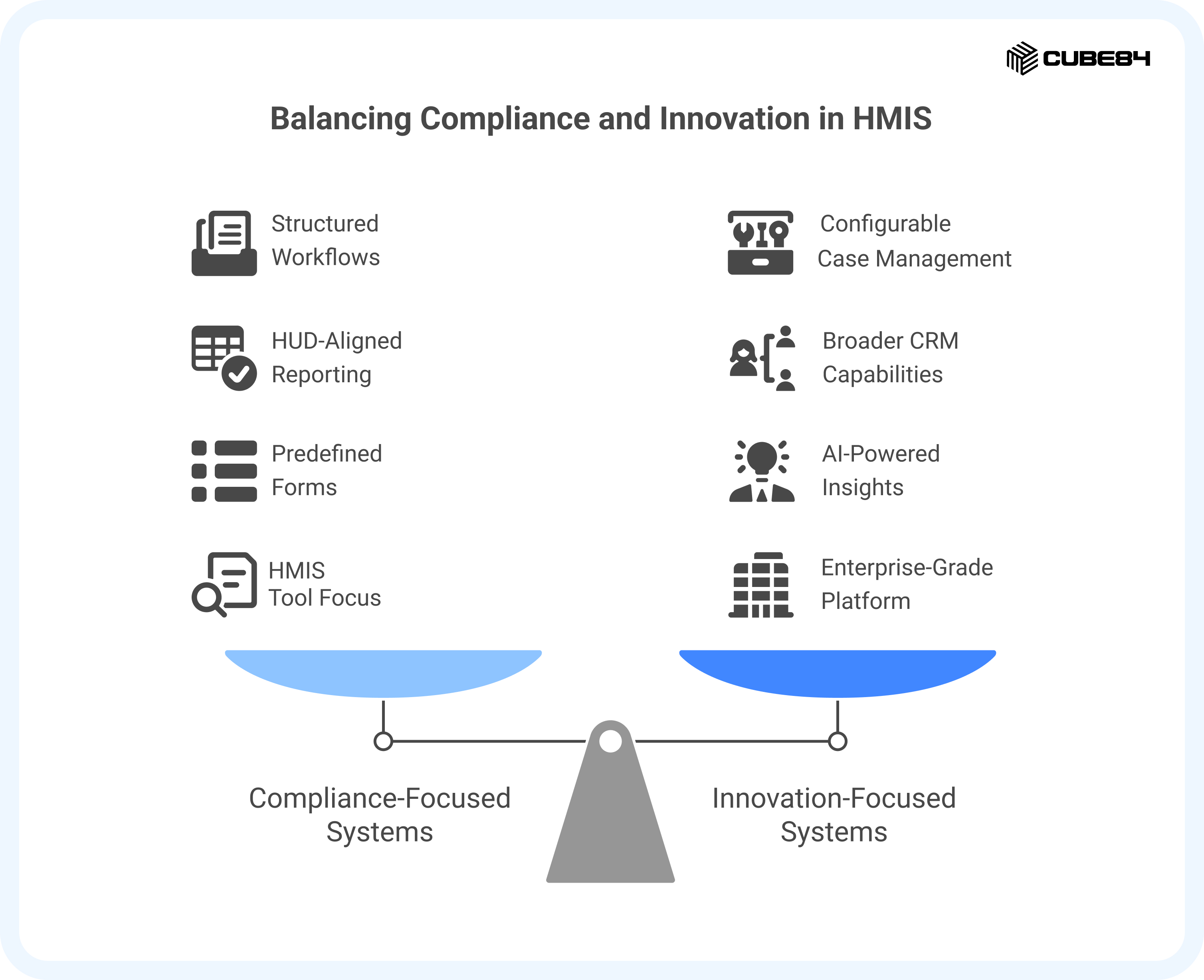
CaseWorthy sits slightly adjacent to this group. It offers configurable case management with strong support for housing and human services programs, including HUD-aligned reporting. Its strength lies in operational depth within defined service environments.
Bonterra, however, is broader. It is a nonprofit CRM that combines fundraising, engagement, and program management capabilities. So, it does not stop with being just an HMIS tool. Its value lies in connecting donor management with service delivery and impact reporting, particularly for mid-sized nonprofits, and it leverages AI to surface insights and automate routine tasks.
That focus is their strength. It is also their boundary.
The distinction with Salesforce is architectural. Salesforce Nonprofit Cloud is built as an enterprise-grade platform with a vast ecosystem, extensibility through AppExchange, and deeply embedded AI capabilities. It is designed not just for compliance or fundraising alone, but to serve as a unified operating layer across housing, workforce, health, and community services.
Something to note here is that Salesforce needs to be designed around your HUD workflows rather than simply being turned on and used as is. But once it is built right, you are not boxed in. You gain flexibility, automation, and room to grow without constantly adding new systems.
If You Are Mid-Contract, the Question Changes
Four organizations were already inside a multi-year HMIS agreement when they started looking. One had five years left to run. None of them were free to pick a winner from a comparison table and sign, and every guide they had read was written for somebody who was.
HUD's position on that situation is unambiguous, and it is on your side more than a vendor would like. Tools for Contract Management states: "Before proceeding with a procurement and selection process that might involve a change of software or vendor product, HUD strongly encourages the CoC to first try to resolve concerns with their current vendor before making vendor changes." The Capacity Checklist adds the escalation path: "If the CoC is still certain that an HMIS Software Vendor transition is necessary, HUD strongly suggests that the CoC request HUD Technical Assistance before beginning the HMIS Software Vendor transition process."
So the mid-contract play HUD describes is a documented improvement effort, and the checklist is the instrument for it. A CoC demonstrates due diligence, in HUD's framing, by completing the checklist, identifying deficiencies, developing an action plan or quality improvement strategy, communicating with the vendor, and negotiating enhanced contractual terms and conditions. That is a sequence you can run with three years left on the paper.
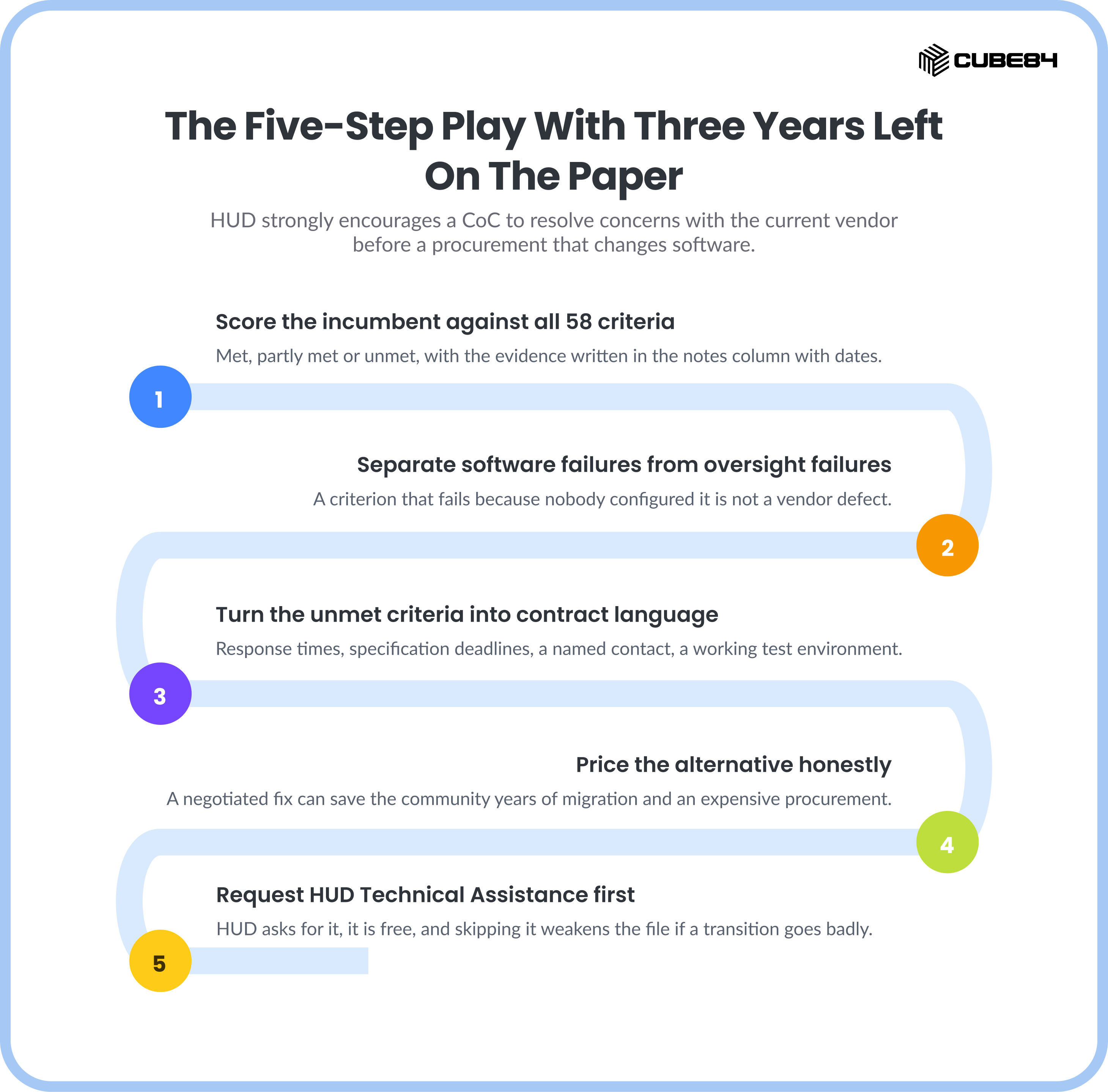
Score the incumbent against all 58 criteria. Mark each one met, partly met or unmet, and write the evidence in the notes column with dates and examples.
Separate the software failures from the oversight failures. HUD names the second category explicitly. A criterion that fails because nobody was assigned to configure it is not a vendor defect and a new vendor will not fix it.
Turn the unmet criteria into contract language. Response-time commitments, specification-update deadlines, a named support contact, a working test environment. These are amendable terms, and the toolkit's own reference templates exist for exactly this.
Price the alternative honestly. HUD's toolkit makes the case for amending in plain terms, describing a negotiated fix as worth it if "it means saving the community years of data migration headaches and an expensive procurement effort."
Request HUD Technical Assistance before you commit to a transition. HUD asks for this, it is free, and skipping it weakens the file if the transition goes badly.
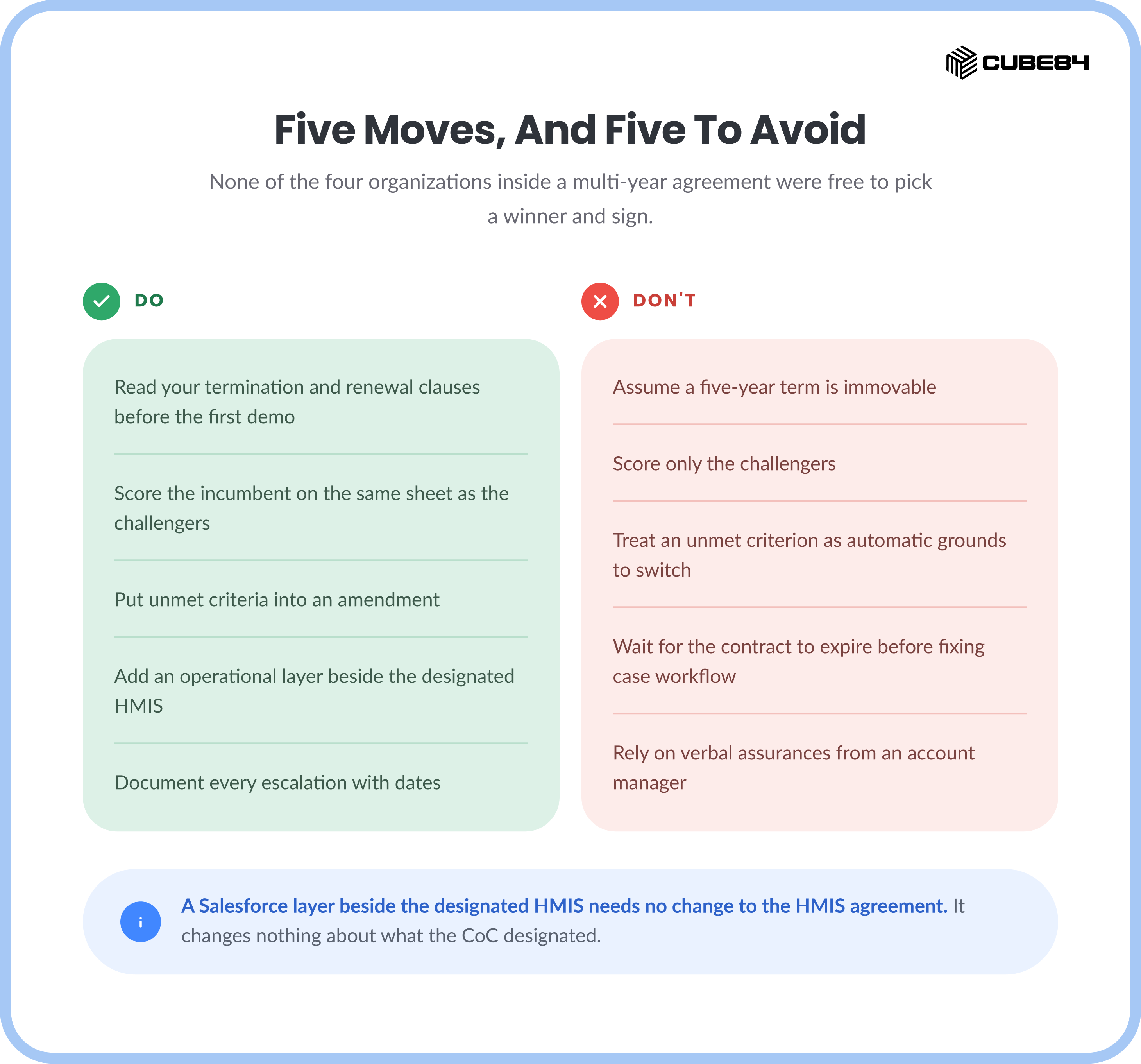
The last row of that table is the practical answer for a provider agency. The HMIS designation and its contract sit at the CoC level, and the work your case managers do every day does not. A Salesforce layer beside the designated HMIS, handling tasks, referral tracking, document expiry and field access, needs no change to the HMIS agreement, because it changes nothing about what the CoC designated or what gets reported out of it.
That is the difference between a purchase you cannot make for three more years and one you can scope this quarter.
Put Data Quality Work in the Comparison, Because It Is Already in the Budget
Three organizations named HMIS data quality as a live operational cost rather than a compliance abstraction: hours every week spent finding, chasing and correcting records so the report at the end of the period holds up. No standard vendor comparison criterion covers that work, so it stays invisible in exactly the document a buyer uses to justify the spend.
The work is not optional. Under 24 CFR 578.7(b)(3), a Continuum of Care must "Review, revise, and approve a privacy plan, security plan, and data quality plan for the HMIS." A plan means somebody executes it, and that somebody is on your payroll.
The scale of the checking is public. Eva is HUD technical assistance's open-source tool for assessing HMIS data quality and testing a CSV export against HUD's programming specifications, and its check list is published as a file in the tool's own repository. Read on August 24, 2026, EvaChecks.csv in the abtassociates/eva repository carried 130 checks.
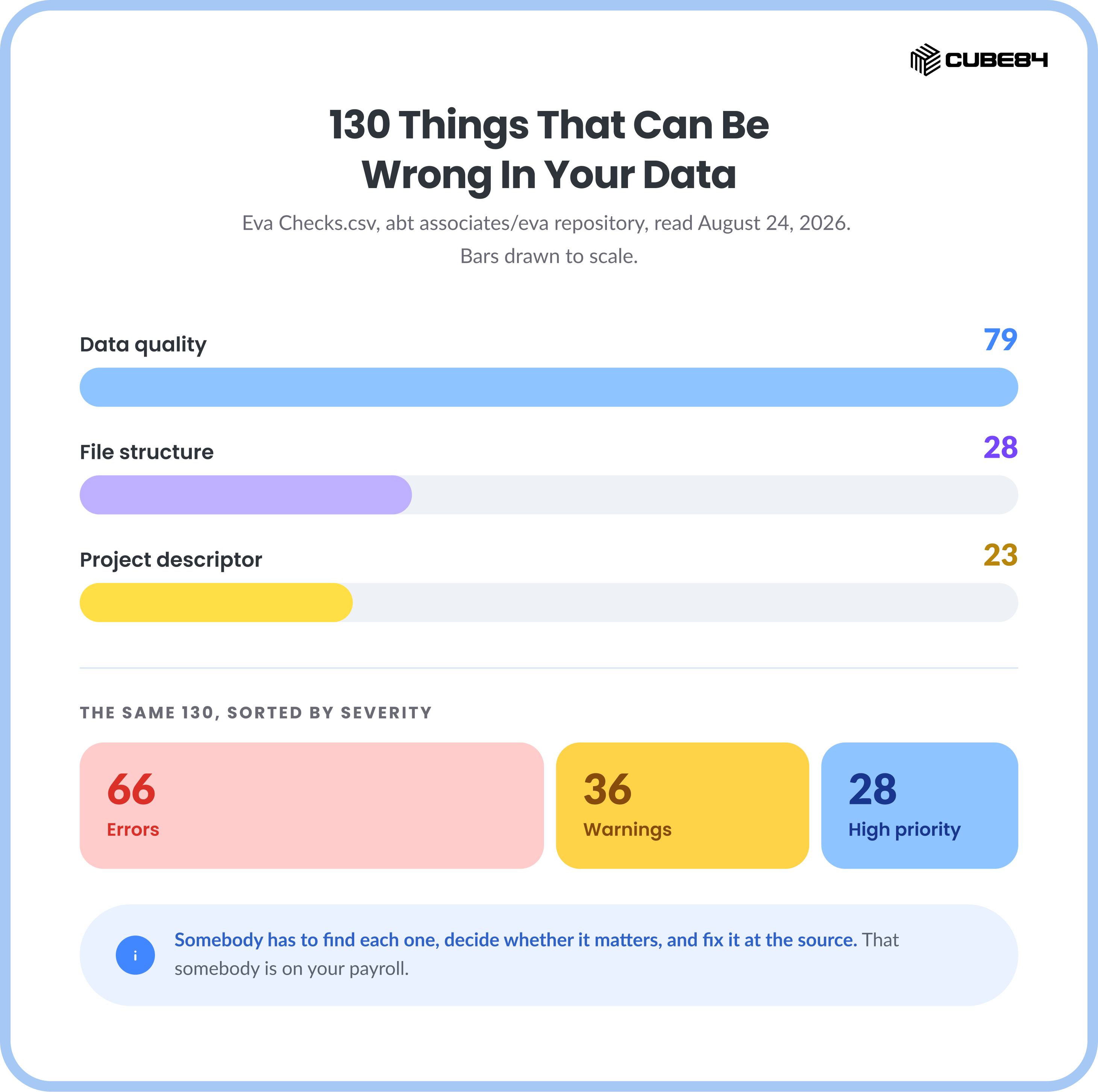
The 130 published checks in EvaChecks.csv, abtassociates/eva repository, read August 24, 2026.
Of those 130 checks, 79 are data quality checks, 28 test the file structure of the CSV export, and 23 test project descriptor data elements. Sorted by severity instead, the same file carries 66 Errors, 36 Warnings and 28 High Priority issues. Every one of those is a thing that can be wrong in your data, and somebody has to find it, decide whether it matters, and fix it at the source.
Some of it traces straight back to how the software was built. Two of the 58 criteria on HUD's Capacity Checklist are about duplicates alone: whether the software "can manage record de-duplication via a client record merger feature or other functionality," and whether it "has sufficient protocols to prevent duplicate client record creation." Duplicate PersonalIDs and duplicate EnrollmentIDs are both High Priority file structure checks in Eva. A system that lets a case manager create a second record for a person under time pressure has moved that cost from the intake desk to the reporting cycle, where it is more expensive and harder to trace.
So data quality belongs on the scorecard with the other criteria, phrased as something a demo can be made to prove.
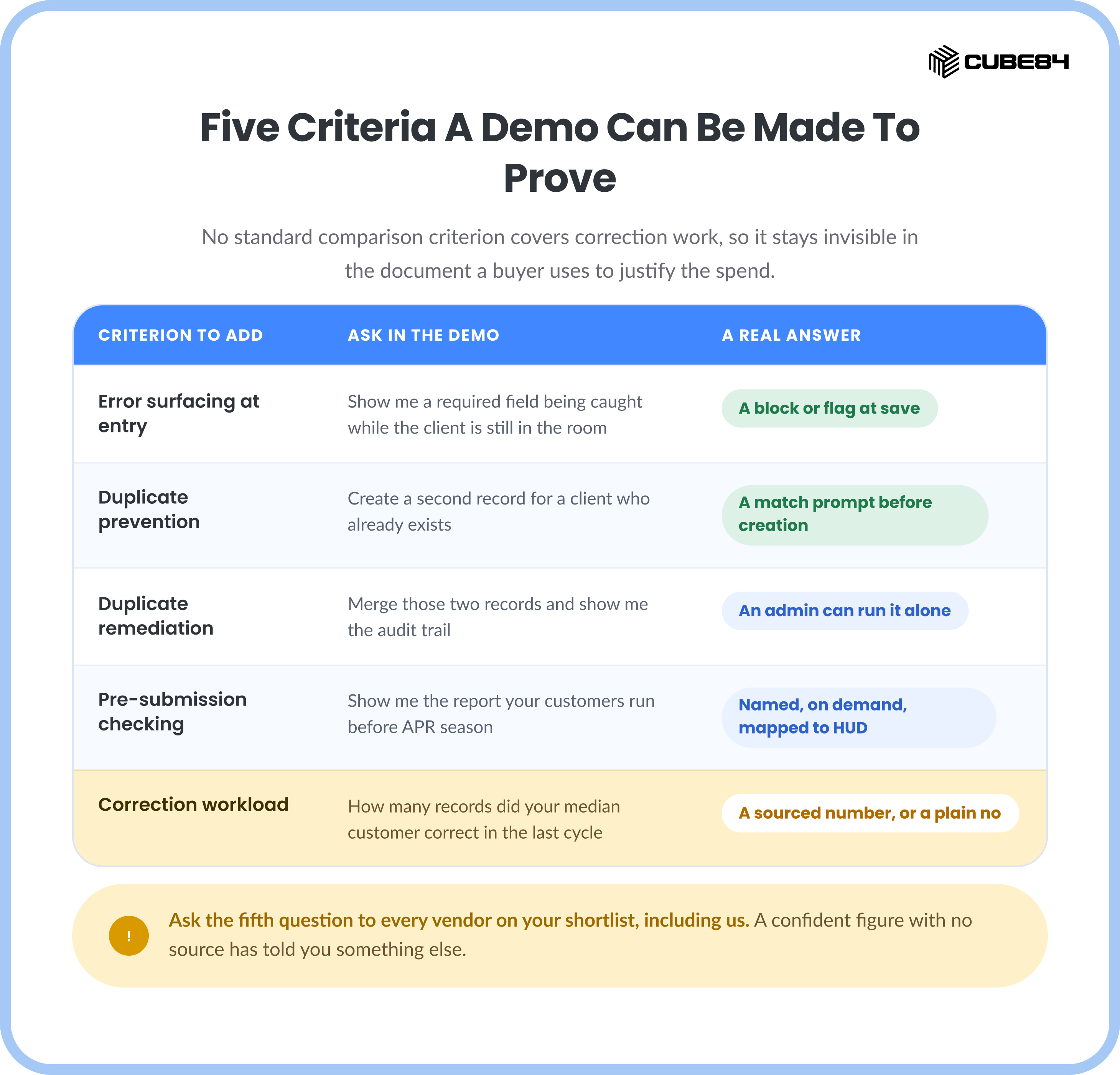
Ask the fifth question to every vendor on your shortlist, including us. A vendor who answers "we don't measure that" has told you something accurate and useful. A vendor who produces a confident figure with no source has told you something else.
This cost lands on individual people, and it is the reason experienced administrators leave. One HMIS administrator described spending 30 to 40 percent of her week chasing missing data, in interviews CUBE84 conducted with housing organizations. That is one account carrying the weight of an anecdote and no more, and there is more from those conversations in what happens to homelessness workers when the technology stops fighting them. Ask your own team the same question and get a real number before you compare anybody on price.
Strategic Roadmap: Building the Right Stack
All of this might get your head spinning a little. So let us slow this down for a second. You do not wake up one day and replace every system your organization depends on. Especially not when compliance, funding, and community partnerships are tied to it. And you do not have to.
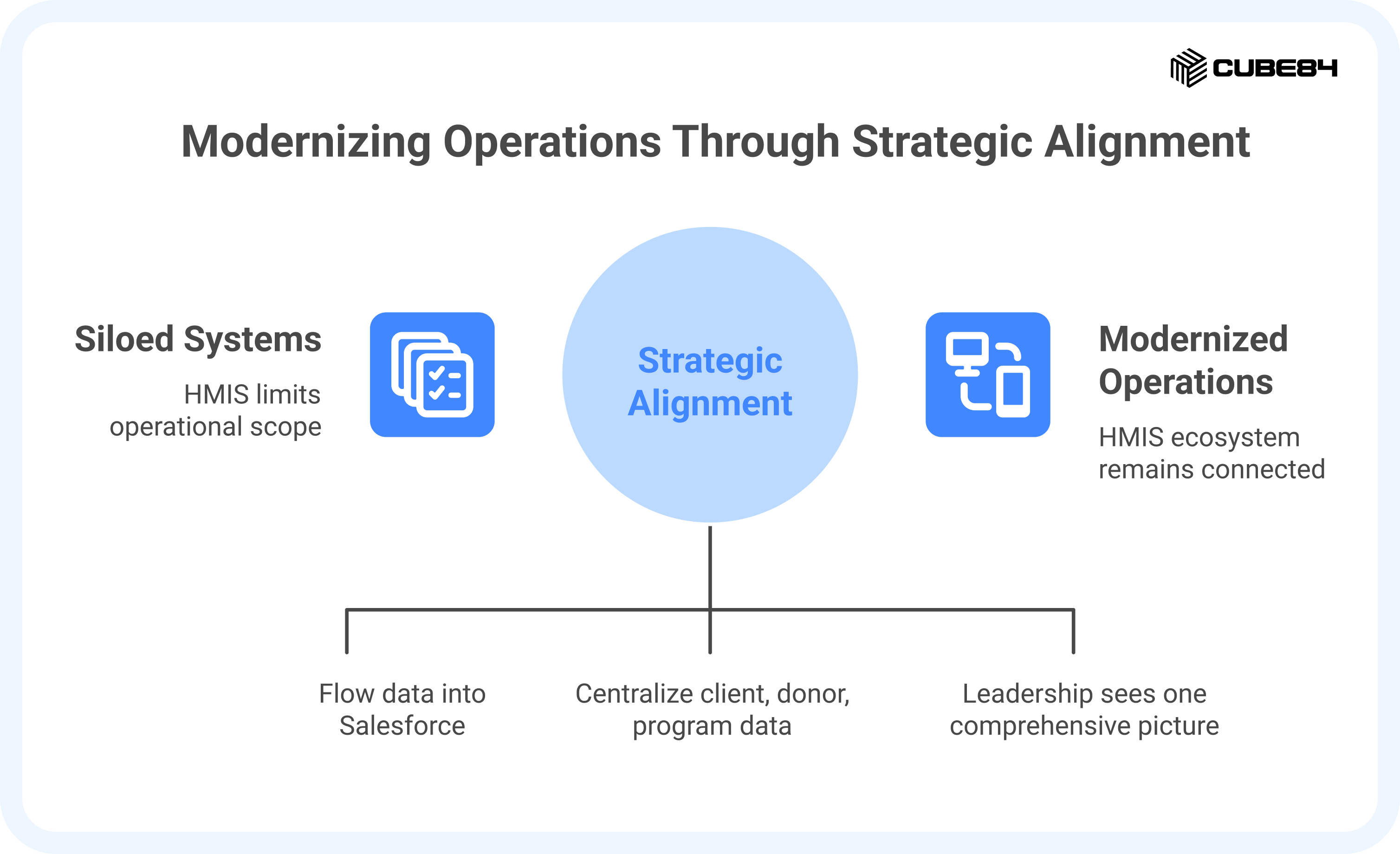
In many cases, the smartest move is not replacement as we think, but aligning it right. Your HMIS continues doing what it was designed to do. It captures HUD data, supports coordinated entry, and stays aligned with your CoC. That ecosystem matters, and you stay connected to it. At the same time, you stop letting that system define the limits of your operations.
Salesforce becomes the broader layer around it. The place where client relationships, donor history, volunteer engagement, program outcomes, and cross-service insights live together. HMIS data flows in through integration, so staff are not reentering information or stitching reports together at the end of the month.
Now, when leadership reviews performance, they are not toggling between platforms. They see one picture. Housing activity alongside fundraising for health. Service delivery alongside community impact.
This is how modernization actually happens. Not through disruption, but through intentional design. You keep what the ecosystem requires and build what your mission demands.
Choosing a Path You Can Actually Take
Two questions about your own position matter more than any capability difference between the five systems this guide compares. Do you hold the HMIS designation, and where does your contract sit. Find your row.
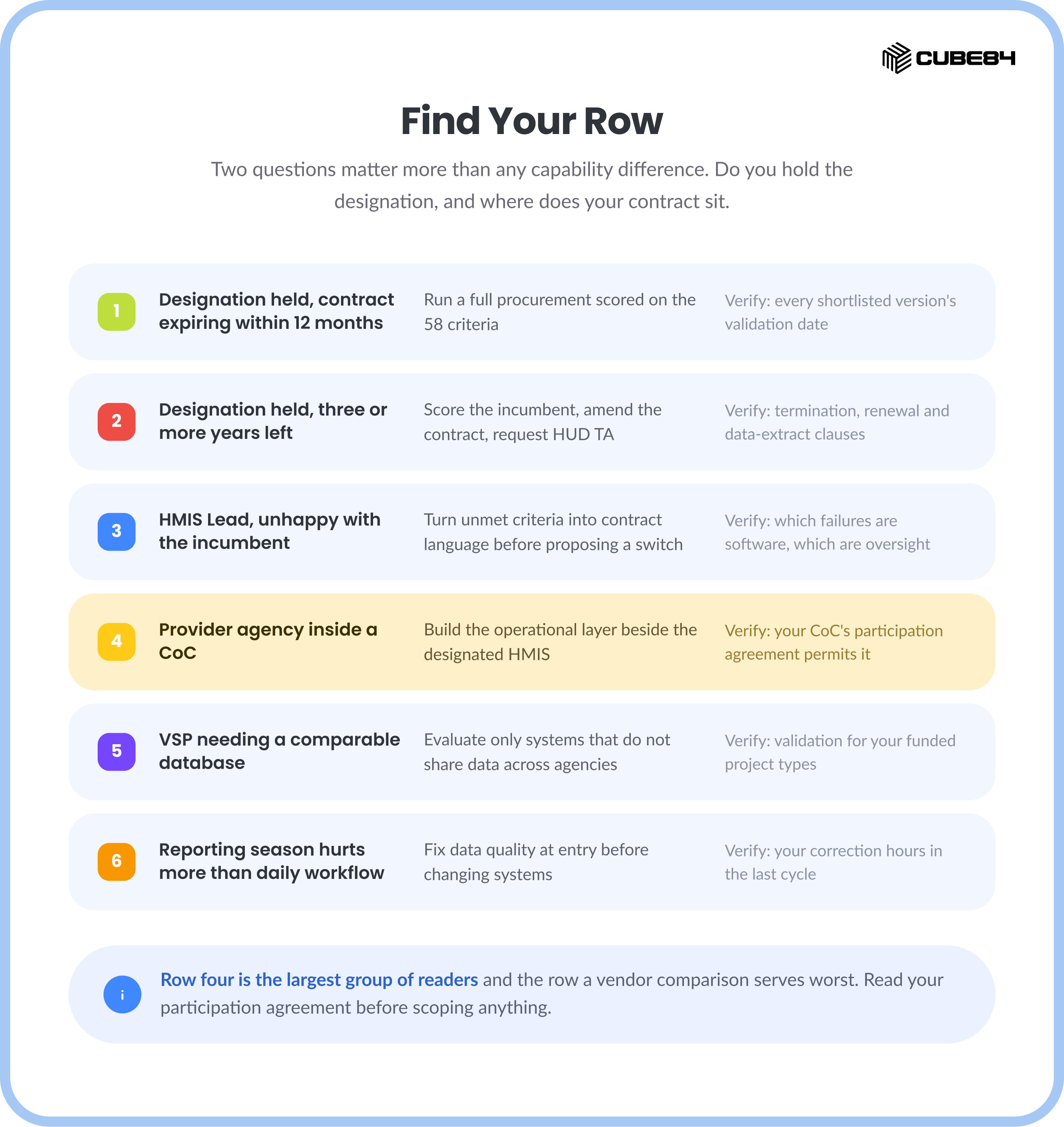
The first two rows are the same case separated by time. With a year or less left, a competitive process scored against HUD's 58 criteria is the defensible path, and the validation dates on HUD's list cut a shortlist fastest. With three or more years left, those same 58 criteria become a negotiating document, which is the sequence HUD asks for.
The third row holds most of the frustration in this market. An HMIS Lead told to fix the HMIS usually has a mix of two problems, and HUD names them both. Sorting the software failures from the oversight failures before going to the board is what stops a transition recreating the same conditions on a new platform.
Row four is the largest group of readers of this page, and the row a vendor comparison serves worst. You cannot change the designated HMIS. You can give your case managers a system that sequences their work, chases their referrals, warns them before a document expires, and keeps a case intact when a colleague leaves. Read your CoC participation agreement before scoping any of it. Some place conditions on adjacent systems holding client data, and the only one that matters is yours.
Row six is worth taking seriously even if it feels like a delay. If your evaluation started because the last APR cycle was brutal, a new system inherits the same intake habits and the same 130 checks. Measure the correction hours first. That number tells you whether you are buying software or buying process, and it is the most useful figure you can walk into a procurement holding.
Conclusion: Bridging Compliance and Innovation
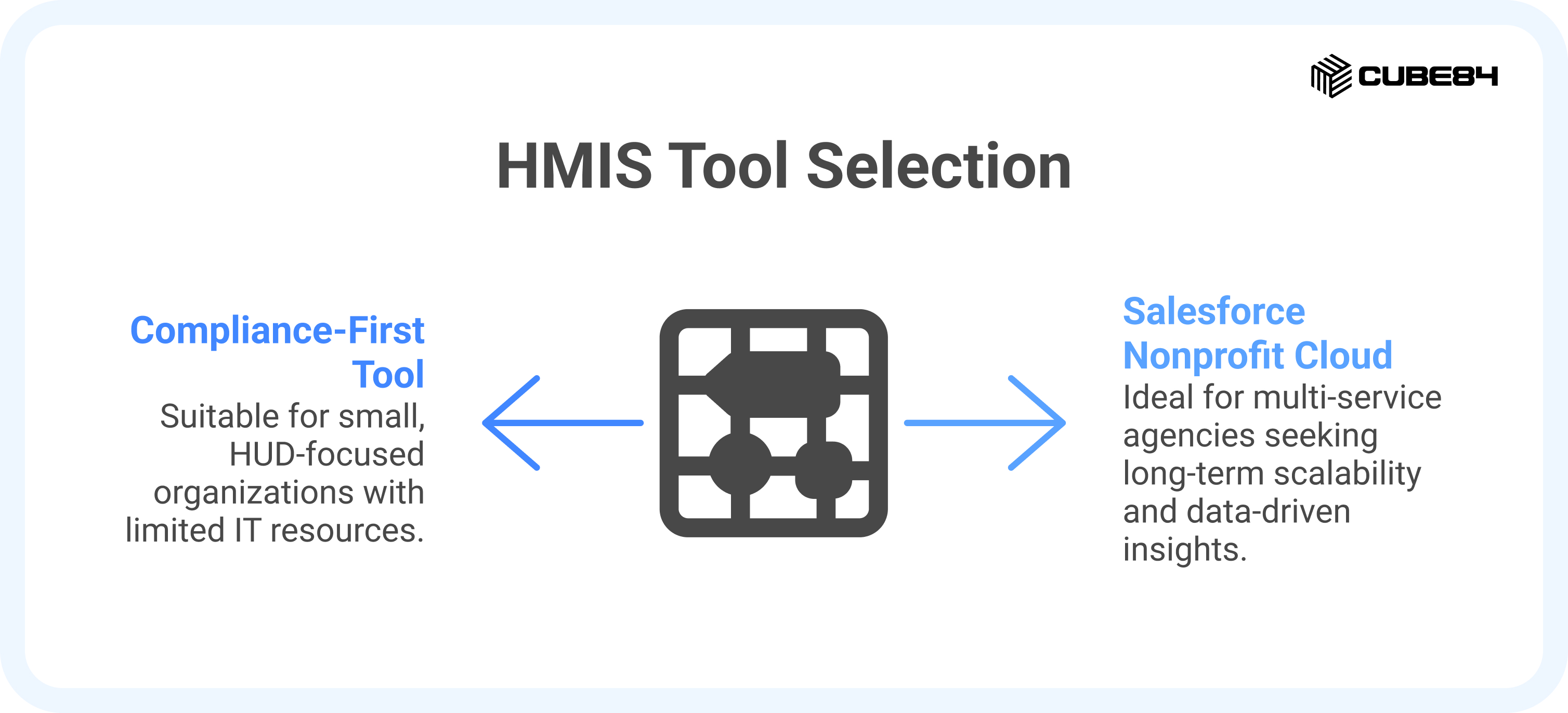
Specialized HMIS tools and broad platforms each serve a purpose. The choice depends on your goals: meet immediate HUD requirements or build for long-term growth. Adopting Salesforce may feel complex at first, but we can help with HMIS-ready templates and proven implementation. With the right setup, compliance data flows smoothly into one system, staff spend less time on manual tasks, and your organization gains a streamlined, future-ready operating model.
Sources
HMIS Vendor Report Validation, HUD Exchange. Fiscal Year 2026 validated systems list, date last updated August 17, 2026; the validation process, project types, and HUD's own statements on endorsement and optional participation.
HMIS Software Vendor Capacity Checklist (PDF), HUD Exchange, November 2020. The 58 criteria, and HUD's guidance on vendor transitions.
Tools for Contract Management (PDF), HUD Exchange, January 2021. Contracting roles by stage, and HUD's guidance on resolving concerns with an incumbent vendor.
HMIS Lead Series, HUD Exchange, March 2022. The nine-product suite both documents above belong to.
24 CFR 578.7, Continuum of Care responsibilities. Paragraph (b) on designating and operating an HMIS. Read on Cornell LII because eCFR redirects automated traffic to an unblock page; the quoted text is verbatim.
EvaChecks.csv, abtassociates/eva repository, read August 24, 2026. The 130 published checks, by category and severity.
Eva, HUD Exchange. What the tool is and what its File Structure Analysis covers.
Organization counts in this piece come from CUBE84's outbound conversations with housing and homeless services organizations during July and August 2026. The unit is organizations, not conversations, and the counts are per pattern, summing to fourteen across the four: seven described the HMIS as selected above them, four were inside a multi-year agreement, and three named data quality as a live operational cost. An organization raising two patterns is counted in both. These are counts of what was said to us and they are not survey findings.