


Introduction
It's 3 PM on a Friday when you need to pull a list sorted by territory, deal size, and close date, but you're stuck creating three separate list views to get the data you need. Sound familiar? If you're an admin tired of workaround solutions, the Salesforce Winter '26 release has your back.
Every Salesforce release gives teams new ways to work smarter and simplify everyday tasks. Three times a year, Salesforce rolls out new features during Spring, Summer, and Winter. Each release shapes how admins manage users, how developers build on the platform, and how organizations deliver value.
The Salesforce Winter ’26 release set the stage with major improvements across admin workflows, development tools, and AI-powered automation. Building on that foundation, the Spring ’26 release pushes these capabilities even further with expanded Agentforce features, deeper AI integration, and smarter automation across the platform.
Together, the Salesforce Winter ’26 and Spring ’26 releases bring:
For admins: simpler user management, faster list views, easier sharing recalculations, enhanced reporting experiences, and improved visibility into user activity and access.
For developers: stronger tools for Lightning Web Components, Apex APIs, Flow testing, and improved automation orchestration with AI-assisted development capabilities.
For all orgs: expanded enhancements in AI and Agentforce, richer AI-driven insights, stronger automation across business processes, along with improvements in nonprofit management and security.
The themes tie together around AI automation, productivity, scalability, accessibility, and compliance.
Picture this: a nonprofit admin can match volunteers to initiatives in just a few clicks, while a developer can preview Lightning Web Components locally before pushing to production.
Here’s a closer look at what’s new in the Salesforce Winter 26 and Spring ’26 releases release and why it matters for your team. Let’s start with the updates admins will notice first.
Admin-Focused Enhancements
For admins, the Salesforce Winter 26 release, further strengthened by Spring ’26 updates, reduces manual effort and improves visibility across users, records, and updates. The changes are designed to make day-to-day management faster and more reliable.
List Views and Search
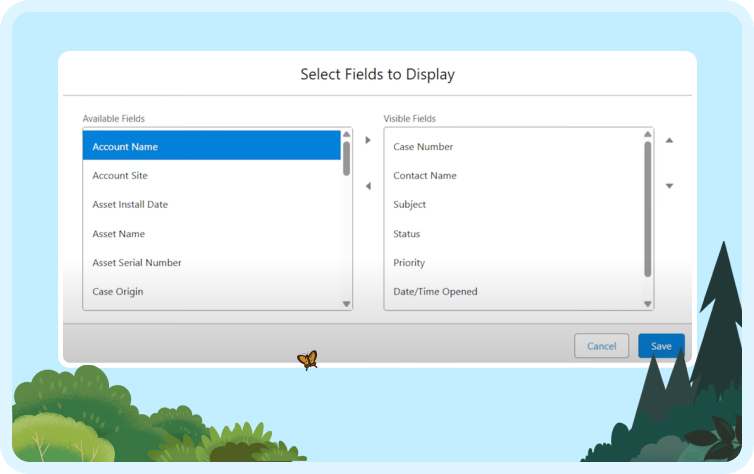
Admins can now sort lists by up to five fields simultaneously.
Field pickers now include type-ahead search functionality.
Continued performance improvements make list views faster and more responsive, especially when working with large datasets.
Example: A nonprofit admin can segment donors by region, pledge size, and renewal date in one screen instead of juggling multiple filters.
User and Identity Management
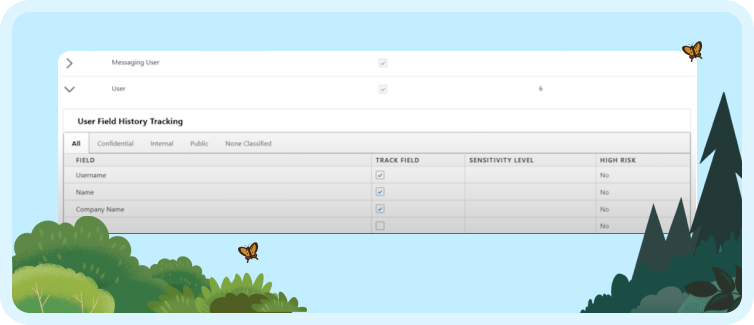
Passwords can be reset by email even when the username is forgotten.
Field History Tracking on the User object (Beta) captures changes to role, profile, or manager.Permission set licenses are released automatically when a user is deactivated.
Improved admin visibility into user activity and access supports better auditing and governance.
Example: An HR admin onboarding seasonal staff no longer needs to manually track license allocations or respond to dozens of password reset requests.
Sharing and Performance
Sharing recalculations now run asynchronously, preventing delays during hierarchy changes.
Example: A university admin updating hundreds of student advisor assignments can complete changes without slowing access for other users.
Release Management Tools
The Setup “Release Updates” page separates mandatory updates from optional ones.
Sandbox preview environments are available ahead of rollout.
Additional improvements enhance how admins track and prepare for upcoming updates.
Example: An IT admin can preview updates in a sandbox, train end users, and roll out changes with fewer interruptions.
Takeaway: Winter ’26 strengthens admin workflows with faster list views, smoother user management, and more reliable sharing and release prep, while Spring ’26 builds on this with better reporting, deeper visibility, and smarter automation. The result is less manual work and more time for strategic projects.
While admins see smoother operations, developers also gain new tools that make building and testing faster.
Developer & Platform Enhancements
The Salesforce Winter 26 release, introduced stronger tools for developers, with Spring ’26 adding further improvements that make building, testing, and automation more efficient. From building Lightning Web Components to managing APIs and Flows, the updates are designed to reduce bottlenecks and improve testing.
Lightning Web Components (LWC)
Lightning Out 2.0 lets you use LWCs in external apps with Lightning Web Runtime.
Local Actions in Screen Flows enable client-side actions without server calls.
SLDS 2.0 introduces updated style tokens, utilities, and a beta dark mode.
Local Dev Preview allows developers to test single LWCs with Salesforce modules locally.
GraphQL (lightning/graphql) is now available in LWCs for data queries.
AI-assisted development capabilities help developers build smarter components and improve productivity.
Example: A product team can build an external customer portal using LWCs, test components locally with GraphQL queries, and deploy with consistent styles across dark and light modes.
Apex and APIs
Unified Test Discovery and Test Runner APIs standardize testing for Apex and Flow.
External Services now support binary file uploads and downloads up to 16 MB.
Stricter access-modifier enforcement and a new ApexDoc format improve code quality.
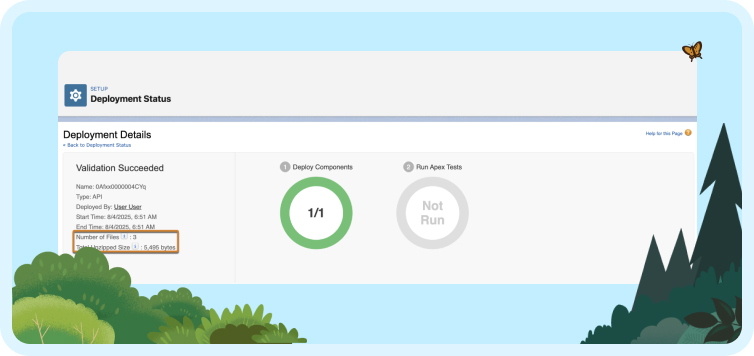
Metadata API introduces new ‘finalizing states’ that provide visibility into the last steps of deployment.
Example: A financial services developer can upload client agreements as binary files, run automated tests across Apex and Flow, and document methods with the new ApexDoc format for compliance.
Flow Improvements
Resource menus now allow faster filtering and searching, helping developers find the right fields more quickly.
Newly created record fields are instantly accessible in Flows.
Action Hub (Beta) shows where custom actions are used, making refactoring safer.
Improved automation orchestration supports more complex, multi-step business processes.
Example: A manufacturing developer can update a custom action in Flow and check through Action Hub that no production automations will break before pushing changes.
Takeaway: Winter ’26 strengthens development with more flexible components, consistent APIs, and safer Flow management, while Spring ’26 extends these gains with smarter automation and AI-assisted development. The result is faster development cycles with fewer risks.
AI, Agentforce, and Automation
Beyond core platform updates, Winter ’26 and Spring ‘26 expand Salesforce’s built-in AI through Agentforce. Across Winter ’26 and Spring ’26, Agentforce and automation capabilities evolve to support more use cases across sales, service, and employee experience.
Employee Agent Enhancements
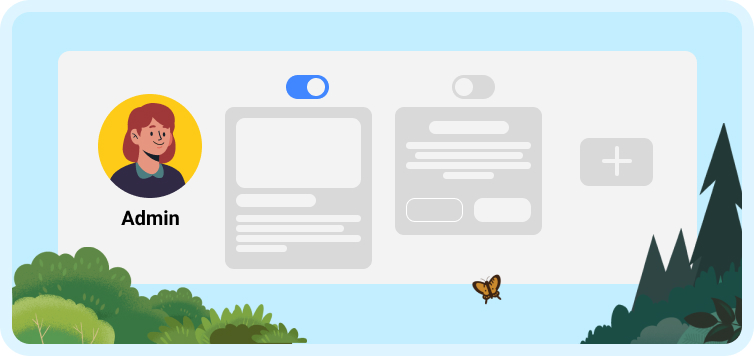
New topics are available, including Participant Notes and Referral Management.
Migration from the default agent to the Employee Agent is now simpler.
Admins can manage recommendation pop-ups through toggles.
The new Agent Access tab centralizes access control.
Example: An HR admin can use the Employee Agent to track referral submissions and manage who has access, while also controlling when recommendations appear for employees.
Case and Task Automation
A new “Close Case” Employee Agent can automatically close cases by number.
AI-powered account research delivers quick insights for sales and service teams.
Example: A service desk agent handling warranty claims can let the Employee Agent close repetitive cases, while sales reps preparing for a client meeting can receive an instant summary of account history without digging through records.
Spring ’26 extends AI capabilities with:
More advanced AI-driven recommendations
Greater autonomy in handling routine tasks
Stronger integration with reporting and analytics
Example: A sales manager can receive proactive deal insights and next-step recommendations without manual analysis.
Takeaway: With Winter ’26, Salesforce AI handles more of the repetitive workload, while Spring ’26 advances these capabilities with more proactive insights and expanded Agentforce functionality. Admins and developers spend less time building custom automation, while teams across the business gain faster insights and smoother processes.
Alongside AI, individual Salesforce clouds also see targeted improvements that sharpen forecasting, service, and nonprofit management.
Product and Cloud-Specific Updates
Across the Salesforce Winter ’26 and Spring ’26 releases, targeted improvements span core products and industry clouds. These updates focus on making forecasting more accurate, service more responsive, community sites easier to manage, and nonprofit operations more efficient.
Sales Cloud
Forecasting now supports opportunity line item (OLI) splits and service date rollups.
Custom fiscal year support is added for consumption forecasting.
AI-driven forecasting insights improve pipeline visibility and planning accuracy.
Example: A subscription-based business can forecast revenue by fiscal year and track partial opportunity splits, giving finance teams more precision when planning budgets.
Service Cloud
SLA Management is now simplified and generally available.
Email-to-Case supports up to 250 emails per case per day.
Case milestones can be displayed as a column in list views.
AI-powered automation improves case resolution speed and efficiency.
Example: A telecom support team can keep SLAs visible within list views and manage high-volume customer cases without hitting email limits.
Experience Cloud
Legacy force.com URLs will retire by Spring ’26.
Static resources and preview styles are now available for site flows.
Example: An IT admin maintaining a customer portal can update site URLs ahead of the deadline and preview site changes before they go live, reducing disruption.
Nonprofit Cloud
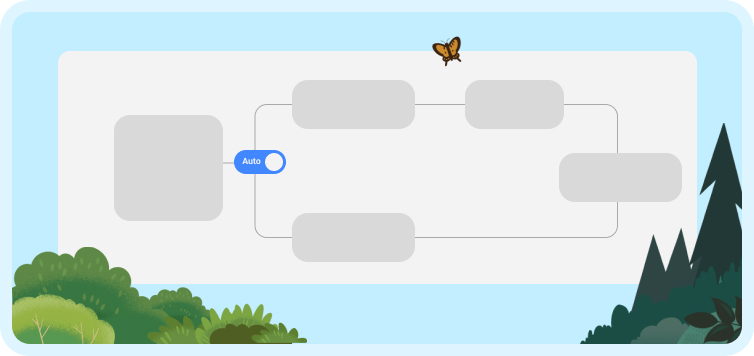
Enhanced algorithms deliver smarter volunteer-to-need matching capabilities.
The platform now supports automated initiative creation workflows.
A redesigned interface reduces the number of clicks required for common tasks.
Additional governance and monitoring capabilities support secure AI adoption.
Example: a nonprofit program manager can automatically match volunteers with events and create new initiatives in minutes, freeing more time to focus on impact rather than admin work.
Takeaway: Across the Winter ’26 and Spring ’26 releases, Salesforce delivers practical improvements across products. Nonprofit Cloud gains tools that simplify volunteer management, while Sales and Service Cloud benefit from greater accuracy, scale, and AI-driven enhancements, and Experience Cloud admins must prepare for legacy URL updates.
These releases also strengthen the developer environment, giving teams more control over testing, previewing, and scaling.
Security and Compliance
TLS certificates now rotate more frequently.
WCAG 2.2 accessibility standards are enforced across the Lightning UI.
Reports and dashboards now support metadata label translations.
Example: A global healthcare provider can meet accessibility requirements and deliver dashboards in local languages, while IT teams stay ahead of certificate compliance.
Takeaway: Winter ’26 delivers practical improvements across products. Nonprofit Cloud gains tools that simplify volunteer management, Service and Sales Cloud receive upgrades that improve accuracy and scale, and Experience Cloud admins must act early to update legacy URLs.
Winter ’26 also strengthens the developer environment itself, giving teams more control over testing, previewing, and scaling
Developer Environment and Performance Tools
Across Winter ’26 and Spring ’26, the developer environment becomes more robust for testing, previewing, and scaling. These updates help teams catch issues earlier, improve performance visibility, and streamline deployments.
Testing and Preview
Sandbox previews and pre-release orgs are now available earlier in the cycle.
The Release Updates setup page clearly marks which changes are required and which are optional.
Example: A dev team preparing for a seasonal sales campaign can test new features in a sandbox, confirm which updates are mandatory, and avoid last-minute surprises during rollout.
Performance and Scale
Sharing recalculations now run asynchronously, reducing performance bottlenecks.
List views and Flow builder now support faster filtering, improving navigation and performance for admins and developers.
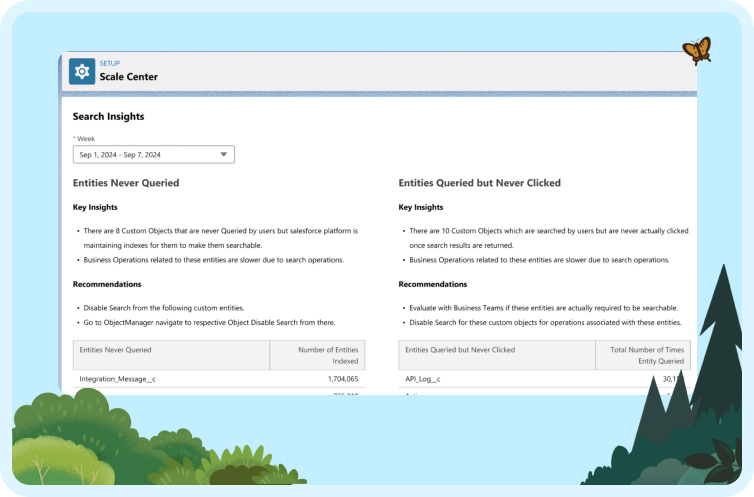
Scale Center adds more metrics to monitor org performance.
Code Builder now supports sandbox environments.
CLI improvements allow developers to run Flow tests and push package upgrades directly from the command line.
Enhanced monitoring provides deeper insights into system performance and behavior.
Example: A manufacturing developer can monitor Scale Center for performance spikes, test Flows through CLI before deployment, and roll out package updates across sandboxes without manual steps.
Takeaway: Across the Winter ’26 and Spring ’26 releases, developers gain greater visibility and control. Early previews, expanded metrics, and stronger CLI support, along with improved monitoring and automation capabilities, help teams deploy confidently and maintain performance at scale.
With so many updates across both releases, preparation is the key to the difference between adopting new features and unlocking their full value. Here’s what each team should focus on.
Salesforce Headless 360: Build and Act Without Opening a Browser
For 25 years, using Salesforce meant logging into Salesforce. A rep opened a console, clicked into a case, and manually updated its status. That model worked when humans were the only ones doing the navigating. In the agentic era, that is no longer true.
Announced at TDX 2026, Salesforce Headless 360 is a new architecture that exposes everything on the Salesforce platform — data, workflows, business logic, and trust controls — as an API, MCP tool, or CLI command. Developers and AI agents can now build, act, and deliver experiences on any surface without ever touching a browser or clicking through a UI.
What Headless 360 delivers?
What does this mean for your team?
For developers, Headless 360 removes the requirement to build inside the Salesforce UI. You can call any Salesforce capability from the coding environment you already use. Salesforce claims this cuts development cycle times by as much as 40% by collapsing a process that previously required four separate tools into one connected experience.
For businesses running Agentforce, the Experience Layer means you no longer need to rebuild agent interfaces for every channel. Build once and render across Slack, mobile, voice, WhatsApp, and any MCP-compatible client.
For IT and security teams, agents operating inside Headless 360 inherit the same permissions, sharing rules, and compliance controls already configured in your org. There is no separate trust layer to rebuild.
Headless 360 is available now. If your team is already on Agentforce or actively building on the Salesforce platform, this is worth exploring with your implementation partner before your next development cycle begins.
Impact and Best Practices
The Salesforce Winter 26 release is packed with features, but making the most of them requires a few focused steps from each team. With Spring ’26 introducing additional AI and automation capabilities, teams should also plan for governance, testing, and user training.
Admins should start by enabling Field History Tracking on the User object to monitor changes to role, profile, and manager. Reviewing permission set licenses is equally important so unused ones are automatically released. Experience Cloud site owners should also plan ahead and update legacy force.com URLs before Spring ’26 to avoid disruptions.
Developers can get the most out of Winter ’26 by testing Lightning Web Components with SLDS 2.0 locally to confirm consistent styling. The new Test Runner APIs help validate Apex and Flow together, making testing more reliable. Before removing or replacing any custom actions, developers should also review Action Hub to prevent accidental breaks in automation.
Security teams should prepare for shorter TLS certificate lifecycles to stay compliant and enable WCAG 2.2 accessibility updates across the Lightning UI to meet the latest standards.
Taken together, these best practices set the stage for a smooth rollout. Which brings us to the bigger picture.
Conclusion
The Salesforce Winter ’26 and Spring ’26 releases bring upgrades that matter for every role, spanning admin workflows, development capabilities, and AI-driven automation. Admins gain tools that simplify user management and list views. Developers have modern capabilities in Lightning Web Components, Flow, and testing. Nonprofits and industry teams see improvements that reduce manual work and make programs easier to run.
With Spring ’26, these capabilities are extended through deeper AI-driven insights, expanded Agentforce functionality, and more advanced automation across workflows.
With updates spanning both Winter ’26 and Spring ’26, the impact is greatest when teams prepare early. Testing in sandbox environments, training users on the most relevant changes, and updating compliance processes will help you roll out smoothly.
Together, Winter ’26 and Spring ’26 create an opportunity to boost productivity, scale with confidence, and strengthen security. With the right preparation, your team can turn these updates into measurable progress.
Successful rollouts depend on understanding both the technical details and the business impact.
Want to get the most out of the Salesforce Winter ‘26 nd Spring ’26 releases? Reach out to CUBE84 to prepare your org for success.

.png&w=3840&q=75)