

Why Universities Need Salesforce Education Cloud
Universities today face growing pressure to improve student experiences and strengthen retention. When students feel unsupported or disconnected at any point in their journey, the risk of attrition rises — and with it, the loss of tuition revenue and long-term alumni engagement. These challenges often stem from a fragmented student experience, where important moments slip through the cracks simply because teams cannot see the full picture.
Operational problems show up next. Admissions, advising, student services, and advancement usually work from separate systems, each holding only part of a student’s story. This makes it harder to guide students proactively, respond with confidence, or build meaningful lifelong relationships. Staff spend extra time searching for information, students repeat the same details across departments, and important context can be overlooked. All of this affects outcomes and satisfaction for both students and staff.
Salesforce Education Cloud helps address these challenges by bringing admissions, student support, and advancement data into one connected place. With a clearer view of the student journey, teams can respond faster and more thoughtfully, and leaders can guide their institutions with greater confidence.
For example, one university that centralized its student engagement processes into Salesforce noticed a significant drop in duplicated communication between teams. Instead of working from separate systems, leadership had a more complete picture of each student’s experience, while individual departments could see only the information relevant to their work. This helped reduce overlaps, improve coordination, and better support students throughout their academic lifecycle. This is the kind of outcome many institutions aim for when modernizing their approach to education, which we explore further in our work across the Education industry
What Salesforce Education Cloud Is (and How It Works)
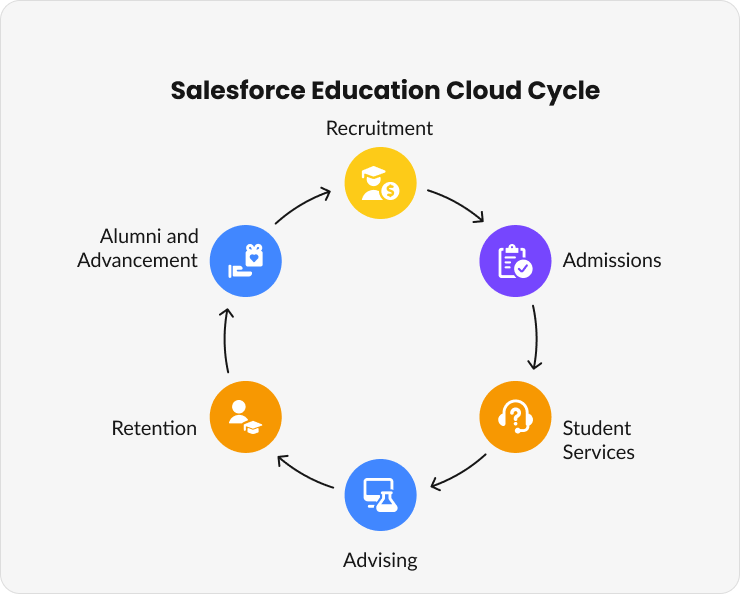
Salesforce Education Cloud is not a replacement for your SIS or LMS. It is a student engagement and lifecycle platform that sits above your core systems. Its job is to unify information and enable the experiences that matter to students, advisors, admissions officers, and alumni teams.
Education Cloud brings together:
Recruitment
Admissions
Student services
Advising
Retention
Alumni and advancement
Instead of switching between tools, teams work from one connected model that shows where a student is in their journey and what support they need next.
Core Modules of Salesforce Education Cloud
Recruitment and Admissions helps track applicants, send reminders, and keep admissions organized.
Example: An admissions team can use it to follow up with students who started but didn’t finish their applications.
Student Success Hub supports retention and advising by identifying students who may need extra help.
Example: Advisors can spot a student falling behind and reach out before finals.
Advancement and Fundraising keeps track of alumni relationships and donations.
Example: The fundraising team sends personalized thank-you notes after each donation.
Academic Operations helps universities bring key academic context into a single view without replacing or duplicating the SIS. The SIS continues to remain the system of record for courses, schedules, registrations, and academic history. Education Cloud simply surfaces the information that advisors and support teams need so they can understand where a student is in their academic journey and offer timely guidance.
Example: A student profile can display their program and current course load, which helps advisors and support teams understand the student’s commitments and provide more meaningful support.
Education Data Architecture (EDA): The Backbone
Salesforce Education Cloud runs on something called the Education Data Architecture, or EDA. It’s a structure that connects people, courses, programs, and departments so that everything is linked together.
Example: At Hamilton University, a student’s record includes their advisor, program, clubs, and past donations, all of which can be found in one view.
Step-by-Step Implementation Roadmap
Pre-Implementation: Data Audit and Early Mapping
Before the project begins, universities need a clear understanding of their current data. A basic audit of where information lives, what is duplicated, and what may be incomplete helps set realistic expectations and avoids delays later in the project. This early work does not need to be perfect, but it should give teams enough clarity to make good decisions once the implementation starts. Many institutions spend the first few months preparing their data so that the build can move forward smoothly.
Step 1: Define Vision and KPIs
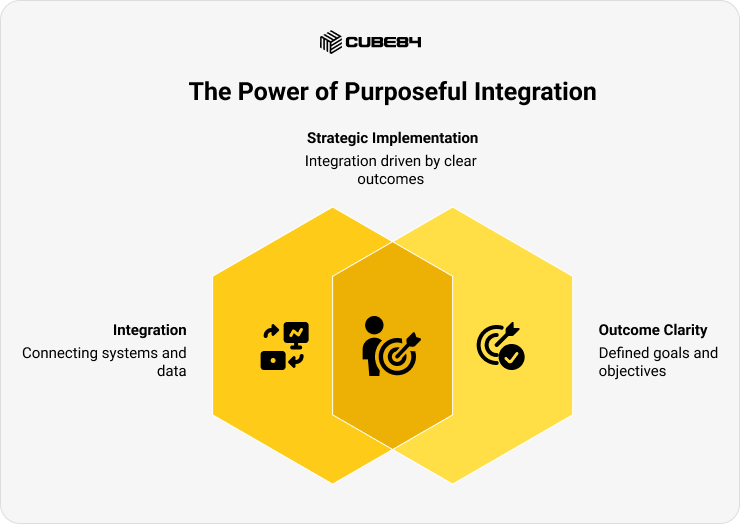
Start with clear goals. Knowing what you want to improve makes everything else easier.
Examples include:
1. Shorter admissions cycles
2. Better visibility into student risk
3. Stronger advisor notes and outreach
4. Higher event attendance
5. Improved alumni engagement
6. Clearer reporting across departments
Every implementation decision becomes easier when tied to a specific outcome. Without this clarity, universities fall into the trap of configuring features without purpose.
Integration is an operational decision that affects accuracy, speed, and trust.
Decide:
1. Which source is the authority for each type of data
2. How often does data need to sync
3. What information must be real-time
4. Where data should not be duplicated
5. What fields support advising, recruitment, and reporting
Step 2: Form a Cross-Department Project Team
Education Cloud touches every part of the student lifecycle. A successful implementation needs voices from across the university, not just IT. A strong partnership with the IT and Enterprise Architecture team is especially important because they understand the institution’s data landscape and ensure that integrations, security, and system ownership are defined correctly from the start. Bring together representatives from admissions, advising, student success, advancement, continuing education, and institutional research. Each team contributes a unique view of how students engage and what information they need to serve them well.
This group becomes your steering team. Their role is to clarify processes, define shared outcomes, and ensure decisions reflect the realities of day-to-day work. When the right people are at the table early, configuration becomes smoother, adoption improves, and the platform reflects how your institution actually operates.
Step 3: Clean and Map Existing Data
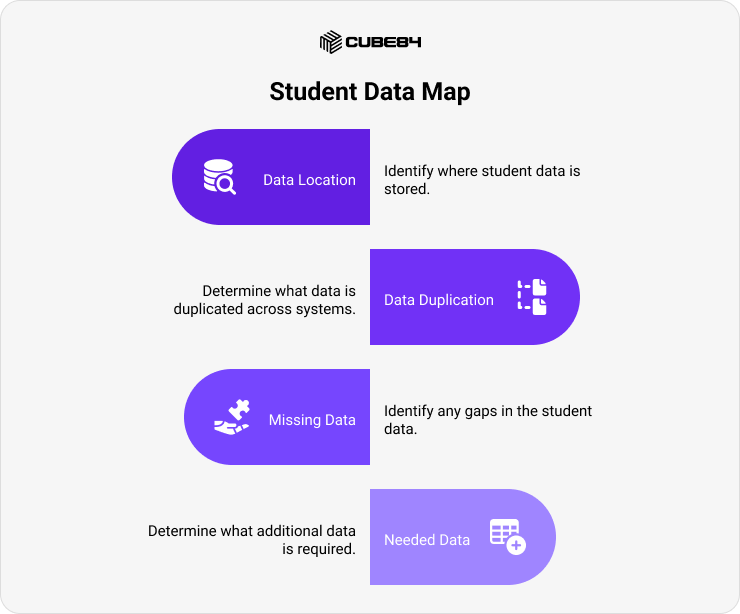
Most universities use a mix of SIS, LMS, portals, application tools, payment systems, and email platforms. Education Cloud does not replace these. It connects to them.
Create a simple map of:
1. Where student data lives
2. What data is duplicated
3. What data is missing
4. What data is needed to support the outcomes defined earlier
This step builds on the early data audit and gives your team a clearer picture of what will flow into Education Cloud and what will remain in legacy systems.
Step 4: Configure the Education Data Architecture (EDA)
Set up how different data points relate to each other.
The EDA defines how records relate to each other.
Integrations bring key data from the SIS, LMS, and portals.
The platform links these records into a single profile that supports advising, recruitment, and alumni work.
The SIS remains your system of record for academic history. The LMS remains the source of learning insights. Education Cloud becomes the engagement layer that ties everything together.
Example: Make sure each student connects to their advisor, courses, and department.
Step 5: Pilot the Solution with One Department
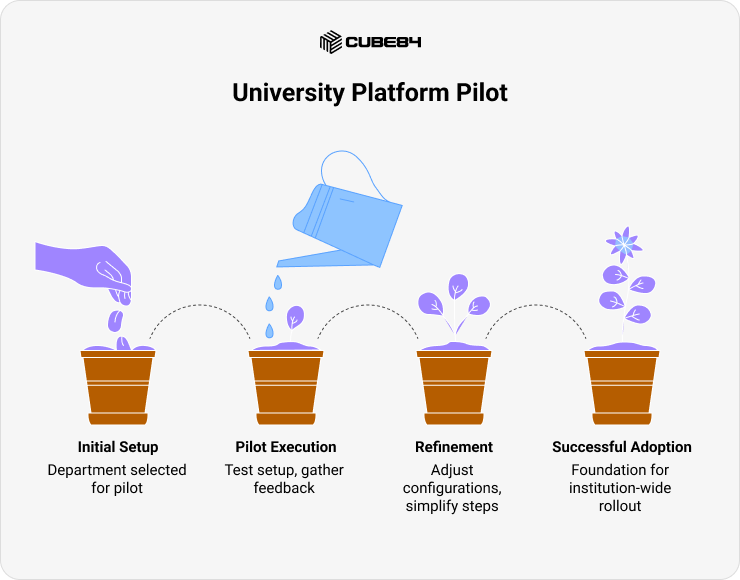
A focused pilot helps your university build confidence before rolling the platform out broadly. Start with one department where processes are well understood and where change will create visible value. While admissions is structured, it is also tied directly to annual revenue and strict deadlines, which makes it a sensitive place to begin. Many universities choose a smaller, more contained team for the first pilot, such as a group within student advising or career services, so they can test the setup, gather feedback, and refine the approach with lower risk.
During the pilot, track what works well, where users struggle, and what processes need refinement. This allows your team to adjust configurations, simplify steps, and strengthen integrations before expanding to other departments. A well-run pilot sets the foundation for successful adoption across the institution.
Step 6: Train by Role, Not in Bulk
Training is most effective when it mirrors the work people do every day. Avoid large, generic training sessions. Instead, build short, task-based learning paths for each role. Admissions officers need to understand applicant tracking and communications. Advisors need clear guidance on notes, alerts, and success plans. Advancement teams need support for donor histories, campaigns, and events.
Role-based training reduces confusion and helps teams see the immediate value of the platform. It also increases adoption because people can map new features directly to their daily responsibilities.
Step 7: Launch, Track, and Iterate
After launch, your work shifts from building the system to refining it. Meet regularly with each department to understand what is working and what needs to improve. Look for patterns that indicate friction, such as duplicated fields, unclear steps, or slow reports. Use these insights to make incremental changes that strengthen the platform over time.
A strong launch is the beginning of a continuous improvement cycle that keeps Education Cloud aligned with your university's goals and evolving needs.
Example: Here’s how this might look in practice. A university set a goal to improve student retention by ten percent. They began by cleaning up their admissions data and then set up EDA to connect students with their programs and advisors. Instead of rolling it out everywhere at once, they began with a pilot in the student services department. Each team got training based on their role. From there, they kept listening, made small changes, and shaped the rollout based on what was working.
How Advancement Directors Use Salesforce Education Cloud
Advancement teams are always looking for better ways to keep alumni engaged and giving. With the right tools, they can spend less time tracking down details and more time building relationships. That is where Salesforce for education comes in.
It gives Advancement Directors a single place to see alumni activity, including history, past interactions, and event participation. They can easily group alumni by interests or engagement level, send thank-you messages right after a gift, and plan outreach based on up-to-date, easy-to-act-on data.
Example: An advancement team might build a dashboard that shows donor engagement by region. This helps them decide where to plan in-person events or who to call first during giving campaigns. Einstein tools can also highlight alumni who are likely to re-engage, helping teams prioritize where to focus their time.
With Salesforce for education, advancement teams don’t have to guess. They have clear data and helpful tools to stay connected to alumni in meaningful ways.
Common Mistakes and How to Avoid Them
Mistake | Impact | Fix |
Skipping data cleanup | Reports are unreliable or incomplete | Review and clean data before migration |
Over-customizing the system | Makes it harder to maintain or update | Stick with the standard EDA setup whenever possible |
Ignoring training | Staff are unsure how to use the features | Train users by role before launch |
No governance plan | Leads to inconsistent data access and updates | Assign owners and define sharing rules early |
Summary: Universities using a CRM for universities, like Education Cloud, often face avoidable problems. A thoughtful setup with good training and clear data management helps teams start off strong.For a deeper breakdown of what typically goes wrong (and how to fix it), refer to the biggest mistakes universities make when using Salesforce.
How Universities Use Salesforce Education Cloud
Admissions Teams: Managing the Student Journey
One university uses Salesforce for higher education to track students from their first inquiry through enrollment. Web forms feed directly into the system, saving the team from hours of manual data entry and reducing errors.
Student Success Offices: Improving Retention
Another college uses success plans and early alerts to support students who may be falling behind. If a student’s grades drop or attendance changes, the advising team gets notified and can step in sooner.
Advancement Directors: Driving Alumni Engagement and Donations
Fundraising teams keep track of giving histories and plan timely outreach. They send newsletters that align with past event participation and thank donors promptly.
These examples show how Salesforce Education Cloud brings student data together in a way that helps each team support their part of the student and alumni journey.
Measuring Success and ROI
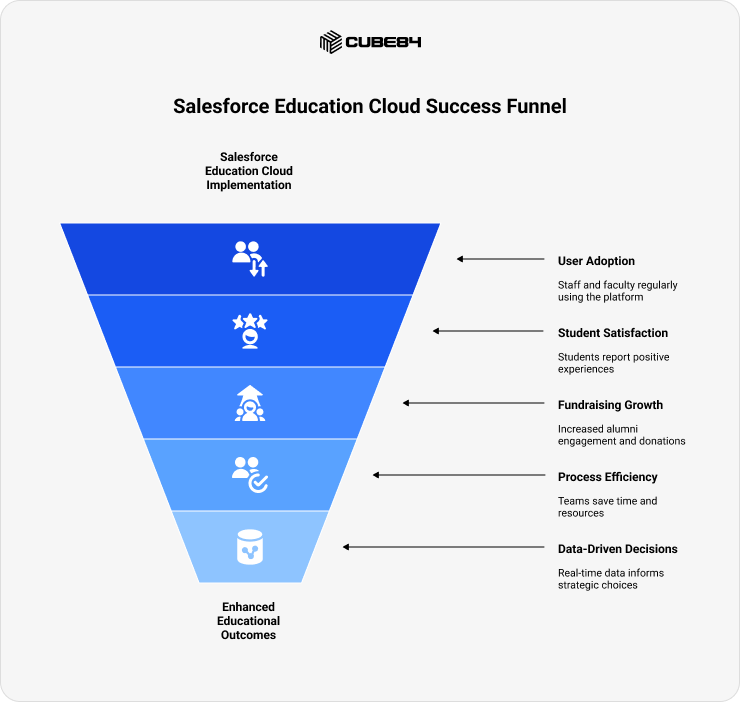
Once Salesforce Education Cloud is in place, it is important to take a step back and ask one simple question. Is it helping?
That question is best answered by tracking a few clear markers of success. When teams know what to look for, it becomes easier to fine-tune the platform, support users, and make sure students are getting the experience they deserve.
User adoption
Adoption starts with visibility. Are staff and faculty logging in regularly? Are they using the platform in a way that reflects their day-to-day work? Role-based tracking helps show where engagement is strong and where a little extra support might be needed. For example, if advisors are entering notes after each session and responding to alerts, that is a good sign that the tools are helping them stay organized and proactive. If one team is not using the system as expected, it might point to a training gap or a need for some configuration changes.
Student satisfaction
One of the most valuable indicators of success is how students feel. Are they able to book appointments without stress? Do they get quicker responses from their advisors or the financial aid office? Are they more confident in their academic progress? These questions can be answered through quick surveys, focus groups, informal feedback from student support teams, and student NPS scores, which many institutions use to understand how likely students are to recommend their experience. A smoother, more responsive experience often shows up first in the stories students share.
Fundraising growth
For advancement teams, the platform’s impact often shows in how campaigns perform over time. When alumni data is better organized and communication is more timely, fundraising teams can build stronger connections. Having access to a donor’s past activity, preferred communication style, or event attendance makes outreach more thoughtful and less transactional. Several universities have seen increases in alumni engagement and campaign success after using Education Cloud to improve their data quality and automate common tasks.
Process efficiency
It also helps to look at how much time teams save. Before adopting Education Cloud, many universities relied on separate systems for admissions, advising, and fundraising. That often means teams spend extra time gathering reports, checking for data inconsistencies, or following up manually. When everything is connected, those tasks get easier. A well-known example is Arizona State University, which has spent several years modernizing its student experience with Salesforce as one of the tools supporting that transformation. Their progress has come from long-term leadership commitment, improved communication journeys, and a broader digital strategy, rather than from any single implementation step. That success came from giving staff tools that allowed them to respond faster, with the right information in front of them.
Dashboards and reporting
Having built-in dashboards gives everyone a clearer picture of what is happening. Admissions staff can monitor incoming applications and see where students are getting stuck. Advisors can keep track of alerts and student plans. Fundraising teams can track donations and engagement by region or class year. Instead of waiting for reports or working from outdated spreadsheets, each department can rely on real-time data that helps them make smart decisions every day.
Common Challenges and How to Avoid Them
Even with the right tools, some parts of Education Cloud implementations can trip universities up. These issues usually show up after decisions have already been made, which makes them harder to fix later. Understanding these patterns ahead of time can help teams avoid frustration and keep things moving smoothly.
Over-customization leads to long-term complexity
It often starts with good intentions. One team asks for a custom object, another wants a special workflow. Over time, these changes can pile up and create a platform that feels unfamiliar to anyone outside the project team. When the system becomes too tailored, it is harder to maintain, harder to upgrade, and much harder to train new users. Keeping things simple at the start helps everyone learn faster and work more confidently.
Weak data relationships cause reporting confusion
If students are not connected properly to their courses, advisors, or departments, reports can quickly become unreliable. These problems may not show up right away, but usually surface when someone tries to answer a big question and cannot find clean data. It becomes difficult to explain numbers or make decisions. Mapping out relationships carefully during setup helps avoid broken links and missing insights down the road.
Generic training leaves teams unsure of what to do
Training sessions that cover everything but apply to no one can leave people more confused than before. Staff walk away not knowing how to use the system for their actual tasks. As a result, they avoid it or use workarounds. When people do not feel comfortable with the platform, they tend to stop trusting it. Giving teams short, practical guidance based on their roles makes it easier to build comfort and confidence from day one.
No structure for updates causes slow problems to build up
Without a shared way to make changes or review updates, the system starts to drift. New fields are added that no one uses. Reports get duplicated. Access rules become inconsistent. These small issues add up and can make users feel like the system is not reliable. A small review group that meets regularly can catch these problems early and keep the platform aligned with how the university actually works.
Best Practices for Sustainable Education Cloud Adoption
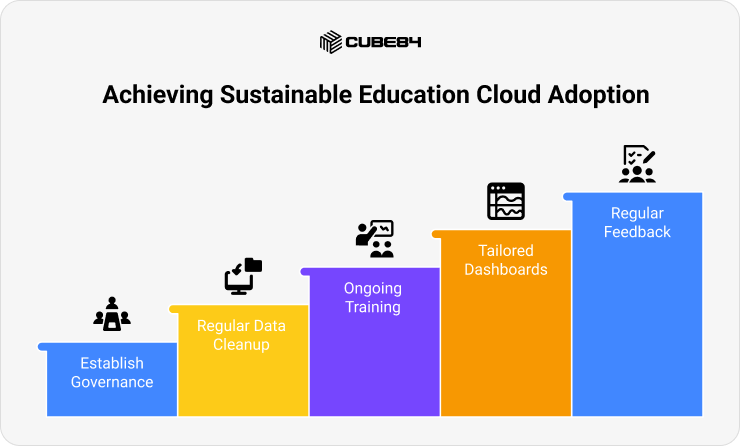
Launching Salesforce Education Cloud is a big step forward, but keeping it effective over time comes down to habits. When universities stay intentional about how they manage, clean, and use the system, it becomes a long-term tool that truly supports students, staff, and alumni. Here are some simple but powerful best practices that have helped institutions stay on track.
Start with a shared governance model
Good governance creates clarity. Assign clear roles for each area of the platform. For example, have someone from admissions oversee student records, someone from advancement manage donor data, and someone from IT coordinate system-wide settings. This way, questions are resolved faster and updates happen with input from the right people. A small governance group can also help catch issues early and make sure that changes reflect how teams actually work day to day.
Make data cleanup a regular habit
Accurate data helps everything run better. Instead of treating cleanup as a one-time project, build it into your monthly or quarterly routines. Review records for duplicates, missing fields, or outdated contacts. Even setting aside one hour a month can make a noticeable difference. Clean data means better reports, fewer errors, and smoother communication with students and alumni. Some universities also create quick guides that help teams enter data consistently from the start.
Keep training short and ongoing
People do not need to know everything all at once. Short, focused training sessions work better than long presentations that try to cover everything. Show advisors how to log notes. Help the advancement staff pull donor lists. Walk admissions teams through dashboards. When training feels practical and specific, people are more likely to remember it. Adding follow-up sessions every few months helps teams stay comfortable with the tools and discover features they may have missed.
Tailor dashboards to what each team needs
Dashboards are most helpful when they are designed with the end user in mind. For example, admissions teams want to see new applications and follow-up reminders. Student success teams look for alerts, advising notes, and attendance. Advancement directors focus on gifts, pledges, and campaign activity. Creating separate dashboards for each team keeps things clean, clear, and focused. It also helps staff make faster decisions and answer their own questions without needing to run extra reports.
Make space for regular feedback
One of the easiest ways to keep the platform helpful is by asking simple questions. What part of the system feels clunky? Is there anything that takes too many steps? What do people wish they could do more easily? Encourage teams to share honest feedback during team meetings, check-ins, or informal sessions. Then act on that input. Small changes like rearranging a screen or adding a new field can make daily work more comfortable. When users feel heard, they tend to stay engaged and willing to learn.
Conclusion: Turning Data into Connected Experiences
Choosing Salesforce Education Cloud is not just about adding another system. It is about giving your teams the tools to understand and support students at every stage, from their first application to their alumni years.
When universities take the time to build thoughtfully, progress follows. Clear goals, clean data, and simple workflows create space for better collaboration and stronger outcomes across departments.
And with built-in insights and automation, teams can focus less on finding information and more on using it. Students feel supported, staff work more confidently, and leaders have a fuller view of what is happening across campus.
If your university is exploring how Salesforce for higher education could support your goals, you can speak with one of our experts to explore what the journey might look like for your team.