
Introduction
For years, Microsoft Fundraising and Engagement (F&E) has been a core part of Microsoft Cloud for Nonprofit, serving as the backbone of donor management and fundraising for many nonprofit and education organizations. It offered an efficient way to track relationships, manage gifts, and engage supporters within the familiar Microsoft environment. Now, with Microsoft confirming the retirement of F&E, these organizations face an important decision. The key question is what comes next and how to evolve without losing the systems that keep their mission moving.
For nonprofit and education leaders, this change can feel heavy. Fundraising and engagement efforts must continue, and every campaign or stakeholder interaction depends on systems that work without interruption. The first priority is continuity. Donor, alumni, and student information should stay secure, and communication routines should continue without disruption. The next question is cost. Any move to a new platform needs to make financial sense, balancing upfront spending with long-term value. For teams managing tight budgets, predictability matters as much as progress. Training and adoption also need to be planned with care, so staff can learn at a manageable pace without slowing ongoing fundraising or engagement work.
At the same time, this transition can open new doors. Many organizations are looking at Salesforce Nonprofit Cloud and Education Cloud because these are purpose-built platforms, designed to align with and support how nonprofit or education teams work. These platforms bring together constituent data, automate routine tasks like acknowledgments or campaign tracking, and connect easily with familiar tools such as Outlook, Teams, and Excel. The result is less time spent managing spreadsheets and more time focused on building meaningful relationships. Both Clouds also connect to a large community of partners and purpose-built apps, giving organizations the flexibility to add features as their needs evolve.
Through this guide, we will explore the practical questions leaders are asking: Why is Microsoft F&E being retired? What options exist for current customers? How do the costs and integrations compare? And what should organizations expect when moving from Microsoft to Salesforce?
Whether serving a community or an academic mission, this is a chance to strengthen the systems that keep progress steady. The goal is to build a technology foundation that grows with every program, learner, and team.
Why is Microsoft F&E retiring?
Brief timeline and Microsoft’s official statement
In July 2024, Microsoft announced that Fundraising and Engagement (F&E), a core component of Microsoft Cloud for Nonprofit, will be retired by December 31, 2026. The company stated that no new feature enhancements will be released and that licensing for new customers ended on December 31, 2024.
In practice, this means organizations currently using F&E have a defined window to plan their transition. They can continue using the product through 2026, although without ongoing investment or roadmap visibility from Microsoft, F&E’s functionality will gradually lose competitiveness as other nonprofit solutions continue to advance.
The strategic shift toward other Microsoft nonprofit offerings or partner-built solutions
Microsoft’s decision reflects a broader realignment of its nonprofit strategy. Instead of maintaining F&E as a fully supported donor management application, Microsoft is refocusing on its core cloud infrastructure, including Dynamics 365, Power Platform, and Azure, while encouraging partners to build tailored fundraising and engagement solutions on top of these platforms.
This approach allows Microsoft to concentrate on platform stability and scalability while third-party developers extend specific nonprofit functionality. As a result, organizations that want to stay within the Microsoft environment must evaluate partner-built options such as MissionCRM or Barhead, which are developing applications designed for nonprofits using the Power Platform.
While this model may provide continuity for some users, it also introduces new considerations such as separate licensing costs, integration complexity, and long-term vendor dependency. These factors make it important for nonprofits and education institutions to assess whether continuing within the Microsoft ecosystem aligns with their capacity and strategic roadmap.
What this means for existing F&E customers
Moving away from F&E affects both daily operations and long-term strategy, so careful planning is key to keeping systems stable during the change.
1. Support and maintenance
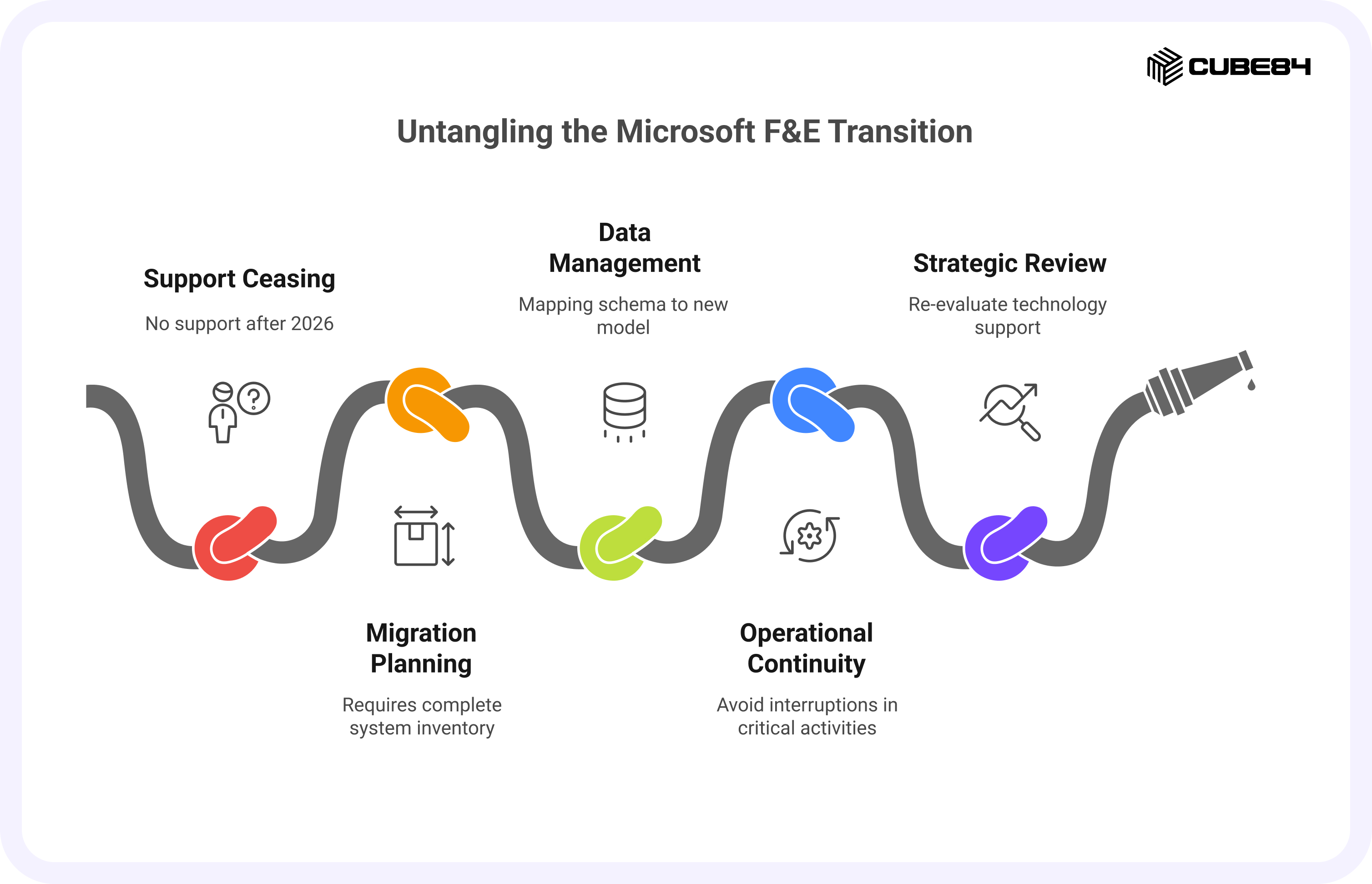
F&E will receive only critical security and compliance updates until December 31, 2026. After that, Microsoft’s official support will cease. This means that while systems will remain functional, any technical issues or compatibility conflicts with future Microsoft updates will become the responsibility of the organization or its implementation partner.
2. Migration planning
Given the two-year timeframe, nonprofits and educational institutions should begin with a complete system inventory. This includes cataloging active workflows, custom entities, automation scripts, and integrations with tools like Outlook, Teams, Power BI, or third-party apps. Early documentation ensures that nothing essential is lost during migration and helps teams evaluate how current processes could be improved in a new environment.
3. Data management
Since F&E is built on Microsoft Dataverse, all constituent, donation, student, and campaign data resides in that environment. Migrating to a different CRM will require mapping this schema to a new data model. Attention must be given to data quality, historical records, and the treatment of sensitive donor information. Organizations should also decide which legacy data needs to move forward and which can be archived securely.
4. Operational continuity
Fundraising, donor engagement and student outreach activities are time-sensitive and revenue-critical. Transition plans should include parallel testing, phased rollouts, and communication strategies to avoid interruptions in donation processing or constituent communications. Leadership teams should also assess the training needs of staff who will be using a new CRM interface.
5. Strategic review
Beyond the technical work, this is an opportunity to re-evaluate how technology supports mission delivery. Nonprofits and education institutions can use this period to define what success looks like for the next decade, whether that means unified donor or student data, streamlined volunteer or alumni management, or deeper analytics capabilities. Choosing a CRM platform should be guided by these goals, not by short-term convenience.
Organizations that begin planning now will have the flexibility to compare systems carefully, run pilot migrations, and align technology investments with long-term objectives.
What are the options after F&E retirement?
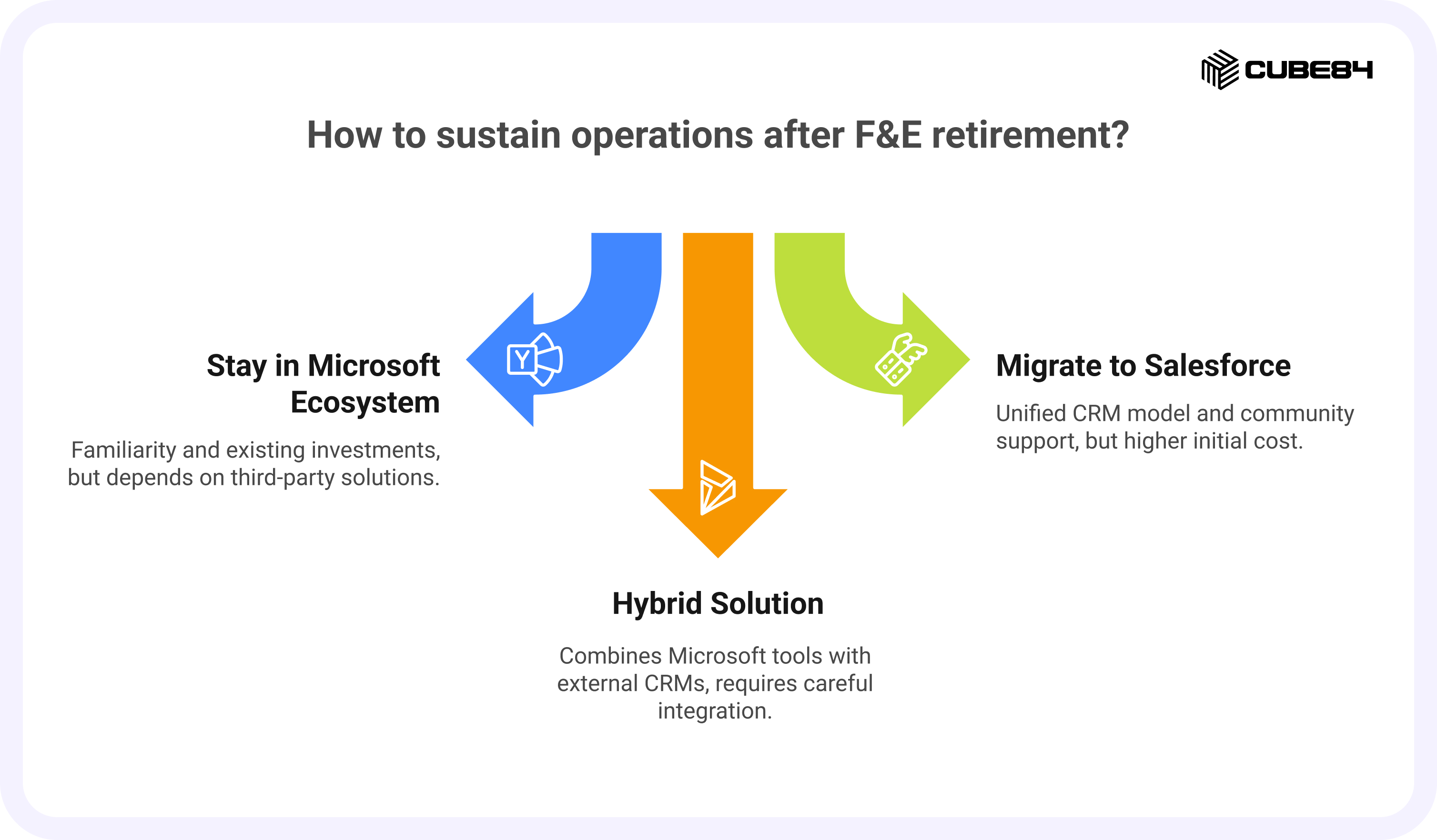
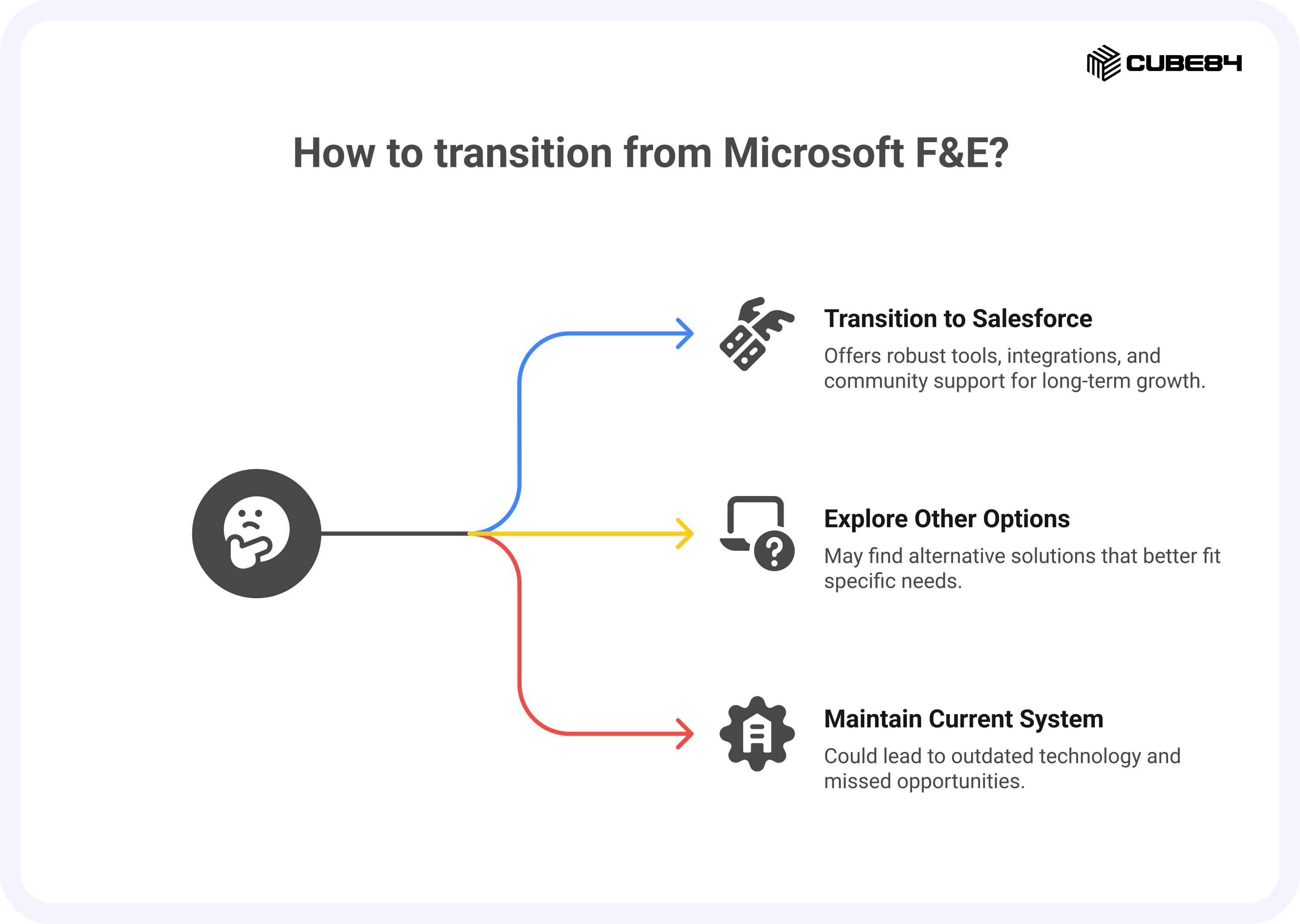
As support for Microsoft Fundraising and Engagement (F&E) approaches its 2026 sunset, organizations must decide how to sustain their donor, student, and stakeholder management, fundraising, and engagement operations. Each nonprofit or education institution will have different priorities, budgets, and technical capacities, but most options fall into three categories: continuing within the Microsoft ecosystem, migrating to Salesforce Nonprofit Cloud or Education Cloud, or exploring a hybrid setup that blends Microsoft tools with external CRMs.
Continuing within the Microsoft ecosystem
Some organizations may prefer to stay in the Microsoft environment they already know. With Microsoft shifting its focus to the Power Platform and Dynamics 365, functionality once delivered through F&E will now be supported through partner-built solutions. These applications are developed by certified Microsoft partners and extend Dynamics 365 capabilities to include donation management, campaign tracking, and engagement tools.
Vendors such as Sylogist Mission CRM, Barhead, and others are building solutions designed for organizations that want to continue leveraging Azure, Power BI, Outlook, and Teams integrations. This option may feel more familiar for existing users and can preserve existing licensing investments. However, it also means depending on third-party applications for innovation and support. Costs and long-term sustainability will vary depending on the partner’s roadmap, pricing structure, and update cadence.
Organizations choosing this route ought to evaluate:
1. The partner’s financial stability and ongoing development plans.
2. The total cost of licensing and custom development.
3. The level of integration with Power Platform and Office 365 tools.
4. Data portability in case another migration is needed later.
Moving to Salesforce Clouds
For nonprofits and educational institutions seeking a more unified CRM model, Salesforce Nonprofit Cloud and Salesforce Education Cloud present strong alternatives. These platforms are designed specifically for mission-driven organizations and provide built-in tools for donor management, program tracking, and engagement analytics.
Salesforce offers several advantages in this context:
1. A standardized data model for fundraising, program delivery, and impact reporting.
2. Deep integration capabilities (Outlook Integration and Einstein Activity Capture) with Microsoft 365 tools such as Outlook, Teams, and Excel.
3. Access to the Power of Us Program, which provides ten free licenses for eligible nonprofit and education institutions, and discounted pricing for additional users.
4. A large community of nonprofit implementers and solution accelerators that reduce customization time.
Migrating to Salesforce typically involves a more structured implementation process, with defined data migration, configuration, and user training phases. While the initial cost may be higher than staying with Microsoft partners, the total cost of ownership (TCO) over three to five years typically balances out through automation efficiencies and reduced maintenance overhead.
Organizations that want to understand what a Salesforce transition involves in practice can refer to our blog titled The Ultimate Guide to Migrating from Another CRM to Salesforce for Nonprofits. The guide outlines planning steps, data considerations, and adoption strategies that help teams prepare effectively.
Exploring hybrid solutions
A third path involves keeping Microsoft’s collaboration and analytics tools while adopting a different CRM platform. In this hybrid approach, the organization maintains its Office 365 ecosystem for productivity while connecting it to a specialized fundraising or donor management platform through APIs or middleware.
For example, data from Salesforce or another CRM can be synchronized with Power BI for reporting, or Outlook calendars can be linked to donor records using Microsoft Graph connectors. This setup allows teams to retain familiar Microsoft tools while gaining the functionality and scalability of a modern CRM.
Hybrid solutions work best for organizations that have invested heavily in Microsoft infrastructure but need a CRM solution better than what Dynamics-based partners provide. However, they require careful integration planning and ongoing governance to ensure data consistency and security.
Comparison of available paths
Option | Primary Environment | Cost Outlook | Complexity of Migration | Ecosystem Alignment | Ideal For |
Stay within Microsoft | Dynamics 365 + Power Platform | Moderate to high, depending on partner licensing and customization | Low to medium if using partner-built apps | Strong alignment with Microsoft 365 | Organizations heavily invested in Microsoft infrastructure |
Move to Salesforce Nonprofit or Education Cloud | Salesforce Platform | Moderate to high upfront, lower maintenance over time | Medium to high, depending on data volume and customization | Strong alignment with both Microsoft 365 and Salesforce ecosystem | Organizations seeking unified data, scalability, and automation |
Hybrid Solution | Mixed (Microsoft 365 + external CRM) | Variable, based on integration tools and connectors | High, due to custom integration work | Partial alignment; depends on the connector strategy | Organizations requiring flexibility but retaining Microsoft productivity stack |
Choosing the right path
The right choice depends on an organization’s size, data maturity, and long-term digital strategy. Smaller teams with deep Microsoft dependencies may find value in partner-built Dynamics extensions. Larger or growing nonprofits often prefer Salesforce for its purpose-built nonprofit model and ecosystem maturity. Hybrid models, while flexible, require stronger internal IT governance to succeed.
No matter the path, early evaluation and phased migration planning will help reduce risk and protect continuity. For nonprofits and education institutions, this planning period is also a chance to look beyond the immediate transition. It allows teams to assess how future systems will support growth, ensure consistent funding or enrollment outcomes, and align technology budgets with long-term goals. By approaching migration as part of a broader strategy rather than a one-time project, organizations can build stability and confidence into every stage of change.
The next section will compare costs and total cost of ownership (TCO) across Microsoft and Salesforce options to help organizations make informed financial decisions.
Cost comparison: Microsoft F&E vs Salesforce Nonprofit Cloud
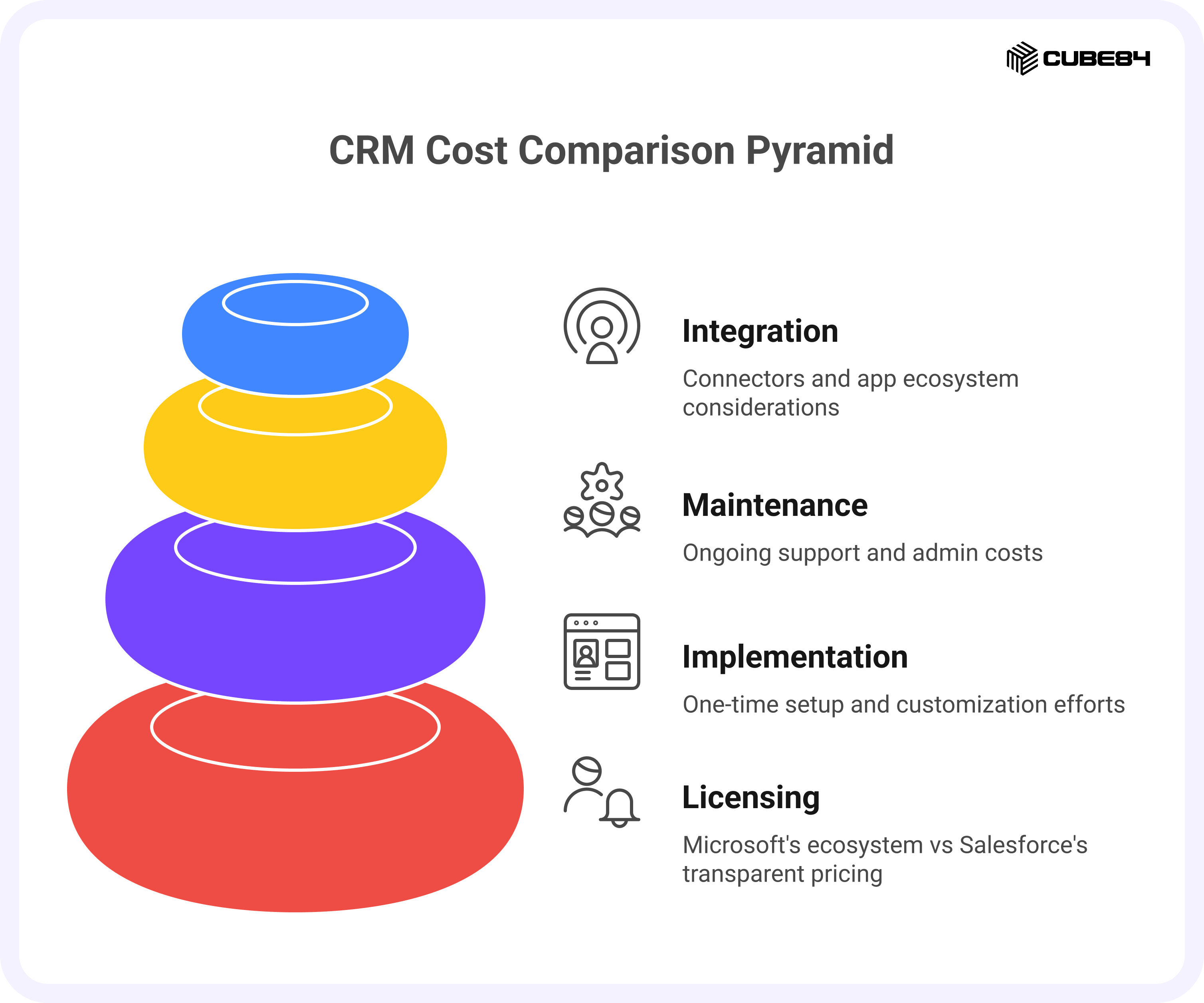
For most organizations, the decision to move away from Microsoft Fundraising and Engagement (F&E) comes down to understanding total cost of ownership (TCO). Licensing is only one factor. Implementation effort, admin time, infrastructure, and integration costs together define the true long-term investment.
This section examines how Microsoft and Salesforce (Nonprofit Cloud and Education Cloud) structure pricing for nonprofits and provides a realistic view of how costs compare over a three to five year period.
Licensing and long-term TCO
Microsoft licensing changes and impact on nonprofits
With F&E retiring, nonprofits can no longer rely on it as part of Microsoft Cloud for Nonprofit. They will now depend on a combination of:
Dynamics 365 licenses, often at nonprofit pricing
Power Platform usage, including Power Apps and Power Automate
Partner-built nonprofit solutions built on Dynamics 365 and Dataverse
Microsoft offers discounts for eligible nonprofits on both Microsoft 365 and Dynamics 365 plans. However, the pricing model has shifted from a bundled first-party product to an ecosystem of partner and platform costs.
A typical Microsoft-based setup now includes:
1. Discounted Dynamics 365 user licenses
2. Azure hosting and Dataverse storage
3. Power Platform usage charges as automation increases
4. Partner licensing and support fees for nonprofit functionality
This change means nonprofits must consider vendor-specific pricing from their Microsoft partner, potential licensing increases over time, and variable costs driven by Power Platform usage.
Salesforce’s Power of Us Program and nonprofit pricing
Salesforce Nonprofit and Education Cloud use transparent, published pricing through Salesforce.org. The Enterprise Edition typically starts at around $60 USD per user per month, depending on eligibility and available discounts for mission-based organizations. This straightforward model allows teams to estimate costs easily and plan budgets with greater predictability.
For eligible nonprofit and education organizations, the Power of Us Program provides:
Ten donated Enterprise Edition licenses
Discounted pricing for additional users and products
This structure often allows small teams to operate almost entirely on donated licenses, while mid-sized teams pay only for users beyond the first ten. Many organizations use these savings to reinvest in implementation, user training, or managed services support.
How TCO differs in structure:
1. Dynamics 365 base licenses per user
2. Microsoft 365 productivity suite costs
3. Partner solution licensing for nonprofit features
4. Azure and Power Platform usage for hosting and automation
5. Ongoing support from the partner vendor
Salesforce Nonprofit and Education Cloud typically involve:
1. Salesforce licenses (with the first ten donated)
2. One-time implementation and migration costs
3. Predictable managed services or admin support over time
4. Integrations available through prebuilt Outlook, Teams, and Excel connectors
5. Optional third-party apps from the AppExchange
For nonprofits, this structure supports fundraising, volunteer management, and impact reporting with minimal customization. For education institutions, Salesforce Education Cloud extends similar flexibility to manage student information, engagement, and advancement processes within the same platform. Both Clouds benefit from transparent pricing, prebuilt integrations, and standardized configurations that reduce ongoing maintenance costs compared to heavily customized legacy systems.
Viewing TCO over three to five years
To evaluate TCO accurately, orgs should model four core categories side by side:
1. Platform and user licenses – number of users, growth expectations, and nonprofit discounts.
2. Implementation and customization – one-time setup and post-launch enhancements.
3. Maintenance and support – internal admin costs or external managed services.
4. Integration and app ecosystem – connectors, middleware, and future integrations.
For a detailed breakdown of what influences Salesforce implementation and support costs, refer to Salesforce Implementation Cost: What You Need to Know, which explains how implementation, support, and optimization costs typically scale across different project sizes and complexity levels.
Example TCO scenario for a mid-sized nonprofit
Consider a mid-sized nonprofit with about 50 CRM users across fundraising, programs, and operations. They plan to keep Microsoft 365 for productivity but are evaluating their next CRM platform for donor and engagement management.
Assumptions
1. 50 active CRM users in both scenarios
2. Microsoft path uses nonprofit pricing for Dynamics 365 and a partner-built fundraising app
3. Salesforce path uses Nonprofit Cloud with ten donated licenses and 40 paid users
4. Implementation and support costs are typical for mid-sized nonprofit projects
Example: 3-year TCO comparison
Cost category | Microsoft ecosystem with partner solution | Salesforce Nonprofit Cloud |
Platform and user licenses | Discounted Dynamics 365 licenses plus partner solution costs. Azure hosting and storage billed separately. | Ten donated Nonprofit Cloud licenses plus 40 paid users at nonprofit pricing. Microsoft 365 costs remain for productivity. |
Implementation and customization | Initial configuration of Dynamics 365, partner solution setup, and additional development to tailor the data model. | One-time Nonprofit Cloud implementation covering migration, configuration, and training. Often uses nonprofit-specific templates. |
Maintenance and support | Ongoing partner support and internal admin effort for Dynamics and Power Platform. Costs rise with complex automation or updates. | Predictable support cost through internal admin or managed services. Lower maintenance due to standardized configuration. |
Integration and app ecosystem | Power Platform used for integrations, with Azure costs for high data volumes. Additional costs for third-party connectors. | Native integrations with Outlook, Teams, and Excel. Access to AppExchange tools for events, giving, and forms at nonprofit pricing. |
Risk and flexibility | Dependent on partner roadmap and Microsoft’s long-term nonprofit direction. Future migration risk if the partner changes product focus. | Stable roadmap centered on nonprofit innovation. Easy to extend into program management, analytics, or AI without replatforming. |
Where savings often appear
Savings on the Salesforce side usually come from:
1. Donated licenses covering part of the user base
2. Standardized nonprofit and education data models reducing customization
3. Streamlined reporting and automation that save admin hours
4. Predictable maintenance costs through managed services or in-house admins
Savings on the Microsoft side often appear in:
1. Discounted licenses for eligible nonprofits and education institutions
2. Reuse of existing Microsoft 365, Power Platform, and Azure investments
3. Lower transition costs for organizations that remain within the Microsoft ecosystem
4. Familiar user experience, which can reduce initial training and adoption time
However, both models have variables that affect total ownership costs over time. Salesforce’s efficiencies are usually realized through unified data and reduced customization, while Microsoft’s savings depend on how much an organization has already invested in its broader cloud stack.
How to estimate your own TCO
To build an accurate model, nonprofits & education institutions should:
1. List all current Microsoft 365, Dynamics 365, and partner costs
2. Estimate Salesforce licensing based on Power of Us discounts
3. Add one-time implementation and migration costs
4. Include admin or managed service expenses over three to five years
Nonprofits and educational institutions can also reference Salesforce.org’s official pricing guide and online calculators to model different scenarios based on their user count and feature needs.
The goal is to choose a platform that delivers sustainable value, predictable operating costs, and the flexibility to grow as program needs evolve, rather than focusing only on the lowest upfront price.
Cost is only one part of the decision. The next consideration for many organizations is how Salesforce connects with Microsoft tools such as Outlook, Teams, and Excel, which continue to be essential in their daily operations.
Integration with Microsoft tools: can Salesforce work with Outlook, Teams, and Excel?
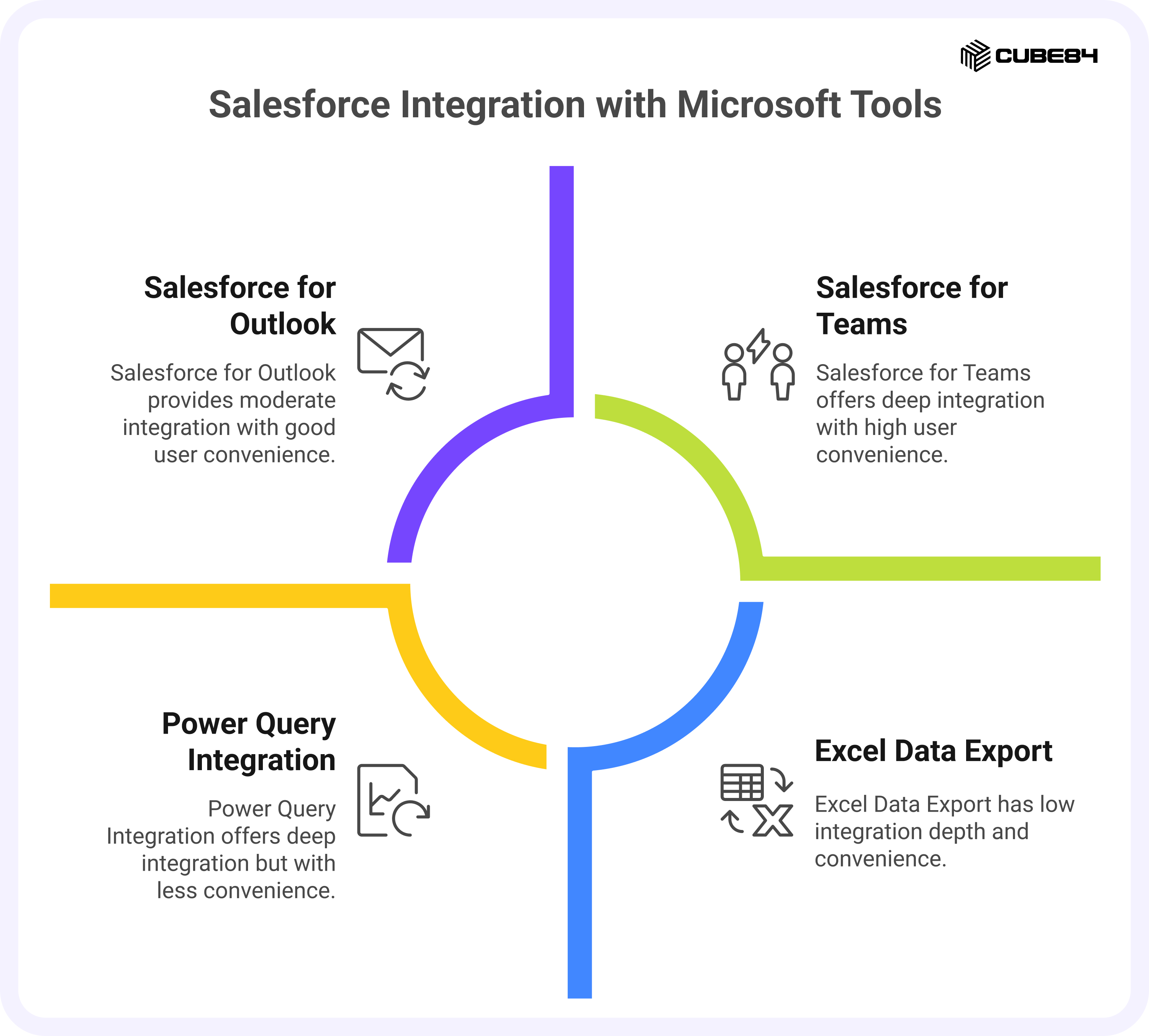
For many nonprofits and education institutions moving away from Microsoft Fundraising and Engagement (F&E), one of the biggest concerns is whether they will lose the convenience of Microsoft 365 tools. Outlook, Teams, and Excel remain central to how most teams communicate, plan, and report. The good news is that both Salesforce Nonprofit Cloud and Salesforce Education Cloud integrate deeply with all three, allowing organizations to maintain familiar workflows while upgrading their CRM capabilities.
Salesforce and Outlook integration
The Salesforce for Outlook and Einstein Activity Capture features connect Salesforce directly with Microsoft Outlook. Users can:
1. View Salesforce records such as donors, students, opportunities, or cases directly from their Outlook inbox.
2. Sync emails and calendar events automatically so that every interaction is tracked in both systems.
3. Create new leads or contacts in Salesforce without leaving Outlook.
4. Use Einstein Activity Capture to keep emails, events, and meetings synchronized live
This integration helps fundraisers,admissions officers and program managers avoid duplication because every supporter, student, or stakeholder interaction appears in both environments.
Salesforce and Microsoft Teams
Salesforce integrates natively with Microsoft Teams through the Salesforce for Teams app. This connection lets staff access donor data, student or program data directly inside Teams channels or chats.
Common use cases include:
1. Accessing and discussing donor, student, or opportunity records directly within a Teams meeting, without switching between applications.
2. Searching for Salesforce records inside Teams using the search bar to find relevant contacts, campaigns, or cases.
3. Adding notes or logging activities in Salesforce while collaborating in a Teams chat.
4. Sharing campaign, fundraising, or student progress updates with colleagues by posting Salesforce record links directly into Teams channels.
This setup keeps communication and context in one place and reduces time spent moving between systems. For distributed nonprofit teams and education teams, it strengthens collaboration and visibility across fundraising, admissions, and program management activities. Where permitted, Teams meeting summaries can also be posted back to Salesforce as notes, reducing double entry and keeping key discussions linked to the right records.
Salesforce and Excel
For organizations that rely on Excel for analysis and reporting, Salesforce provides several connection methods.
1. The Data Connector for Excel allows users to open Salesforce reports and objects directly in Excel for deeper analysis.
2. Using Power Query or the Microsoft Data Integration Gateway, users can refresh data automatically and maintain a live connection between Excel and Salesforce.
3. Reports can also be created in Salesforce and exported to Excel without losing formatting or breaking data integrity.
This flexibility lets finance and operations teams continue using their preferred analysis tools while ensuring that all underlying data remains accurate and governed.
Integration summary
Microsoft Tool | Integration Method | Key Capabilities | Ease of Integration (1–5) |
Outlook | Salesforce for Outlook, Einstein Activity Capture | Email and calendar sync, record visibility, contact creation | 5 |
Teams | Salesforce for Teams app | View and share records, log activities, collaborate on donor updates | 4 |
Excel | Salesforce Data Connector, Power Query | Direct data access, report exports, live data refresh | 4 |
Each of these integrations is designed to work securely within the Microsoft 365 environment. Permissions and access controls continue to be governed by both platforms, ensuring compliance with nonprofit and education data policies.
Salesforce’s compatibility with Microsoft tools ensures that organizations transitioning from F&E can maintain the collaboration and productivity they already depend on while gaining unified data visibility and automation within Salesforce Nonprofit Cloud and Salesforce Education Cloud
Cost and integration together form the foundation of a transition plan. The next step is understanding how to manage that transition effectively, from data migration to user adoption and long-term support.
Transition considerations for F&E customers
Once an organization decides to move away from Microsoft Fundraising and Engagement (F&E), the next challenge is execution. Migrating data, aligning systems, and preparing users all require careful planning. A successful transition involves more than moving records, it also protects continuity in fundraising, engagement, and reporting.
Data migration complexity and tools available
Migrating from Microsoft F&E involves several layers of complexity. Because F&E is built on Microsoft Dataverse, data structures differ from Salesforce’s object-based model. Donation records, contacts, and activities may be stored across multiple related tables in Dataverse, while Salesforce typically groups them under objects such as Account, Contact, Opportunity, and Campaign.
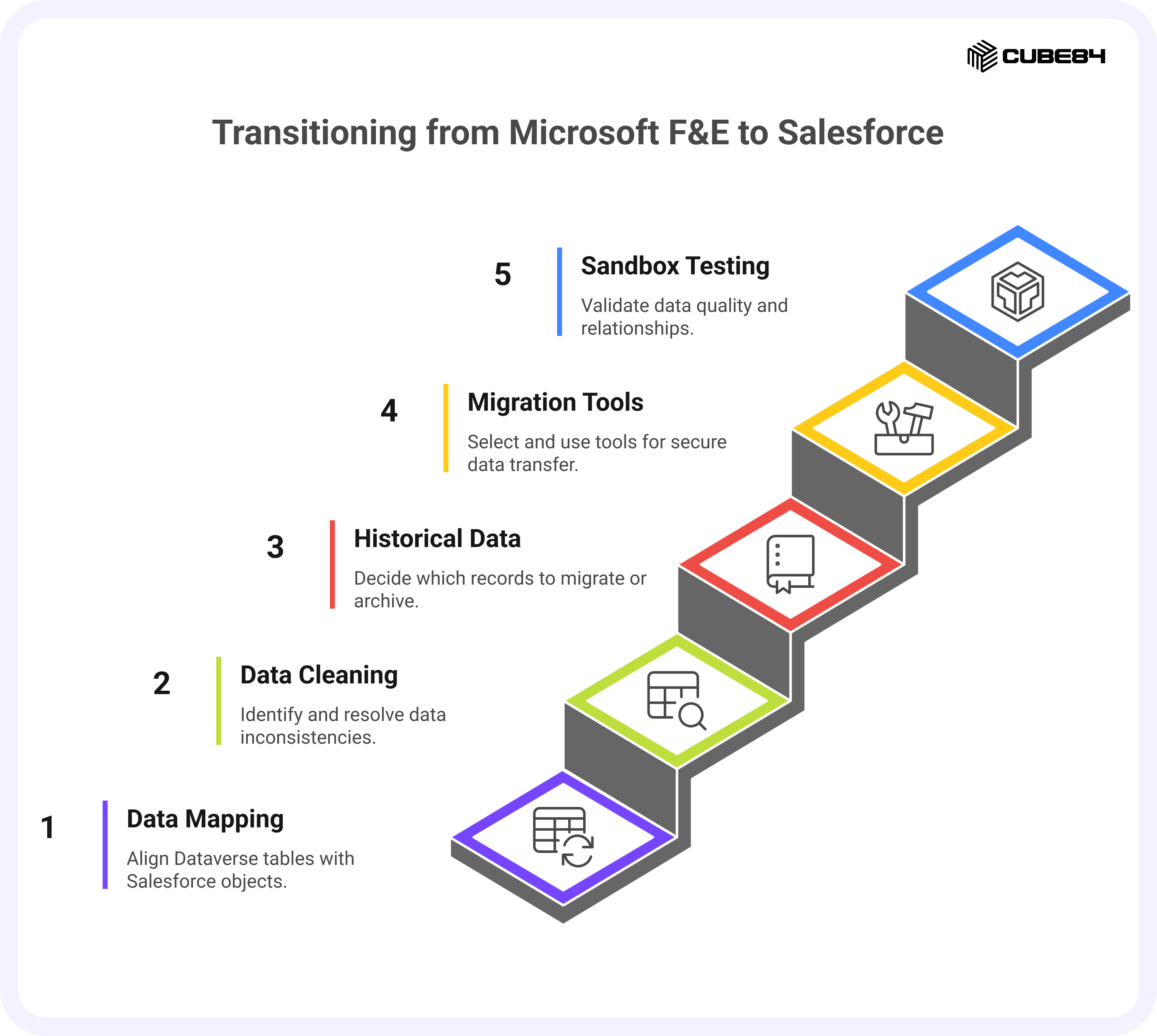
Key considerations during migration include:
1. Data mapping: Align each Dataverse table to the right Salesforce object. For example, donor profiles in F&E might map to Salesforce Contacts, while recurring gifts align with Opportunities. Pledges also align with Opportunities, with each pledge schedule mapped as related records to preserve payment timelines.
2. Data cleaning: Identify duplicates and ensure consistent naming conventions before migration.
3. Historical data: Decide which historical records to bring over and which to archive since large datasets can increase storage and migration costs.
4. Migration tools: Use specialized utilities such as Salesforce Data Loader, MuleSoft Composer, or partner-developed migration accelerators to automate large-scale data transfers securely.
Most nonprofits and education institutions also rely on sandbox testing before the final migration to validate data quality and ensure relationships between donors, students, gifts, and campaigns remain intact.
Differences in data model
While both Microsoft and Salesforce CRMs track similar data types, their structures reflect different design philosophies.
Microsoft Dataverse uses a relational data model similar to traditional databases. Relationships between entities, such as donor and transaction, are defined through foreign keys, and the schema can become complex as custom tables are added.
Salesforce uses a standardized object model with predefined relationships for nonprofits through Nonprofit Cloud. Contacts, households, donations, and program engagements all connect in a unified schema that is easier to report on and maintain.
For education institutions, Salesforce Education Cloud uses the Education Data Model (EDM), which provides a unified structure for managing students, courses, affiliations, and program enrollments. It brings together data from admissions, advising, advancement, and alumni relations into one connected view. This consistency allows schools and universities to track the full learner lifecycle and report across departments with greater accuracy and less manual effort.
For organizations coming from F&E, this can simplify their data landscape. Instead of managing custom relationships in Dataverse, Salesforce’s Nonprofit Data Model and Education Data Model provides a consistent foundation that supports fundraising, marketing, student engagement, and program delivery without the need for additional custom tables. Both models create a clearer structure for reporting and make it easier for teams to maintain and scale their systems over time.
Managing user adoption and change enablement
Technology transitions succeed or fail based on user adoption. Fundraisers, program officers, and administrators need to see the new system as an improvement.
Key steps for change enablement include:
1. Early involvement: Engage users early to gather feedback on pain points in the current F&E setup.
2. Hands-on training: Focus on day-to-day workflows such as entering donations, viewing campaign performance, and running reports.
3. Pilot programs: Start with a small group of power users to test the new system, gather feedback, and refine before a full rollout.
4. Leadership support: Reinforce adoption with executive sponsorship, clear communication, and visible use of Salesforce dashboards in leadership meetings
Training should not end after go-live. Regular refresher sessions and user support channels help maintain confidence and momentum as teams adapt to the new environment.
To help teams prepare for this phase, the article Top 5 Mistakes Nonprofits Make When Implementing Salesforce (and How to Avoid Them) outlines common pitfalls such as underestimating data quality issues or skipping post-launch governance, along with practical ways to avoid them. These insights are valuable for organizations transitioning from F&E, where legacy data and processes can complicate the move.
Role of partners and managed service providers
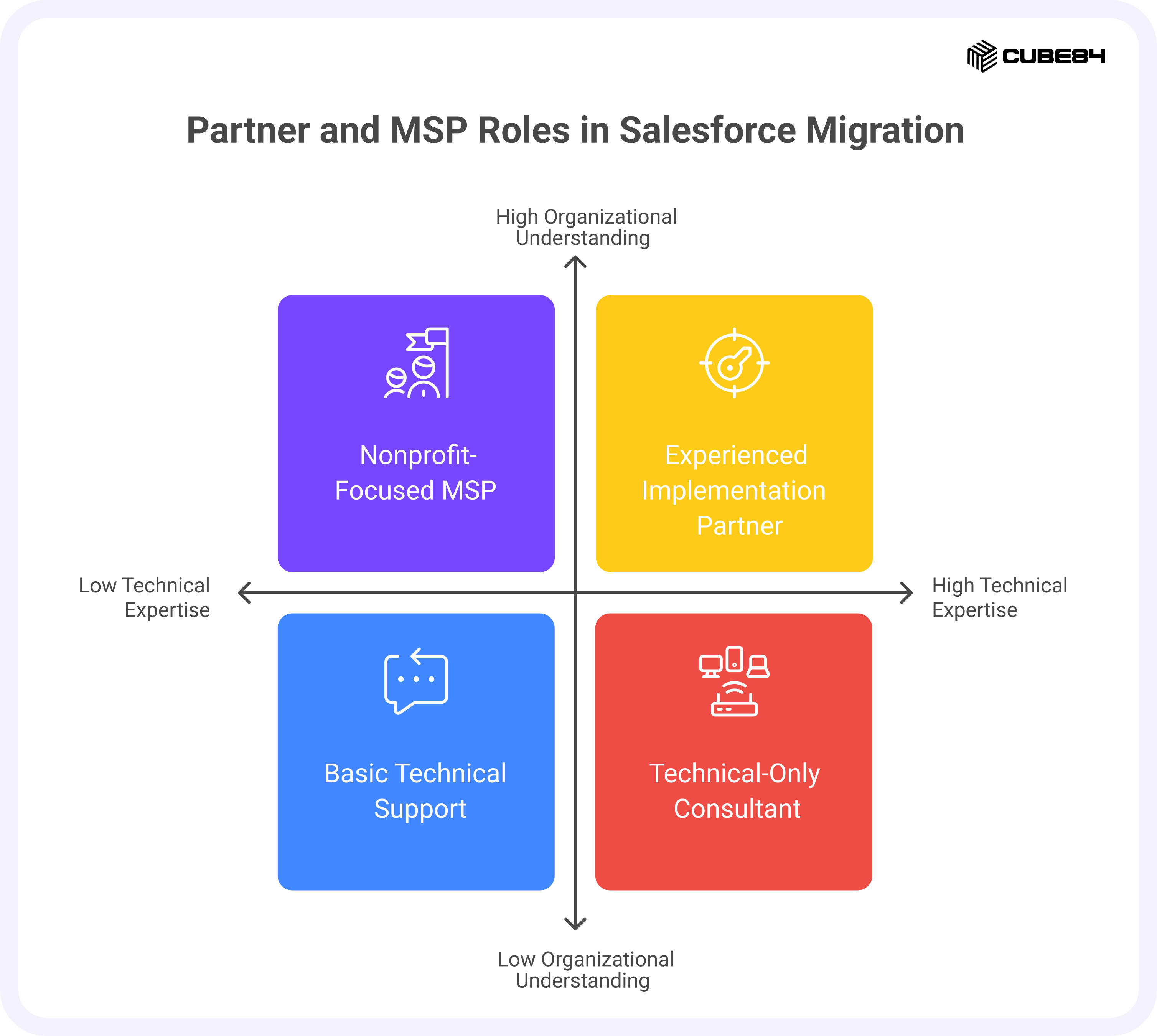
Most successful migrations from F&E to Salesforce involve experienced implementation partners. The right partner brings both technical expertise and an understanding of nonprofit/ education data, ensuring that the transition is smooth and compliant.
Partners and managed service providers can help with:
1. Data strategy: Structuring donor, student and program data for long-term reporting and analytics.
2. Migration execution: Managing extract-transform-load (ETL) processes and validation.
3. Customization: Configuring Salesforce Nonprofit Cloud or Education Cloud to reflect existing workflows and terminology.
4. Post-migration support: Handling user issues, automations, and release updates.
Choosing a partner with experience in both Microsoft and Salesforce ecosystems can reduce migration time and risk. Managed service providers can continue to support the organization after go-live, ensuring updates, security, and integrations are handled proactively.
Transitioning from Microsoft F&E gives organizations a chance to re-evaluate how their systems support their mission and impact. With careful planning, the right tools, and strong adoption support, organizations can emerge with a more unified, flexible, and future-ready CRM foundation.
Key advantages of Salesforce for former F&E users
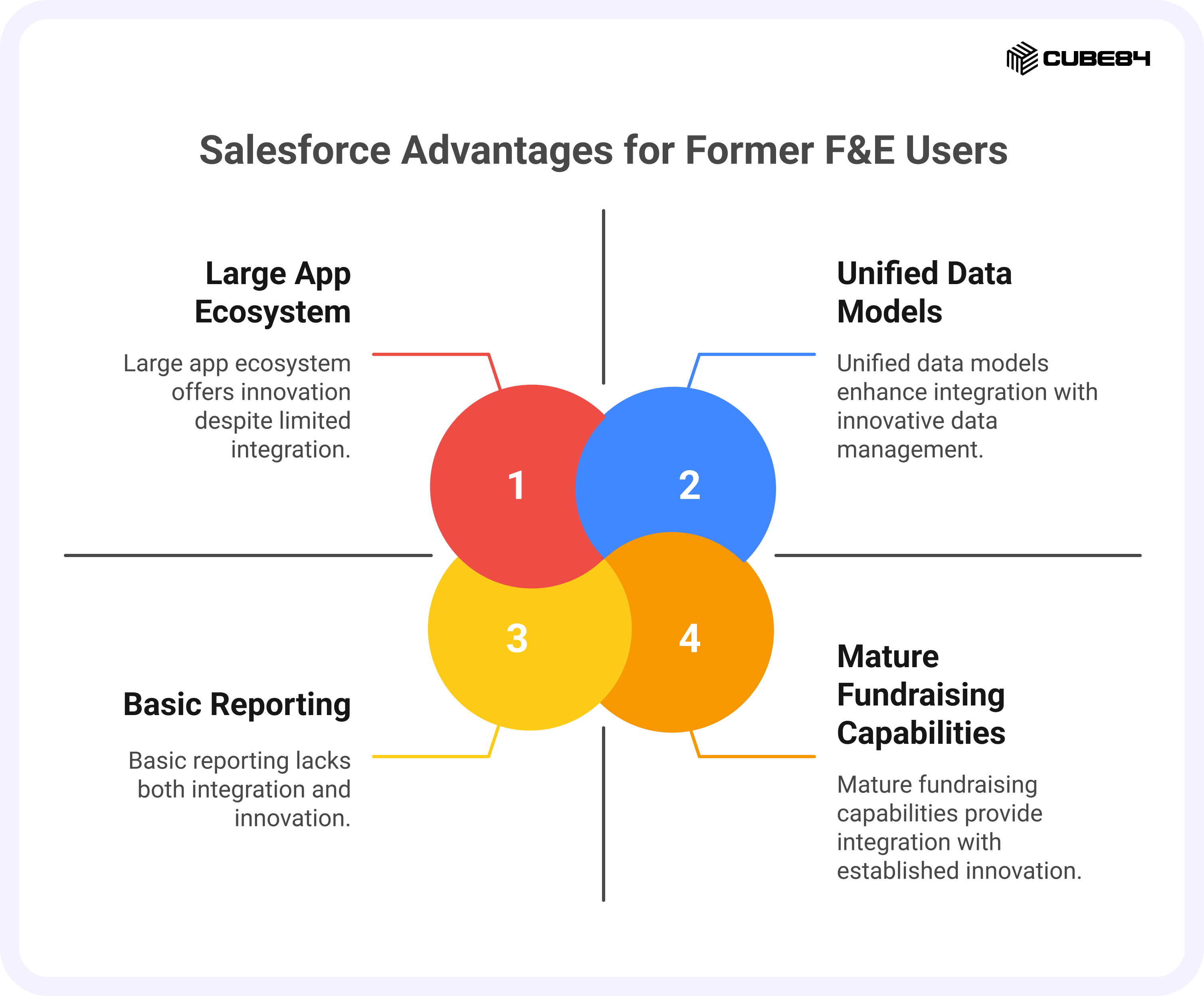
After comparing costs, integrations, and migration steps, many organizations find that Salesforce Nonprofit Cloud and Education Cloud are not only a reliable alternative to Microsoft F&E but also a strong foundation for managing relationships, programs, and impact at scale. The platforms’ purpose-built data models, comprehensive fundraising and student engagement capabilities (respectively), broad app ecosystem, and steady innovation cycle make them strategic choices for mission-driven and education-focused organizations.
Unified nonprofit and education data models
At the center of Salesforce Nonprofit Cloud and Education Cloud are purpose-built data models that provide a consistent foundation for managing relationships, engagement, and outcomes.
The Nonprofit Data Model (NDC) organizes donors, households, gifts, campaigns, volunteers, and program data in one place. The Education Data Model (EDM) offers a parallel structure for education institutions, connecting students, courses, affiliations, and alumni records within a single system.
For organizations moving from F&E, these models remove the fragmentation that often comes from custom-built databases or multiple Microsoft tables. Instead of reconciling information across different sources, teams can view the full history of a supporter, student, or constituent on a single screen.
The unified data structure also simplifies reporting. Fundraising, admissions, and finance teams can work from shared real-time dashboards without manually merging spreadsheets. This improves transparency, audit readiness, and the ability to measure both donor impact and learner outcomes accurately.
Mature fundraising and engagement capabilities
Salesforce Nonprofit Cloud and Education Cloud have been shaped by years of collaboration with mission-driven organizations and educational institutions of all sizes. Their fundraising, advancement, and engagement tools are designed to support daily operations while giving leaders clearer visibility into performance.
Key strengths include:
1. Lifecycle tracking: Every interaction, from event participation to recurring gifts or student milestones, is stored in one record.
2. Gift and contribution management: Built-in tools for batch entry, recurring donations, soft credits, and campaign attribution.
3. Engagement automation: Integration with Marketing Cloud for Nonprofits or Marketing Cloud for Education helps teams nurture supporters, prospects, or students through personalized journeys.
4. Outcome reporting: Donation, program, and academic data link directly to results, helping teams demonstrate measurable impact to funders, boards, and stakeholders.
This maturity reduces customization needs and helps organizations realize value sooner after implementation.
Large ecosystem of nonprofit and education apps
Salesforce’s open architecture gives nonprofits and education institutions access to a wide range of prebuilt solutions on the AppExchange for fundraising, admissions, payments, forms, events, and communications.
Popular examples include:
1. Give Lively for online giving and peer-to-peer fundraising.
2. Classy for donation and event management.
3. FormAssembly for secure form creation and data collection.
4. Blackthorn, Affinaquest, and TargetX for admissions, advancement, and alumni engagement in education contexts.
5. DonorSearch and Omatic Cloud for wealth screening and data enrichment.
This ecosystem allows teams to extend functionality without building from scratch. Most apps are designed specifically for mission-based or education use, are security-tested, and integrate smoothly with Salesforce Nonprofit Cloud and Education Cloud.
Ongoing innovation and community support
Salesforce’s platform evolves through three major releases each year, introducing new features in automation, data management, and analytics. Nonprofits and education institutions automatically gain access to these updates without new software installations or disruptive upgrades.
The Salesforce.org community is another major advantage. Thousands of administrators, partners, and professionals share best practices, templates, and open-source tools through the Power of Us Hub and Trailblazer Community. This collective knowledge helps teams of any size find answers quickly and adopt new functionality faster.
Salesforce is also expanding its focus on AI for good and AI for education through tools like Einstein AI, which delivers donor insights, campaign predictions, enrollment forecasting, and automated reporting. These enhancements help organizations spend less time on manual analysis and more time advancing their mission or improving student success.
Why it matters
For former F&E users, these strengths represent more than a set of features. Salesforce provides a single, flexible platform where fundraising, admissions, programs, and reporting work together. The result is a CRM that scales with the organization, stays current automatically, and continuously improves through community-driven innovation.
As nonprofits and education institutions plan their next steps, several practical questions often arise. The following section answers the most common ones leaders are asking right now.
Common questions Microsoft F&E customers are asking
As Microsoft Fundraising and Engagement (F&E) approaches retirement, many nonprofit and education leaders are asking the same practical questions. The answers below combine publicly available information with best practices gathered from recent nonprofit CRM transitions.
Why is Microsoft F&E being retired?
Microsoft has confirmed that F&E will reach end of support on December 31, 2026. The decision reflects a broader strategy shift toward the Power Platform and partner-built solutions within the Microsoft Cloud for Nonprofit ecosystem. Rather than continuing F&E as a first-party product, Microsoft is encouraging nonprofits to adopt applications developed by partners such as MissionCRM and Barhead, built on the same Dynamics 365 foundation.
Will Microsoft offer migration tools or direct alternatives?
Microsoft has not released an official first-party migration toolkit or a one-to-one replacement for F&E. However, data can be exported from Dataverse and migrated to other systems through standard integration tools like Azure Data Factory, MuleSoft Composer, or Salesforce Data Loader. Many implementation partners have also created their own migration accelerators that streamline this process.
How much will it cost to switch to Salesforce Nonprofit Cloud?
Costs vary depending on the size of the organization, data complexity, and user count. Through Salesforce’s Power of Us Program, eligible nonprofits receive ten free Enterprise Edition licenses and discounted pricing for additional users. Implementation and support costs depend on the level of customization required, data migration needs, and ongoing managed service arrangements.
For a deeper look at how costs compare between Microsoft and Salesforce ecosystems, refer back to the Cost Comparison section of this guide.
How much will it cost to switch to Salesforce Education Cloud?
Education Cloud pricing follows a similar model to Nonprofit Cloud through Salesforce’s Power of Us Program, which offers donated and discounted licenses for eligible institutions. However, total cost often depends more on integration depth than user count. Most education projects involve connecting Salesforce with existing systems such as Student Information Systems (SIS), Learning Management Systems (LMS), and advancement databases, which can influence implementation effort.
Institutions planning to use Education Cloud for both student lifecycle management and alumni engagement should also consider costs for data migration, staff training, and ongoing administrative support. For an overview of available pricing options, institutions can refer to Salesforce’s official Education Cloud pricing page.
Does Salesforce integrate with Microsoft 365 tools we already use?
Yes. Salesforce integrates natively with Outlook, Teams, and Excel, preserving the productivity and collaboration workflows most nonprofits and education institutions rely on. Outlook integration ensures emails and meetings are logged automatically. The Salesforce for Teams app brings CRM data into daily chats and meetings, while the Data Connector for Excel allows reporting and data refresh directly from spreadsheets.
How long does it take to migrate from F&E to Salesforce?
Timelines vary depending on data complexity, but most nonprofit migrations take 8 to 16 weeks from planning to go-live. The process typically includes:
1. Assessment and planning : reviewing the current F&E setup and defining scope.
2. Data mapping and cleaning : aligning Dataverse fields to Salesforce objects and removing duplicates.
3. Pilot migration and validation : testing data integrity in a sandbox environment.
4. Training and go-live : preparing users and ensuring smooth adoption.
A phased rollout often helps large organizations minimize disruption while moving key functions first, such as donor management or volunteer tracking.
What happens to my donor and financial data during the migration?
Data remains under your organization’s control throughout the process. F&E data can be extracted from Microsoft Dataverse in CSV or API format, then securely imported into Salesforce using approved migration tools. Partners typically create a read-only archive of legacy data to maintain historical access. Proper data governance policies ensure compliance with privacy and financial regulations.
Is Salesforce more expensive than Microsoft F&E?
Not necessarily. While Salesforce licensing costs can appear higher upfront, the Power of Us Program and streamlined implementation often balance the overall total cost of ownership. Microsoft solutions may have lower entry pricing but depend on paid partner apps and Power Platform usage that can increase costs over time. The most accurate view comes from modeling three to five years of costs across licensing, maintenance, and integrations.
Can I keep using Power BI with Salesforce data?
Yes. Power BI can connect directly to Salesforce through native connectors and APIs. This allows teams to continue using existing Power BI dashboards while sourcing data from Salesforce in real time. Organizations can also combine Salesforce data with other systems in Power BI for holistic reporting. Many nonprofits use both platforms together successfully.
What kind of support will my team need after go-live?
After the initial launch, most organizations engage a managed services provider for ongoing improvements, troubleshooting, and user support. This ensures regular updates, dashboard enhancements, and continued training. For smaller nonprofits, internal Salesforce admins can manage day-to-day requests, supported by community resources and the Salesforce.org network.
What if my organization is not ready to migrate yet?
If migration is not immediately feasible, continue maintaining your F&E environment securely. Review current data hygiene, export critical records regularly, and stay aware of Microsoft’s support timeline. Begin exploring your future CRM options now so you have time to evaluate partners, plan data mapping, and budget for implementation before 2026.
Conclusion
The retirement of Microsoft Fundraising and Engagement (F&E) is a big change for nonprofits and educational institutions that use Microsoft for donor and student engagement. Even though it may feel challenging, it’s also a chance to update systems, bring data together, and improve how teams work with supporters.
Salesforce gives organizations a strong option to move forward. It has a clear data model, powerful fundraising and student engagement tools, and smooth integrations with Microsoft 365 tools like Outlook, Teams, and Excel. With its large community, regular updates, and nonprofit-friendly pricing, Salesforce helps organizations stay stable and grow over time.
The smoothest transitions happen when teams treat this change as part of a bigger digital plan. By checking data quality, planning integrations, and training users early, organizations can switch to Salesforce with confidence and without major disruption.
Talk to CUBE84, a Salesforce Crest Consulting Partner, to learn how Salesforce Nonprofit Cloud or Education Cloud can help your organization build a strong, future-ready system for fundraising, engagement, and impact.