
Migrating data to Salesforce is one of the most consequential technical decisions a business can make. When executed correctly, it unlocks clean, reliable CRM data that drives revenue, productivity, and smarter decisions. When executed poorly, it can haunt your team for years — corrupted records, broken workflows, and lost customer trust.
Yet despite the stakes, the same mistakes appear repeatedly across industries. Whether you're moving from a legacy CRM, consolidating multiple systems, or migrating data as part of a Salesforce implementation, these seven pitfalls will cost you time, money, and credibility — unless you see them coming.
Here's what they are, how much they cost, and exactly how professional Salesforce data migration services help you avoid them.
Mistake #1: Skipping the Data Audit
THE MISTAKE
Many teams rush straight into migration without ever taking a hard look at what they're actually moving. Source data is assumed to be clean, complete, and usable. It rarely is. What you'll typically find upon proper inspection: outdated contacts, inconsistent formatting, fields that were repurposed over time, empty records, and data entered by people who no longer work at the company.
THE COST
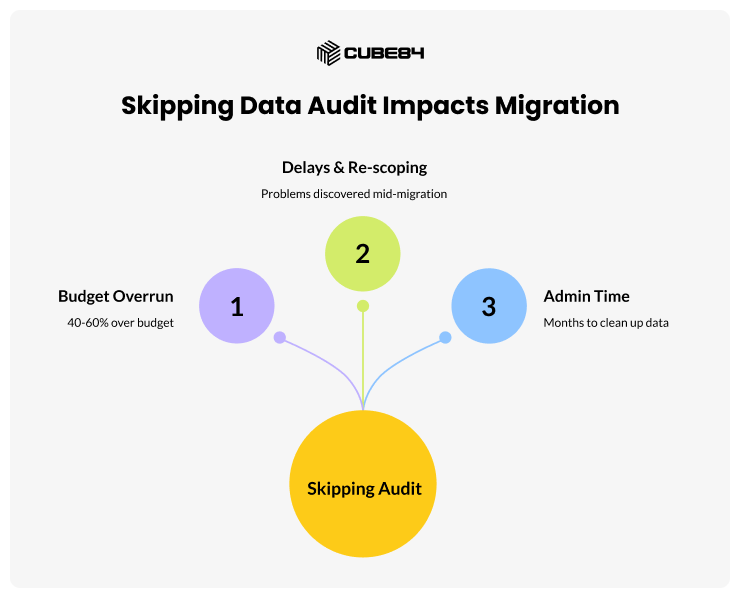
Skipping a data audit is one of the top reasons migrations run 40–60% over budget. Teams discover problems mid-migration, causing delays, re-scoping, and emergency fixes. In some cases, bad data migrated into Salesforce takes months to clean up after go-live — consuming hours of admin time and eroding user trust in the system.
HOW TO AVOID IT
Before writing a single migration script, conduct a full source data audit. Profile every key object — Accounts, Contacts, Leads, Opportunities — for completeness, format consistency, duplicates, and business relevance. Define which records are worth migrating, which should be archived, and which should simply be discarded. This single step can reduce migration scope by 20–30%, making everything downstream faster and cheaper.
Mistake #2: Ignoring Deduplication
THE MISTAKE
Duplicate records are the silent killer of CRM quality. Source systems accumulate duplicates naturally — a contact entered twice under slightly different names, a company listed as both 'Acme Corp' and 'Acme Corporation.' When you migrate without deduplication, you import all of it, and Salesforce inherits the mess.
THE COST
The business impact of duplicate data is well-documented: sales reps chase the same prospect twice, marketing sends duplicate emails (a compliance risk), and reports produce inflated or contradictory numbers. Cleaning duplicates post-migration is exponentially more expensive than preventing them upfront — especially once users have begun creating new records against the duplicates.
HOW TO AVOID IT
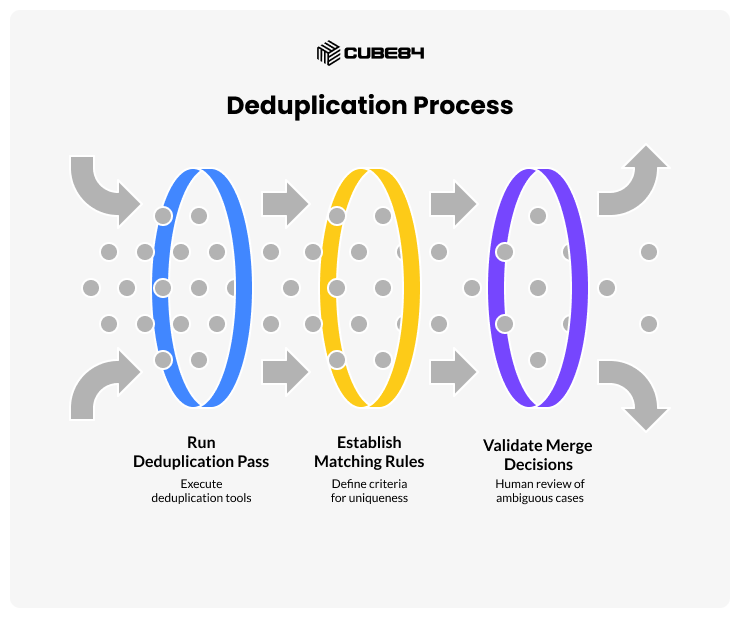
Run a formal deduplication pass before migration begins. Use Salesforce's own Duplicate Management, or third-party tools like DemandTools or RingLead. Establish matching rules (email, phone, company name) and have a human decision-maker validate merge decisions for ambiguous cases. Define what 'unique record' means for your business before touching the data.
Mistake #3: Incorrect Field Mapping
THE MISTAKE
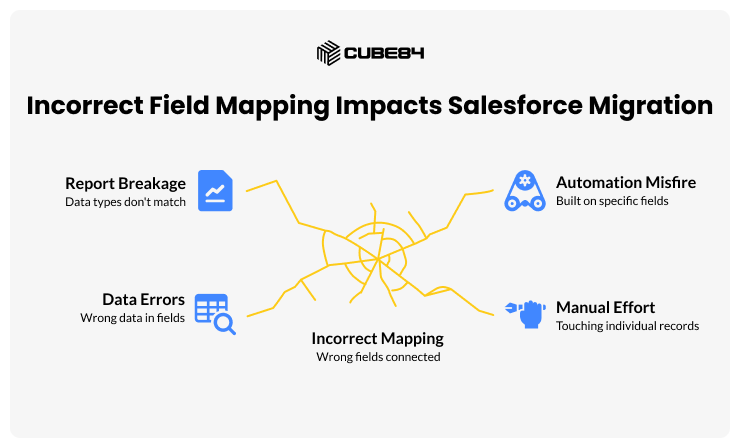
Field mapping connects data fields in your source system to the appropriate fields in Salesforce. It sounds mechanical, but it's where a surprising amount of migration projects go wrong. A phone number field gets mapped to a text field. The date format doesn't match. A picklist value in the source system has no equivalent in Salesforce. A custom field was created in the source system for a purpose that no longer exists.
THE COST
Poor field mapping leads to data landing in the wrong places — or not landing at all. Sales reps open Accounts and find phone numbers in address fields. Reports break because data types don't match. Automation built on specific fields misfires. Fixing field-level errors after migration means touching individual records, which at scale is an enormous manual effort.
HOW TO AVOID IT
Create a detailed field mapping document before any data is moved. For each source field, explicitly define the target Salesforce field, the data type, transformation rules, and what happens when the field is empty. Involve your Salesforce admin and business stakeholders in the review. Validate against a small test dataset before running the full migration.
Mistake #4: No Rollback Plan
THE MISTAKE
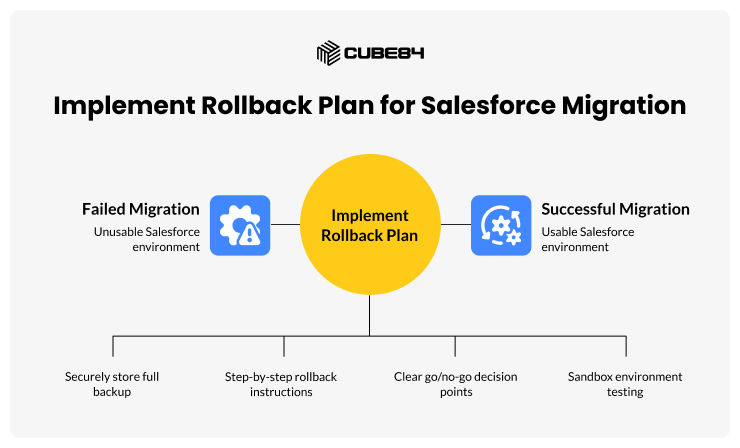
Most migration teams plan thoroughly for success and not at all for failure. A rollback plan — the documented, tested process for reverting Salesforce to its pre-migration state — is frequently skipped due to time pressure or overconfidence.
THE COST
Without a rollback plan, a failed migration can leave your Salesforce environment in a partially-migrated, unusable state. This is a business continuity crisis: sales operations halt, customer records are inaccessible, and recovery becomes a chaotic, expensive scramble. Data backups that weren't properly taken before migration may not exist, making full recovery impossible.
HOW TO AVOID IT
Treat the rollback plan as a first-class deliverable. Before migration day, export and securely store a full Salesforce backup. Document step-by-step rollback procedures. Define clear go/no-go criteria: if X records fail validation, stop and roll back. Test the rollback procedure in a sandbox environment before go-live.
Mistake #5: Underestimating Go-Live Time
THE MISTAKE
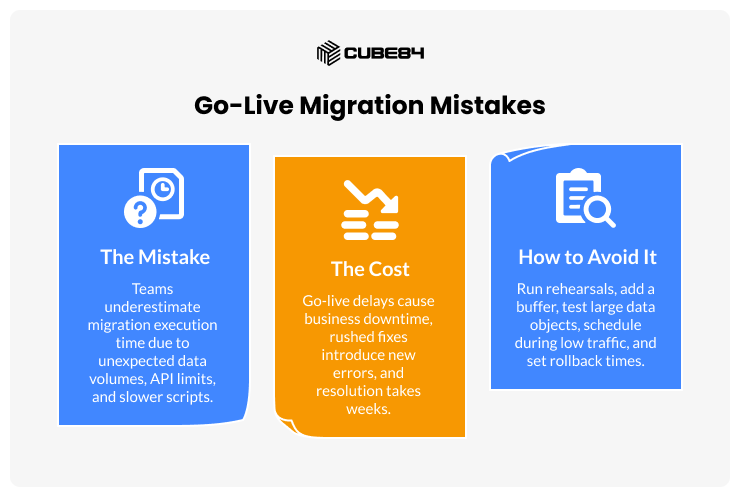
Teams routinely underestimate how long migration execution takes on go-live day. Data volumes are larger than expected, API rate limits are hit, transformation scripts run slower than in testing, and what was supposed to be a four-hour window turns into a twelve-hour ordeal — often over a weekend with a Monday deadline.
THE COST
Go-live delays directly translate into business downtime. If the migration runs into Monday morning business hours, users are trying to operate in a system that isn't ready. Rushed fixes under pressure introduce new errors that compound the problem and can take weeks to fully resolve.
HOW TO AVOID IT
Run at least two full end-to-end migration rehearsals in a sandbox, timing each phase precisely. Add a minimum 50% buffer to your estimated window. Identify your largest data objects and test them specifically for performance. Schedule migrations for the lowest-traffic window possible, and set a hard rollback decision time if migration isn't complete by a defined checkpoint.
Mistake #6: Ignoring Validation Rules and Automation
THE MISTAKE
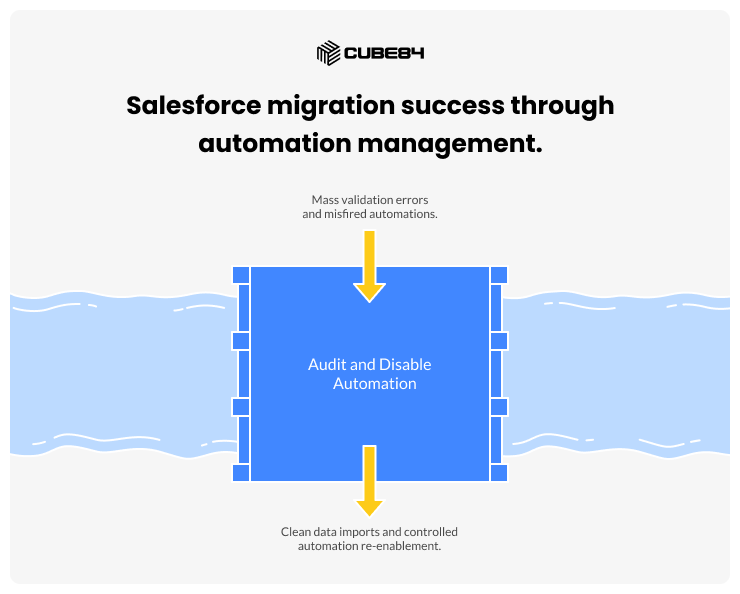
Salesforce is not a passive database — it's a living system with validation rules, workflow rules, Process Builder flows, triggers, and approval processes that fire when data is created or updated. Teams often forget that importing records activates all of this logic, causing mass validation failures and misfired automations.
THE COST
A migration that doesn't account for active automation can result in thousands of failed record imports, workflow emails sent to customers en masse, or approval processes triggered on historical records. Untangling these issues post-migration can take days and may require manual record-by-record correction.
HOW TO AVOID IT
Before migration, audit all active automation in your Salesforce org. Decide which rules should be temporarily disabled during migration and document the disable/re-enable procedure. Consider using a dedicated migration user profile with adjusted permissions. Re-enable automation in a controlled sequence after data is loaded and verified — never all at once.
Mistake #7: Not Training Users Post-Migration
THE MISTAKE
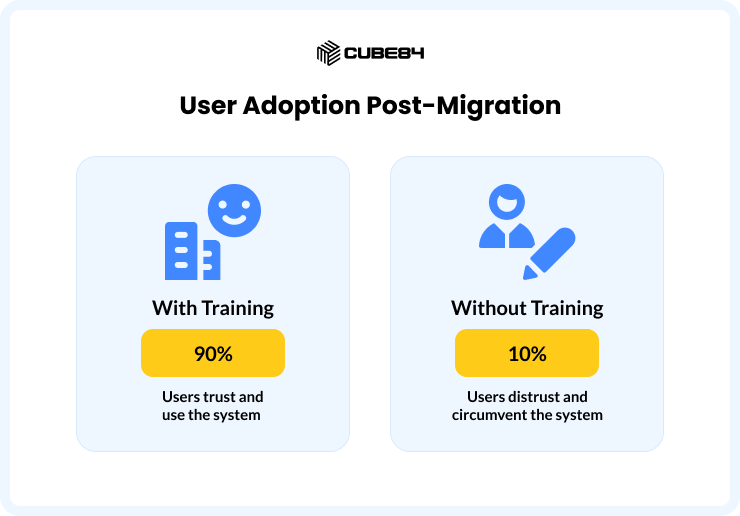
The data is migrated, the system is live, and the project is declared done. Then users log in, find records look different, fields have moved, and old shortcuts no longer work. Without structured post-migration training, even a technically successful migration becomes a failure in the eyes of the people who use the system every day.
THE COST
When users don't trust the data, they maintain parallel spreadsheets, stop logging activities, and circumvent the system. Salesforce becomes shelfware — an expensive tool nobody uses properly. This undermines the entire ROI of the migration and often leads to expensive re-implementation projects down the line.
HOW TO AVOID IT
Build user training into the migration project plan as a required phase. Prepare role-specific training materials. Run live walkthroughs before and immediately after go-live. Assign internal Salesforce champions who can answer day-to-day questions. Follow up with a 30-day check-in to surface frustrations early, while they're still easy to fix.
The Critical Role of Data Modelling in Salesforce Migration
Most migration conversations focus on moving records from A to B. But experienced Salesforce data migration services teams know that the most important work happens before any data moves at all — and that work is data modelling.
Data modelling is the process of defining how your business data is structured, related, and represented inside Salesforce. It determines which standard objects you'll use, which custom objects you'll create, how records relate to one another, and how the entire data architecture will support your business processes.
Skipping or shortcutting data modelling is arguably the most expensive mistake of all — because unlike the seven mistakes above, poor data modelling problems don't fully surface until the system has been live for months, by which point changing the architecture is deeply disruptive and costly.
Why Data Modelling Matters for Migration
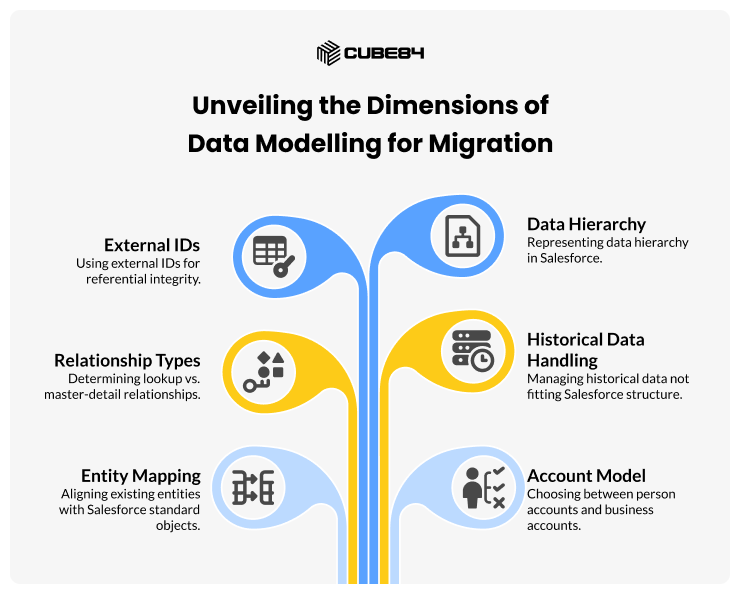
Your source system — whether it's a legacy CRM, spreadsheets, or a custom database — almost certainly has a different data structure to Salesforce's object model. That gap cannot simply be bridged by mapping fields. You need to make deliberate architectural decisions about:
How your existing entities map to Salesforce's standard objects (Account, Contact, Lead, Opportunity, Case)
Whether to use person accounts or business accounts, and which model fits your sales motion
Which relationships are lookup vs. master-detail, and what that means for rollup summaries, cascade deletes, and sharing rules
How to handle historical data that doesn't fit Salesforce's native structure
Whether external IDs are needed to maintain referential integrity during and after migration
How your data hierarchy (e.g., parent/child accounts, territories) will be represented
Getting these decisions wrong during migration means inheriting architectural debt from day one. It's far better to design the right model before migrating than to migrate and then re-architect.
Core Data Modelling Principles for Salesforce
1. Leverage Standard Objects Before Creating Custom Ones
Salesforce's standard objects — Account, Contact, Opportunity, Lead, Case, Campaign — carry significant built-in functionality: reports, dashboards, automation templates, AppExchange compatibility, and future product features. Always attempt to map your source data to standard objects first. Custom objects should only be introduced when the use case is genuinely not served by standard objects or their extensions.
2. Master-Detail vs. Lookup Relationships
This is one of the most consequential data modelling decisions in Salesforce. Master-detail relationships create tight coupling: child records are deleted when the parent is deleted, and rollup summary fields become available. Lookup relationships are looser — the child can exist independently. The wrong choice here affects data integrity, rollup reporting capability, sharing rules, and the behaviour of automations. Define these deliberately, not by default.
3. External IDs and Upsert Strategy
Every migrated record should carry an External ID — a field that stores the unique identifier from your source system. This serves two critical purposes during migration: it enables upsert operations (insert-or-update rather than blind insert), and it allows you to re-run migration in stages without creating duplicates. Post-migration, external IDs become the bridge for any ongoing integration with source systems.
4. Data Hierarchy and Account Structure
Large organisations often have complex account hierarchies — parent companies, subsidiaries, regions, and franchises. Salesforce supports account hierarchies natively through the Parent Account field, but your migration must establish this hierarchy correctly from the start. Migrating accounts without their parent relationships, then trying to reconstruct the hierarchy post-migration, is a significant remediation effort.
5. Record Ownership and Territory Model
Every Salesforce record has an owner, and ownership drives visibility, assignment rules, forecasting, and reports. During migration, you must define a clear ownership assignment strategy — which user, queue, or default owner receives migrated records — and ensure your territory model (if applicable) is configured before data loads. Migrating records without a coherent ownership model produces a chaotic, unsegmented dataset.
Industry-Specific Data Architecture Considerations
Salesforce is used across virtually every industry, and each brings its own data model requirements, compliance constraints, and object architecture nuances. A one-size-fits-all migration approach fails to account for these differences. Below is what experienced Salesforce data migration services teams consider when working in specific industries.
Industry | Key Salesforce Cloud | Primary Data Architecture Considerations |
Financial Services | Financial Services Cloud | Household model, regulatory data retention, KYC/AML fields |
Healthcare & Life Sciences | Health Cloud | Patient/person account model, HIPAA compliance, clinical data |
Manufacturing | Manufacturing Cloud | Account-based forecasting, run-rate vs. net-new, partner portals |
Retail / B2C Commerce | Commerce Cloud + CRM | Person accounts, order management, loyalty data linkage |
Real Estate | Sales Cloud + custom | Property objects, multi-party relationships, timeline data |
Professional Services | Service Cloud + PSA | Project hierarchies, resource records, milestone tracking |
Nonprofit | Nonprofit Success Pack (NPSP)/ Nonprofit Cloud (NPC) and Data Cloud | Household model, unified constituent profiles, DMO mapping, identity resolution |
Nonprofit: NPSP, Nonprofit Cloud, and Salesforce Data Cloud
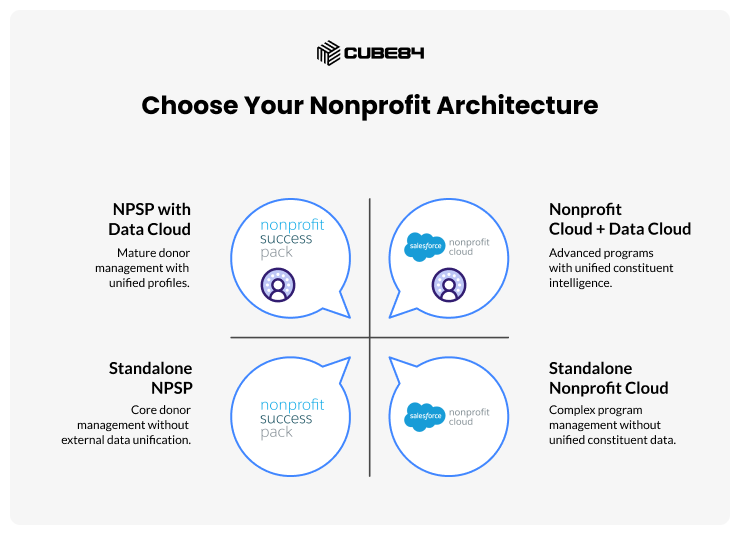
The Salesforce nonprofit ecosystem has evolved significantly, and understanding which architecture you're migrating into — NPSP, Nonprofit Cloud, or a Data Cloud-augmented environment — is one of the most consequential decisions a nonprofit migration team faces in 2024 and beyond.
The NPSP Foundation
The Salesforce Nonprofit Success Pack (NPSP) completely restructures the standard object model. In NPSP, every individual is a Contact that belongs to a Household Account (an auto-created Account record). Donations become Opportunity records associated with both the Contact and the Household. Recurring donations are managed through a dedicated Recurring Donation object.
Nonprofits migrating from legacy donor management systems (Raiser's Edge, Bloomerang, DonorPerfect) face the challenge of reconstructing household relationships that may be implicit in the source system. Source records might store spouses as separate donor records without an explicit household link; NPSP requires that household relationship be made explicit.
Grant management adds further complexity: grants involve a grantor (an Organisation Account), a Contact at the grantor, a grant opportunity, grant payments (scheduled and actual), and outcome/report records. This multi-object structure rarely has a direct equivalent in legacy systems and must be carefully designed before migration.
NPSP-specific tip: Use NPSP's built-in Data Import Tool rather than standard Data Loader for initial migration. It is designed to handle NPSP's household creation logic natively, reducing custom scripting and post-migration cleanup significantly.
Nonprofit Cloud: The Next-Generation Data Model
Salesforce's newer Nonprofit Cloud (NPC) — distinct from NPSP — introduces a significantly redesigned data model built on Industry Cloud foundations. Rather than the Opportunity-as-Donation pattern in NPSP, Nonprofit Cloud introduces dedicated objects: the Fundraising objects layer (Gift Transaction, Gift Commitment, Gift Commitment Schedule), the Program and Benefit Management layer, and the Outcome Management framework.
For organisations migrating into Nonprofit Cloud rather than NPSP, the object mapping is entirely different. A recurring monthly donation in a legacy system becomes a Gift Commitment with associated Gift Commitment Schedules in NPC — not a Recurring Donation object as in NPSP. Programme deliverables become Benefit objects linked to Service Delivery records. This is a full re-architecture, not just a field remap.
If your organisation is choosing between NPSP and Nonprofit Cloud as a migration target, this decision must be made before data modelling begins — the two architectures are not compatible migration paths, and switching between them post-migration requires starting over.
Architecture decision point: NPSP is a proven, stable platform with a large partner ecosystem. Nonprofit Cloud is the strategic direction from Salesforce but is still maturing. For most organisations migrating today, the right choice depends on programme complexity, budget, and timeline — not simply which is newer.
Salesforce Data Cloud for Nonprofits: Unified Constituent Profiles
Salesforce Data Cloud (formerly known as Customer Data Platform, or CDP) represents a paradigm shift in how nonprofits can manage constituent data — and it introduces its own distinct data architecture layer that migration teams must understand.
Data Cloud does not replace NPSP or Nonprofit Cloud. Instead, it sits alongside them as a real-time data unification engine. Its role is to ingest data from multiple sources — your CRM, your email platform, your event management system, your volunteer portal, your fundraising platform — and resolve all of that data into a single Unified Individual profile for each constituent.
The core data model in Salesforce Data Cloud for Nonprofits is built around three layers:
Data Streams — the ingestion layer, where data from each source system is connected and normalised into Data Cloud's canonical schema
Identity Resolution — the matching and merging layer, where Data Cloud uses rules (email, name, address, phone) to resolve multiple source records into a single Unified Individual
Calculated Insights and Segments — the activation layer, where unified constituent profiles are enriched with calculated metrics (lifetime giving, programme engagement score, lapsed donor flag) and segmented for personalised outreach
For nonprofits undergoing a Salesforce migration, Data Cloud introduces an important architectural question: are you migrating data only into CRM objects, or are you also establishing Data Cloud data streams from external systems simultaneously? These are two different scopes of work with different technical requirements.
Data Cloud Migration Architecture: What to Model Upfront
If your nonprofit is implementing Data Cloud alongside a CRM migration, the following must be designed before either project begins:
Source system inventory: Every system that will feed Data Cloud (email platform, fundraising database, event system, volunteer tool) must be identified, and its schema documented
Identity resolution ruleset: Define the matching logic that will be used to unify constituent records across systems — which fields constitute a match, how conflicts are resolved, and how match confidence thresholds are set
Canonical field mapping: Data Cloud requires incoming data to be mapped to its Data Model Objects (DMOs). For nonprofits, the key DMOs are Individual, Contact Point Email, Contact Point Phone, Loyalty Programme Member, and custom DMOs for donation and programme data
Calculated Insights design: Determine upfront which constituent metrics you need to compute at the Data Cloud layer (e.g., cumulative giving by fiscal year, consecutive years of giving, lapsed donor flag, programme participation score) — these inform the data you must carry through migration
Activation targets: Identify which downstream systems (Marketing Cloud, email platforms, ad platforms) will receive segmented audiences from Data Cloud, as this affects how segments and activation targets are configured
One of the most common mistakes nonprofits make when adding Data Cloud to a migration project is treating it as a post-go-live addition. In practice, Data Cloud's identity resolution quality depends heavily on the cleanliness and consistency of the data it ingests. Running a data migration that cleans and standardises constituent records, then feeding those clean records into Data Cloud from day one, produces far better unified profiles than connecting Data Cloud to messy historical data after the fact.
Design principle: Clean CRM data and high-quality Data Cloud identity resolution are mutually reinforcing. Invest in constituent deduplication and standardisation during the migration — it pays dividends twice: cleaner Salesforce records and more accurate unified profiles in Data Cloud.
NPSP vs. Nonprofit Cloud vs. Data Cloud: Architecture Summary
To clarify the relationship between these three platforms for migration planning purposes:
NPSP: A managed package on Sales Cloud. Best for donor management, grants, and programme tracking. Mature, widely supported, large partner ecosystem.
Nonprofit Cloud (NPC): A native Industry Cloud product. Best for organisations with complex programme delivery, outcome measurement, and case management needs. Newer, strategically preferred by Salesforce.
Salesforce Data Cloud: A separate data platform that unifies constituent data from CRM and external sources into a single profile. Complements both NPSP and NPC — it is not a replacement for either.
The most sophisticated nonprofit migrations today combine Nonprofit Cloud as the CRM backbone with Data Cloud as the constituent intelligence layer — connected through a thoughtfully designed data model that was defined before a single record was moved.
Financial Services: The Household and Relationship Model
Salesforce Financial Services Cloud (FSC) uses a fundamentally different data architecture to standard Sales Cloud. The core model centres on the Financial Account object, the Household Account, and relationship groups that link individuals to their financial accounts and advisors.
When migrating data into FSC, teams must map legacy customer records to either Individual Person Accounts or Business Accounts, then establish the household groupings that link family members to shared financial relationships. This is rarely a direct lift-and-shift — source systems often store household relationships implicitly through shared addresses or account numbers, which must be explicitly reconstructed as Salesforce relationships during migration.
Compliance is also a central concern. Financial services data often carries regulatory retention requirements: certain records must be preserved for 7–10 years under regulations such as MiFID II, Dodd-Frank, or local equivalents. Your data model must include retention metadata, and your migration must not purge records that appear 'inactive' but are legally required.
Key architecture decision: In FSC, never default to the standard Account/Contact model without evaluating the Household Account model. Migrating to the wrong model and attempting to switch later is a near-complete re-implementation.
Healthcare & Life Sciences: Patient Data and HIPAA Architecture
Health Cloud introduces the Patient object and clinical timeline, replacing the standard Lead and Opportunity lifecycle with a care journey model. Contact records become Patients. Cases become Care Plans. The standard sales pipeline is replaced by care programme enrolment and episode management.
From a data modelling perspective, healthcare migrations must resolve the patient identity problem: a single patient may exist in multiple source systems under different identifiers (hospital MRN, insurance ID, referring physician record). The migration must establish a master patient identifier strategy and link all source references to a single Salesforce person account before any clinical data is loaded.
HIPAA compliance requires that Protected Health Information (PHI) fields are identified, that field-level security is configured before data is loaded (not after), and that audit trails are enabled. Migrating PHI into a Salesforce org that isn't yet HIPAA-compliant is a serious regulatory risk.
Architecture rule: Enable Salesforce Shield or field-level encryption for all PHI fields before the first record is loaded. Retrofitting encryption after migration requires re-loading data and is significantly more complex.
Manufacturing: Account-Based Forecasting and Partner Data
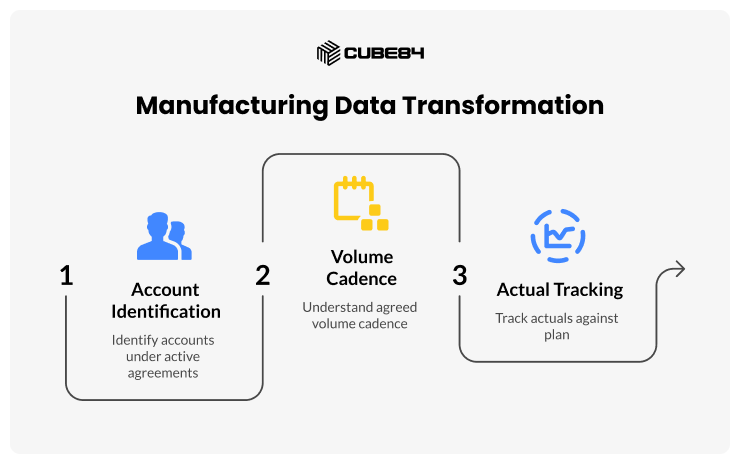
Manufacturing companies migrating to Salesforce Manufacturing Cloud must account for the Run Rate Agreement (RRA) object — a core construct unique to the manufacturing data model. RRAs capture the ongoing, scheduled volume commitments between a manufacturer and their distribution or retail partners, distinct from one-off Opportunity records.
Many legacy manufacturing CRMs (or ERP-adjacent systems) store this data as flat order history, not as forward-looking volume agreements. The migration must transform historical order data into the RRA model — which requires understanding which accounts are under active agreements, what the agreed volume cadence is, and how actuals are tracked against plan.
Partner and channel data adds another layer of complexity. If your manufacturing business sells through distributors, your source data may have a flat account list without the hierarchy that Salesforce's partner portal model expects. Partner Community licences, portal users, and the partner account hierarchy must all be modelled before the migration begins.
Data modelling challenge: Transforming flat order history into forward-looking Run Rate Agreements requires business logic that data engineers must define collaboratively with sales operations — this is not a technical decision alone.
Professional Services: Project Hierarchies and Resource Data
Professional services firms — consulting, legal, accounting, engineering — typically require Salesforce to model projects, engagements, resources, milestones, and time entries. While Salesforce doesn't have a native Professional Services Automation (PSA) cloud, several major ISV solutions (Certinia, formerly FinancialForce; Kantata; Salesforce's own PSA) build on the Salesforce platform with their own extended data models.
Migrating into a PSA-extended Salesforce environment means migrating not just into standard Salesforce objects but into the custom object hierarchy of the PSA product. Project records, resource assignments, budget lines, and time entries all have specific parent-child relationships and dependency sequences that must be respected during migration — records loaded in the wrong order create orphaned children or broken rollup calculations.
Critical sequencing rule: In PSA migrations, always load parent objects before child objects. Projects before Milestones. Milestones before Time Entries. Resource Requests before Assignments. Load order errors are the leading cause of data integrity failures in PSA migrations.
The Bottom Line
A successful Salesforce data migration doesn't happen by accident. It happens because a team anticipated the problems, planned for failure, validated obsessively, and — critically — designed the right data model before a single record was moved.
The seven migration mistakes are avoidable with discipline and process. But the data modelling and industry-specific architecture decisions are where migration projects either lay a strong foundation or build on sand. A technically clean data transfer into the wrong data model is not a successful migration — it's a deferred re-implementation.
That's precisely what experienced Salesforce data migration services provide: not just the technical execution of moving records, but the architectural judgment to design the right model for your industry, your data, and your business processes — before go-live, when it's still easy to get right.