


The CASE Insights on Alumni Engagement survey opens September 15, 2026 and closes January 15, 2027. Most advancement teams do not find out their Salesforce org cannot answer the question until someone sits down to fill out the survey, often days before that January deadline.
The question sounds simple: how many alumni did we engage this fiscal year, and in what way? The Council for Advancement and Support of Education (CASE) answers it with a specific framework: four engagement modes, each counted once per person, rolled into one unduplicated number. Salesforce does not report that framework by default.
Building that framework inside Salesforce takes three things: an object model that separates activity by mode, scoring logic that turns that activity into an unduplicated count, and a report that hands CASE the five numbers it asks for. A readiness check at the end verifies all three are in place before the window opens.
The four CASE engagement modes, defined
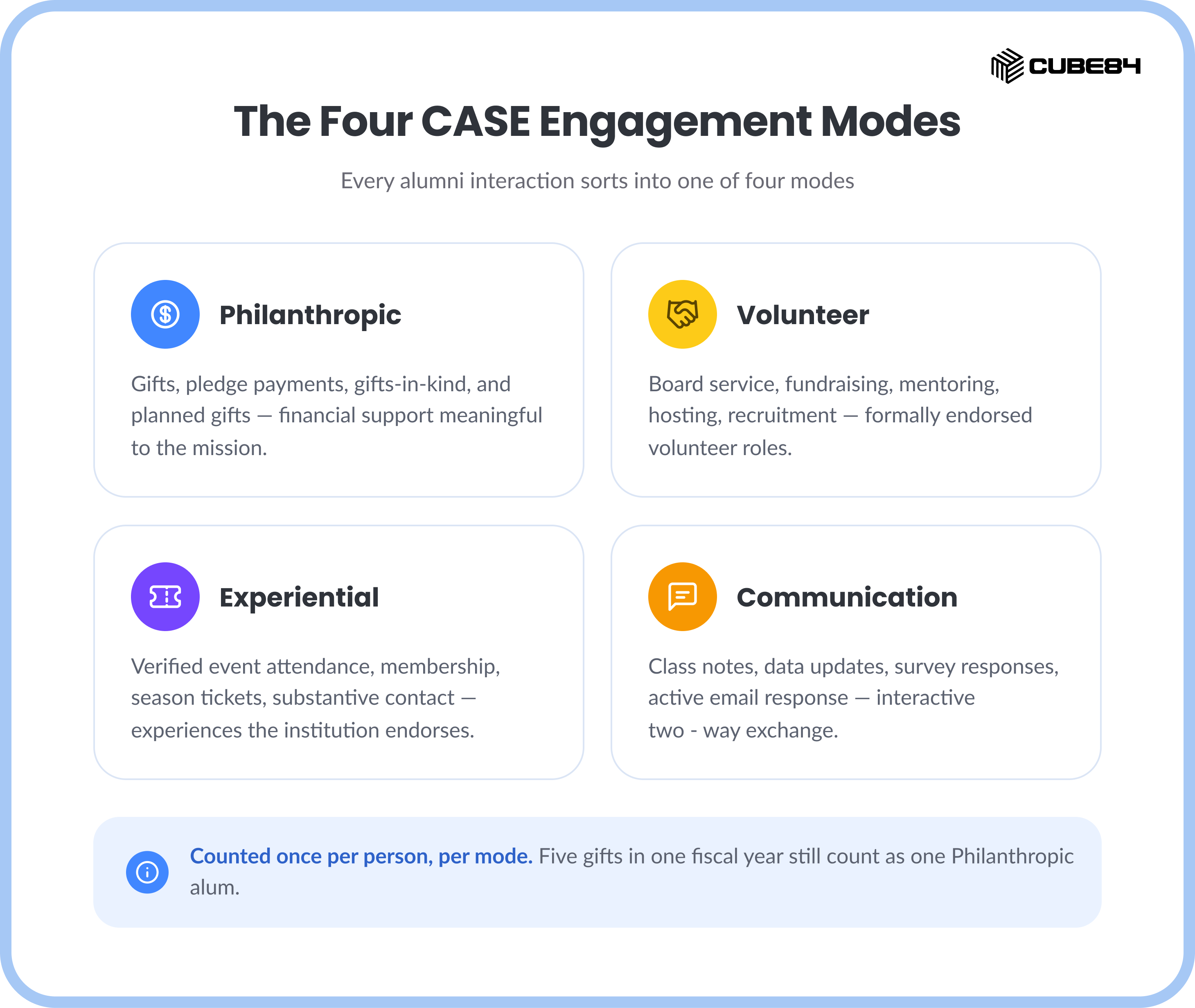
CASE's Alumni Engagement Metrics (AEM) framework sorts every alumni interaction into one of four modes. An alum is either engaged in a mode for the fiscal year or not: an alum who gives five times in the fiscal year still counts once in the Philanthropic mode, not five times. The count tracks people, not how many times they engaged.
Two counting rules carry the whole framework. Within a mode, an alum counts once, no matter how many gifts, events, or messages they generated. Across modes, the same person can count in more than one, and CASE's "any mode" column, the headline reach number, is the unduplicated count of alumni who showed up in at least one.
The deadline is not the hard part. The object model is.
Every advancement team already has the raw activity: gifts in the database, volunteer signups in a spreadsheet, event check-ins in an app, email clicks in a marketing platform. The deadline does not create new work. It exposes that the data was never organized around CASE's four modes in the first place.
That is a modeling problem, not a reporting problem. A report can only unduplicate what the object model already separates cleanly by mode and by person. If gift records and event records both write to the same generic "Activity" object with no mode tag, no report can split them apart in October.
For advancement leaders, the any-mode number is not paperwork. CASE uses it for peer benchmarking, and boards increasingly ask for it alongside the annual giving total, since it tells a fuller story than dollars alone. For the operations team building it, the number is only as reliable as the object model behind it. A count rushed together in October does not hold up when a board asks how it was calculated.
The object model: four modes, two Salesforce paths
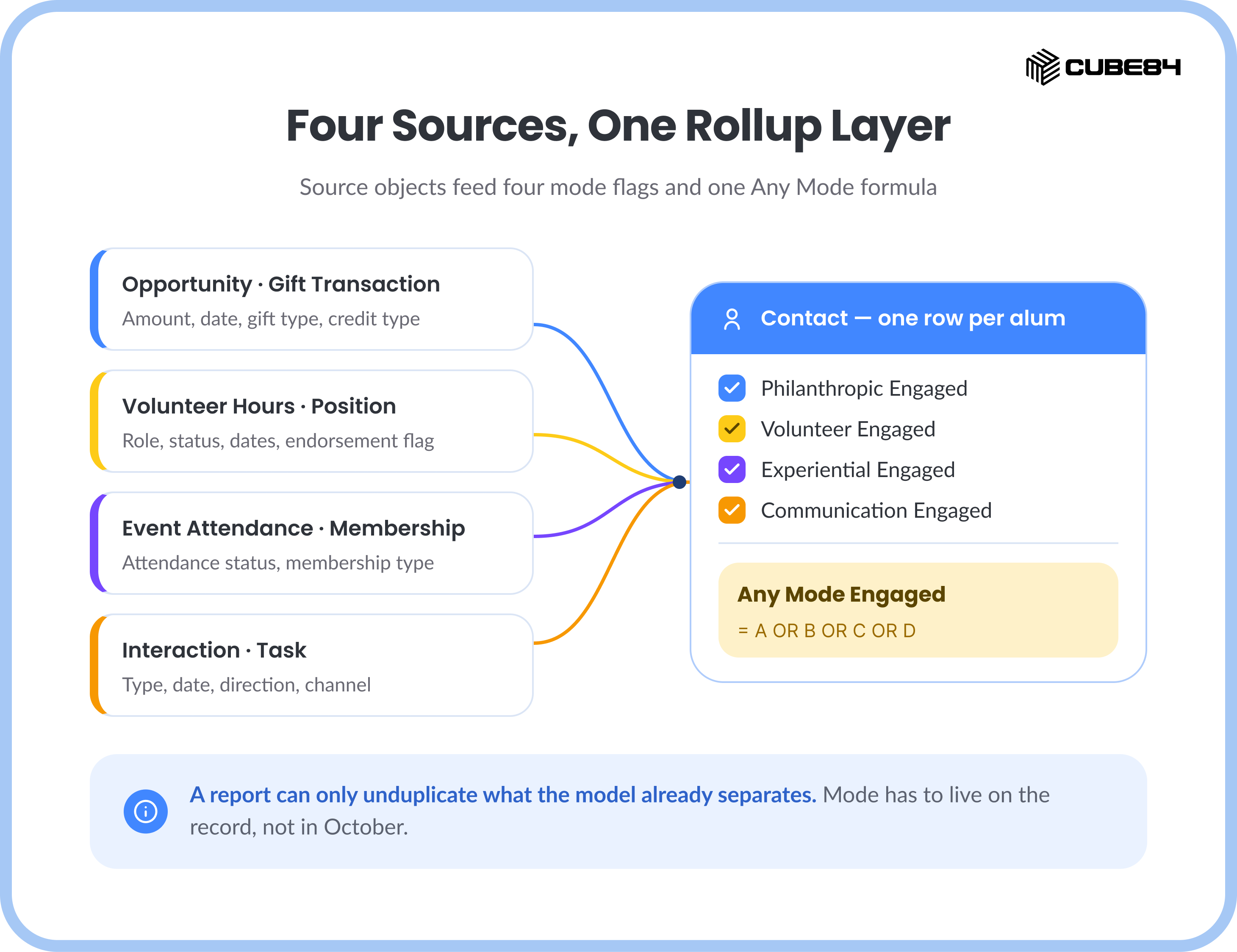
Each mode maps to a distinct part of the Salesforce data model, and the specific objects depend on which Salesforce foundation the org runs. NPSP and Education Cloud share one pattern. Nonprofit Cloud, the newer Salesforce offering now folded into Agentforce Nonprofit, uses a different set of objects for two of the four modes and the same pattern for the other two.
Above these sources sits one rollup layer: four fields per person, one per mode, each a checkbox or formula that answers a single question for the fiscal year: did this person qualify in this mode, yes or no. A fifth formula field, Any Mode Engaged, is simply those four fields joined with OR. That fifth field is the one CASE's survey asks for.
The scoring logic: unduplicated flags, not points
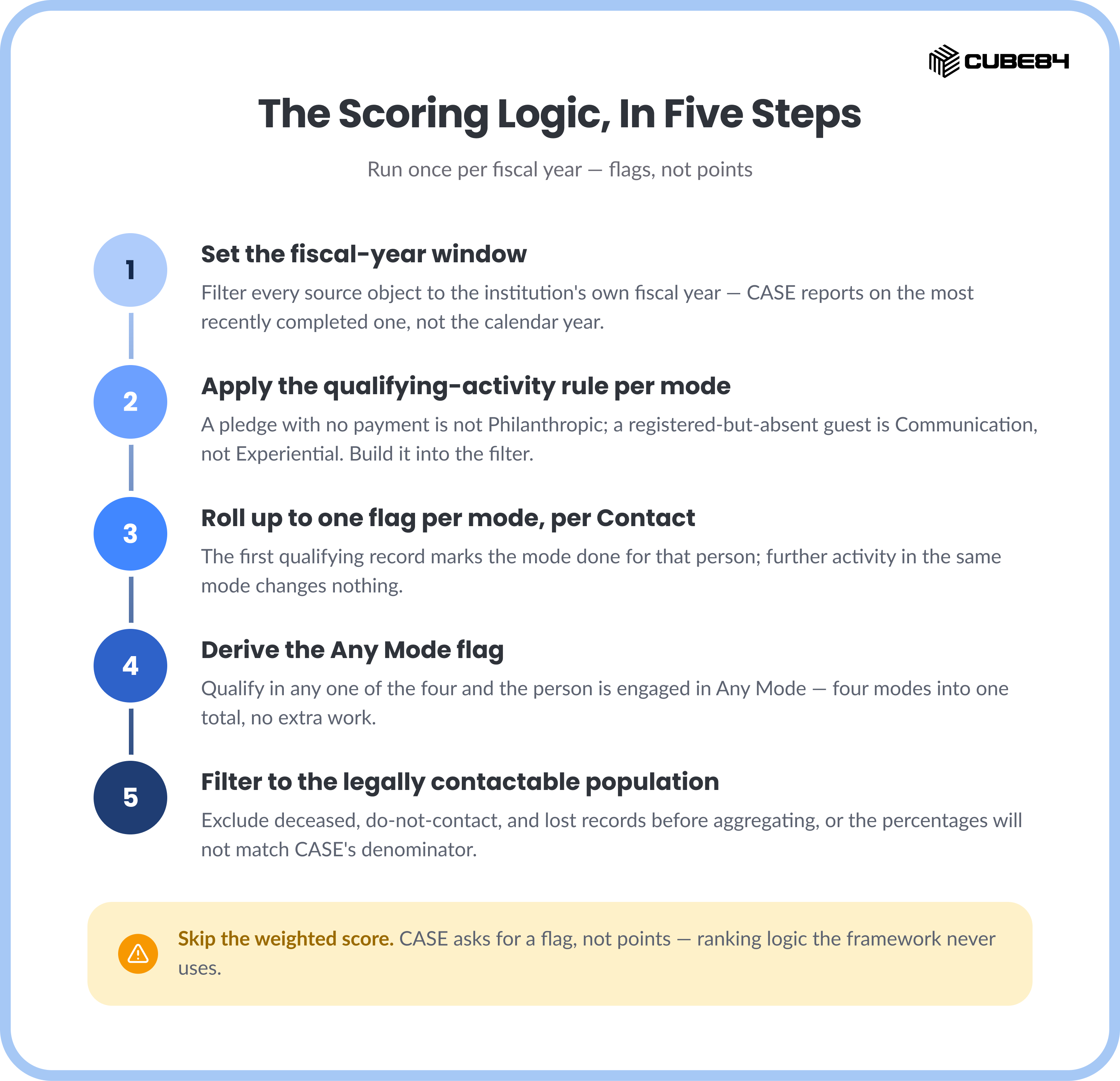
The instinct to build a weighted score, five points for a gift, three for an event, ten for volunteering, is the most common mistake in this build. CASE does not ask for a score. It asks for a flag. Points introduce a ranking the framework does not use and a maintenance burden it does not need.
The scoring logic runs in five steps, once per fiscal year:
Set the fiscal year window. Filter every source object (Opportunity, Volunteer Hours, Campaign Member, Interaction) to the institution's own fiscal year, since CASE reports on the most recently completed one, not the calendar year.
Apply the qualifying-activity rule per mode. A pledge with no payment does not qualify as Philanthropic. A registered-but-absent Campaign Member does not qualify as Experiential, it counts toward Communication instead. Build this filter into the report or flow logic, not into a person's judgment at report time.
Roll up to one flag per mode per Contact. The moment one qualifying record shows up for a person in a fiscal year, Salesforce marks that mode as done for them automatically, no separate tracking list required. Any further activity that qualifies in the same mode makes no difference, because the person is already counted.
Derive the Any Mode flag. If a person qualifies in any one of the four modes for the fiscal year, Salesforce marks them as engaged in Any Mode automatically, combining the four modes into one total with no extra work.
Filter to the legally contactable population before aggregating. CASE's denominator is legally contactable alumni, not every Contact record in the org. Exclude deceased, do-not-contact, and lost records before the count runs, or the percentages will not match what CASE expects.
Before submitting, run the same report against last fiscal year's already-submitted numbers, if the institution has them. A mismatch is cheaper to find in August than to explain in a CASE follow-up email in November.
The output: what CASE wants back
The survey wants five numbers: the size of the legally contactable alumni base, and the count engaged in each of the four modes, plus the unduplicated count engaged in any mode. A report built on the rollup fields above produces this directly, no manual reconciliation required.
Example (illustrative, not institutional data):
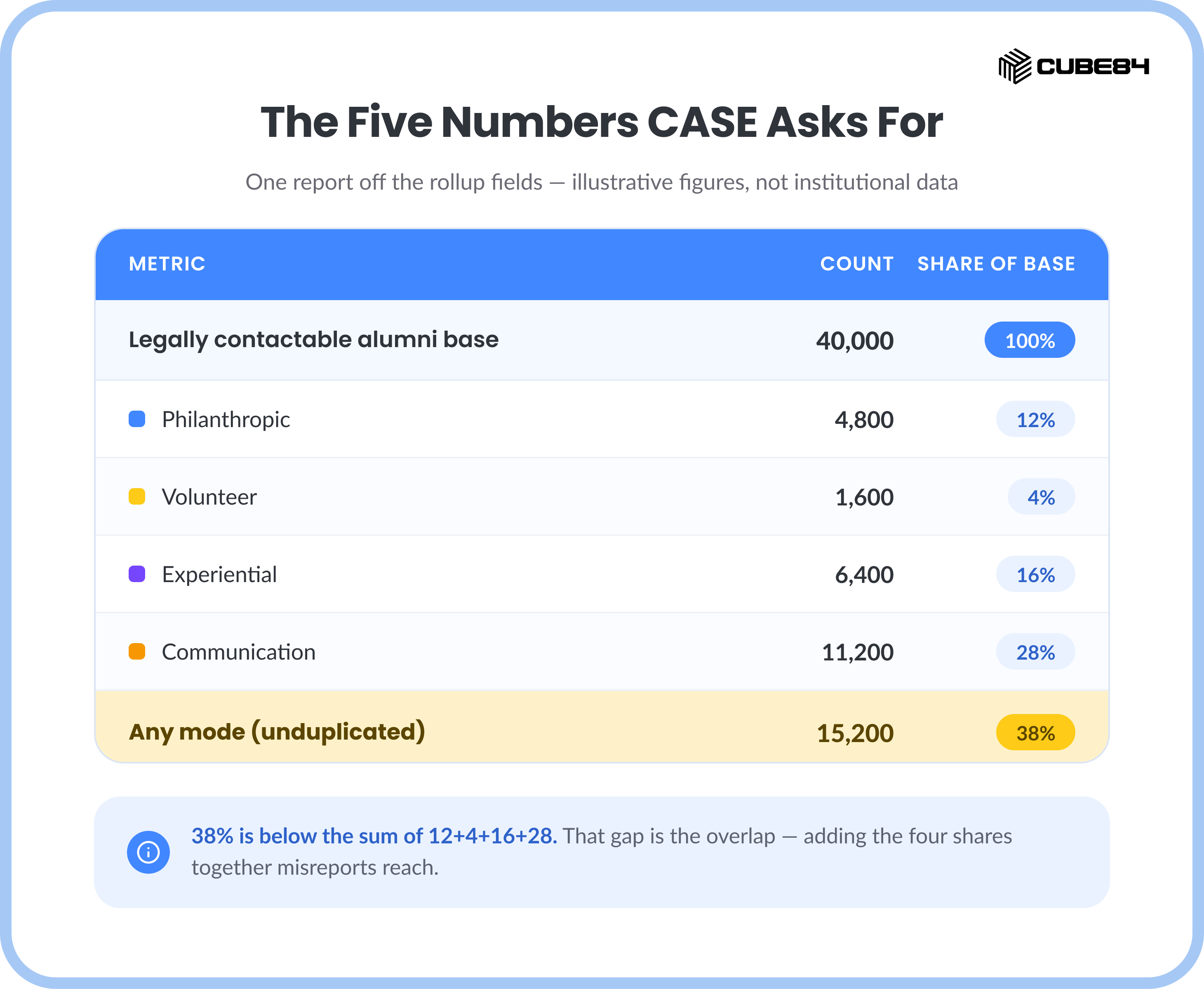
Note that the any-mode share is smaller than the sum of the four individual shares. That gap is the overlap, alumni who show up in more than one mode, and it is expected. A report that adds the four percentages together and reports that sum as reach is misreporting the framework.
Before September 15: a five-point readiness check
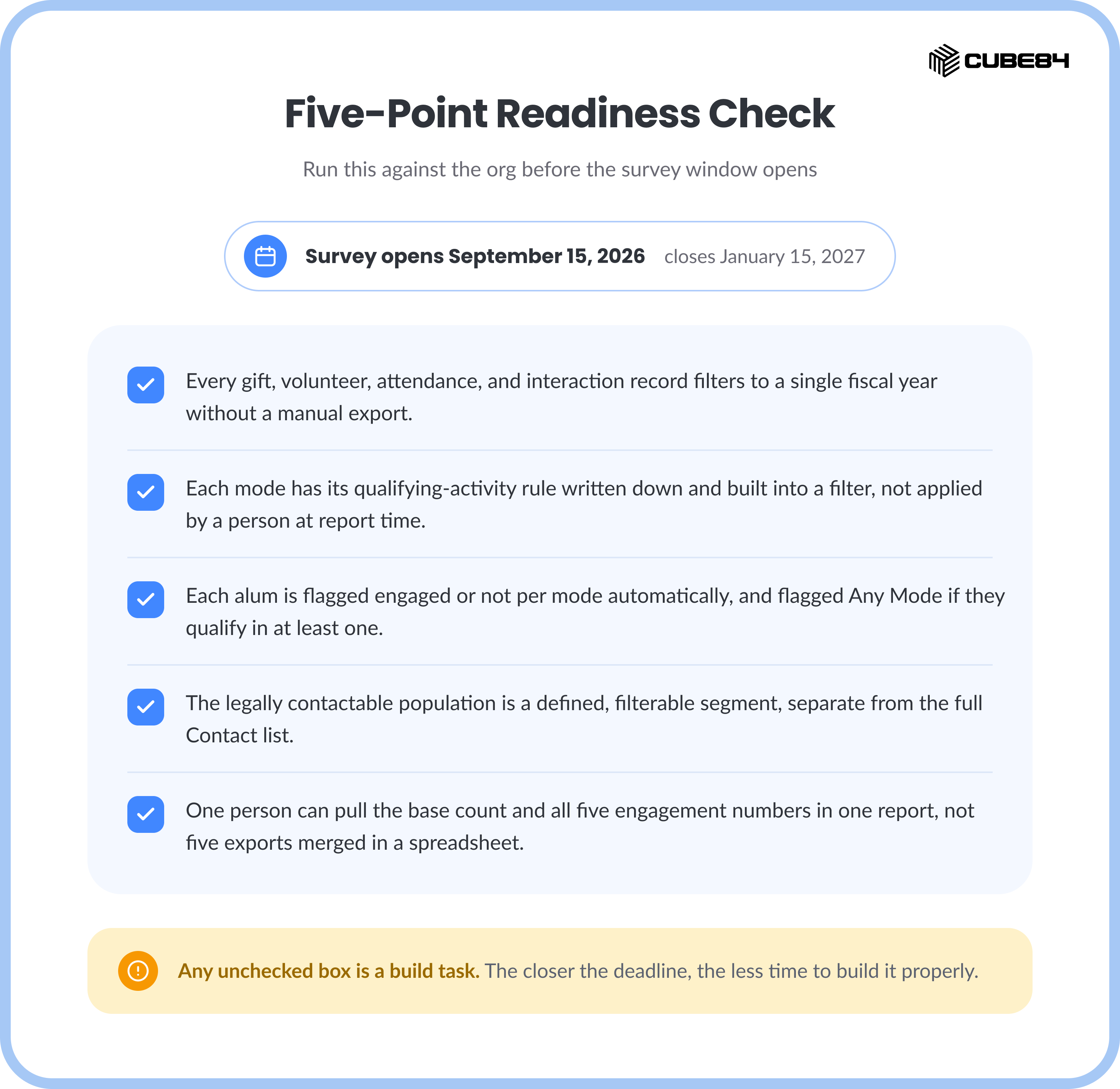
Run this against the current org before the survey window opens.
[ ] Every gift, volunteer, attendance, and interaction record can be filtered to a single fiscal year without a manual export.
[ ] Each of the four modes has its own qualifying-activity rule written down and built into a filter, not applied by a person at report time.
[ ] Each alum is marked engaged or not for each mode automatically, and marked engaged in Any Mode if they qualify in at least one.
[ ] The legally contactable population is a defined, filterable segment, separate from the full Contact list.
[ ] Someone can pull the base count and the five engagement numbers in one report, not five separate exports merged into a spreadsheet before submission.
Any unchecked box is a build task, and the closer the deadline gets, the less time remains to build it properly.
Outbound links
The following external sources were referenced in this blog and are available for outreach.
CASE Insights on Alumni Engagement: CASE's survey overview page, including the FY2025/FY2026 schedule and regional deadline variations.
CASE Alumni Engagement Guidance Document, September 2025: The current CASE guidance defining the four engagement modes, qualifying activities, and unduplicated counting rules.
Fundraising, Nonprofit Cloud Data Model Gallery: Salesforce's official reference for the Gift Commitment and Gift Transaction objects used in Nonprofit Cloud.
Volunteer Management, Nonprofit Cloud Data Model Gallery: Salesforce's official reference for the Position, Job Position Assignment, and Time Slot objects used in Nonprofit Cloud.