TL;DR
Introduction
Choosing the right Salesforce development model sounds simple at first.
Hire someone. Build what you need. Move forward.
But in reality, the decision is rarely that straightforward.
Many companies reach a point where Salesforce is doing far more than storing contacts and tracking deals. It is routing leads, powering marketing automation, running partner portals, managing integrations, and producing revenue forecasts leadership relies on every week.
At that stage, the question shifts from “Do we need Salesforce help?” to something more practical:
“How should we structure that help?”
Two models usually come up in these conversations:
Hiring dedicated Salesforce developers
Working with on-demand Salesforce development support
Both models are widely used and can work extremely well. And both can quietly burn money if chosen for the wrong reasons.
Over the past decade, it has evolved into a business operations platform supporting everything from sales pipeline management and marketing automation to customer lifecycle workflows, Experience Cloud portals, and integrations with finance, product, and analytics systems.
According to Salesforce’s ecosystem report, the Salesforce economy is expected to create 9.3 million jobs and $1.6 trillion in new business revenues by 2026 (IDC, Salesforce Economy Study)
That growth reflects something important. Companies are building increasingly complex systems inside Salesforce.
And complexity directly impacts the development model you choose.
Understanding the difference helps prevent the most common mistake companies make: choosing a Salesforce development model based only on hourly rates instead of operational reality.
In this guide, we break down the real operational differences between dedicated Salesforce developers and on-demand support, so you can determine which model aligns with your workload, system complexity, and long-term growth plans.
The Two Core Models Explained
Before comparing them, let’s define both approaches clearly.
1. Dedicated Salesforce Developers
A dedicated developer works exclusively on your Salesforce environment.
They understand:
Your data model
Your automation logic
Your integrations
Your reporting structure
They are essentially embedded in your ecosystem, even if they sit within a vendor team.
Typical responsibilities include:
Building automations and workflows
Developing Apex and Lightning components
Maintaining integrations
Supporting Experience Cloud portals
Improving data architecture and performance
This model creates continuity and speed.
On-Demand Salesforce Development
On-demand support works like a pay-on-the-go model.
Instead of reserving one developer for your organization, you draw work from a shared pool of Salesforce specialists. Tasks are submitted as tickets and assigned based on availability and expertise.
Typical requests might include:
Creating flows
Updating validation rules
Adjusting reports or dashboards
Debugging small integration errors
Adding fields or objects
You only pay for the hours used.
For companies with irregular workloads, this flexibility can be extremely attractive.
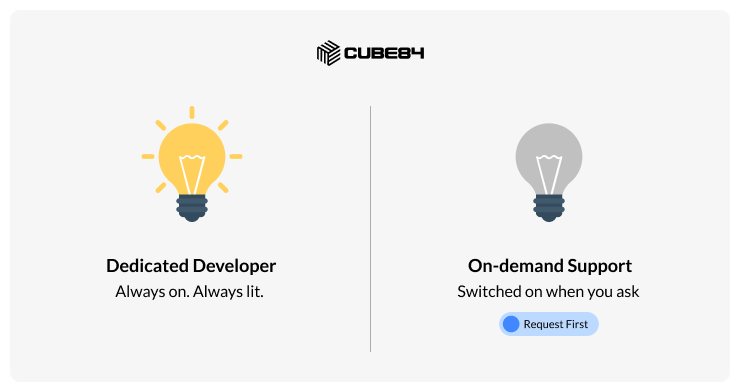
A Simple Way to Visualize the Difference
When Hiring Dedicated Salesforce Developers Makes Sense
Dedicated developers shine when Salesforce is evolving continuously rather than being maintained occasionally.
Here are the most common scenarios where this model works best.
1. Your Salesforce Backlog Never Ends
Most growing organizations accumulate a constant list of requests.
Examples include:
New lead routing rules
Campaign attribution improvements
Integration updates
Data model adjustments
Automation requests from sales teams
If those requests appear every week, the workload becomes predictable.
A dedicated developer can move through that backlog faster because they already understand the system.
2. Your Architecture Is Complex
Complex Salesforce environments often include:
Multiple integrations
Apex-based automation
Advanced sharing models
Custom Lightning components
Multi-department workflows
When developers rotate frequently, each new resource spends time rediscovering the architecture.
That learning curve slows development significantly.
Dedicated developers reduce this friction because they already know the structure.
3. Salesforce Is Tied to Revenue Operations
In many companies, Salesforce supports revenue teams directly.
Examples include:
Marketing lead routing
SDR task automation
Opportunity lifecycle management
Pipeline forecasting
Campaign attribution
If those systems break or lag, revenue teams feel the impact immediately.
Consistent development ownership becomes essential.
4. You Run a Portal With Salesforce
Portals built using Salesforce Experience Cloud fundamentally change how development works.
Instead of only internal users, your system now serves external audiences such as:
Customers
Partners
Vendors
Applicants or students
Portal development typically requires:
Lightning Web Components
Apex controllers
Custom UI development
Authentication logic
Integration with external systems
At that point Salesforce behaves more like an application platform.
Rotating developers can introduce delays and errors because portal logic often depends on complex permission structures and data relationships.
Where On-Demand Salesforce Development Works Well
On-demand models are not inferior. In many situations, they are the smartest choice.
The key is matching them with the right workload.
1. Your Monthly Workload Is Small
Some companies only require small Salesforce adjustments.
Typical examples include:
Adding fields
Updating reports
Minor automation tweaks
Fixing validation rules
If these requests appear occasionally rather than continuously, hiring dedicated Salesforce developers may create unused capacity.
On-demand support keeps costs aligned with actual work.
2. Salesforce Is Not Central to Your Operations
In smaller organizations Salesforce may simply track deals and contacts.
Sales teams may still rely on spreadsheets or external tools for deeper processes.
If Salesforce mainly functions as a record-keeping system, development demand remains limited.
In this environment, on-demand support is usually sufficient.
3. Your Workload Is Unpredictable
Some teams experience bursts of activity followed by quiet periods.
Examples include:
Quarterly campaign launches
Annual reporting changes
One-time integration projects
On-demand support provides flexibility when demand fluctuates.
Choosing the Right Model Starts With Your Workload
At the end of the day, this decision rarely comes down to usage patterns.
A company that needs 10 hours of Salesforce work each month should not maintain a full-time developer.
A company handling 80 hours of monthly enhancements, integrations, and portal updates cannot rely on an on-demand developer.
Therefore, measure your current workload, match your operations to how Salesforce supports it, and choose the model that aligns with both.
Below is a rewritten, deeper, step-by-step section that walks the reader through the decision logically. It introduces the decision matrix, explains cost, continuity, ramp-up, and operational impact, and then moves toward workload calculation and model selection. The tone stays consultative with slight analytical framing, as you requested.
Planning Your Salesforce Development Capacity
If you are evaluating whether to hire Salesforce developers in a dedicated model or rely on on-demand support, the most useful place to start is not pricing. It is capacity.
Many teams jump directly to hourly rates. But the real decision becomes clearer when you first understand how much Salesforce development capacity your organization actually needs.
Start with three pieces of information.
1. Estimated Salesforce work hours per month
Look at how many requests your teams generate across automation, reporting, integrations, and system improvements.
2. Salesforce products currently in use
The development demand changes significantly depending on whether you are using:
Sales Cloud
Experience Cloud portals
Marketing automation integrations
Data integrations with finance or product systems
Each product layer increases system complexity.
3. Number of active users and licenses
More users typically means more workflow requests, reporting needs, and automation improvements.
When these three inputs are clear, you can estimate the development capacity required to maintain and evolve your Salesforce environment.
From there, deciding between on-demand support, dedicated Salesforce developers, or a hybrid model becomes much easier.
But before estimating capacity, it helps to understand how the two models behave operationally.
A Practical Decision Matrix for Salesforce Development Models
Most teams evaluate Salesforce support models using a simple but powerful matrix.
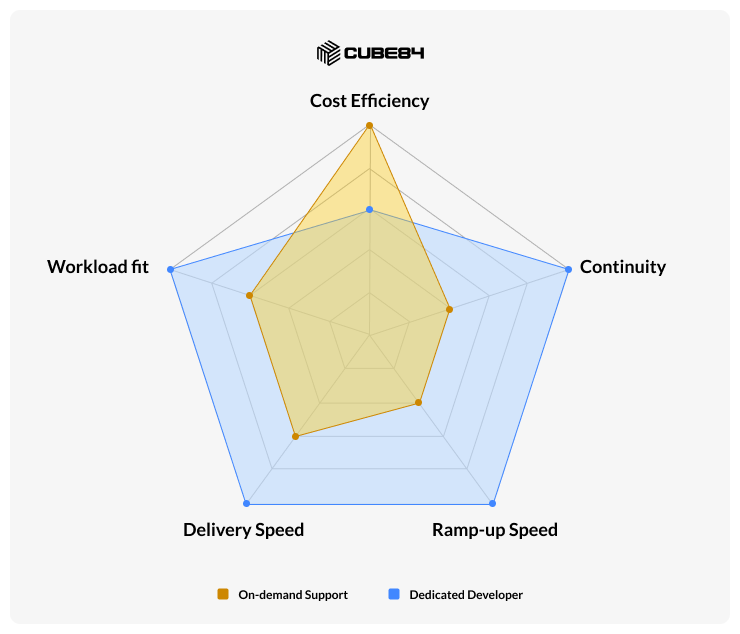
Instead of focusing only on cost, the matrix considers four operational factors:
Cost structure
Continuity of system knowledge
Ramp-up speed for tasks
Typical use cases
Factor | On-Demand Salesforce Support | Dedicated Salesforce Developers |
Cost Structure | Pay only for hours used | Fixed monthly cost |
Continuity | Limited system familiarity | Deep understanding of org |
Ramp-Up Time | Higher (context review required) | Low (already knows system) |
Speed of Delivery | Moderate | Faster for complex work |
Best For | Small or irregular workloads | Continuous development backlog |
Neither model is universally better. The right choice depends on how much work exists and how complex the system has become.
To understand that difference, we need to look at the hidden cost factor many teams overlook.
The Hidden Cost Most Companies Overlook
Hourly pricing often drives the initial decision.
On-demand models appear cheaper because you only pay for the hours used. Dedicated developers require a fixed monthly investment.
But operational efficiency plays a much bigger role in long-term cost.
Consider a simple example.
Dedicated Developer Scenario
A developer who already understands your Salesforce environment can start working immediately.
A small automation change might take:
Development work = 3 hours
Total effort: 3 hours
On-Demand Scenario
In an on-demand model, the developer assigned to your task may not have previous context.
Before writing code or building automation, they must first understand your system.
Context review = 2 hours
Development work = 3 hours
Testing adjustments = 2 hours
Total effort: 7 hours
Cost Comparison
If the hourly rate is $120:
Dedicated model cost = 3 × $120 = $360
On-demand cost = 7 × $120 = $840
The hourly rate is identical. But the operational cost more than doubles because of context ramp-up.
This does not happen with every task. However, it becomes increasingly common in environments that include:
complex automation
multiple integrations
custom Apex development
Experience Cloud portals
As Salesforce environments mature, context becomes more valuable than hourly flexibility.
How to identify if you need a dedicated or on-demand Salesforce developer?
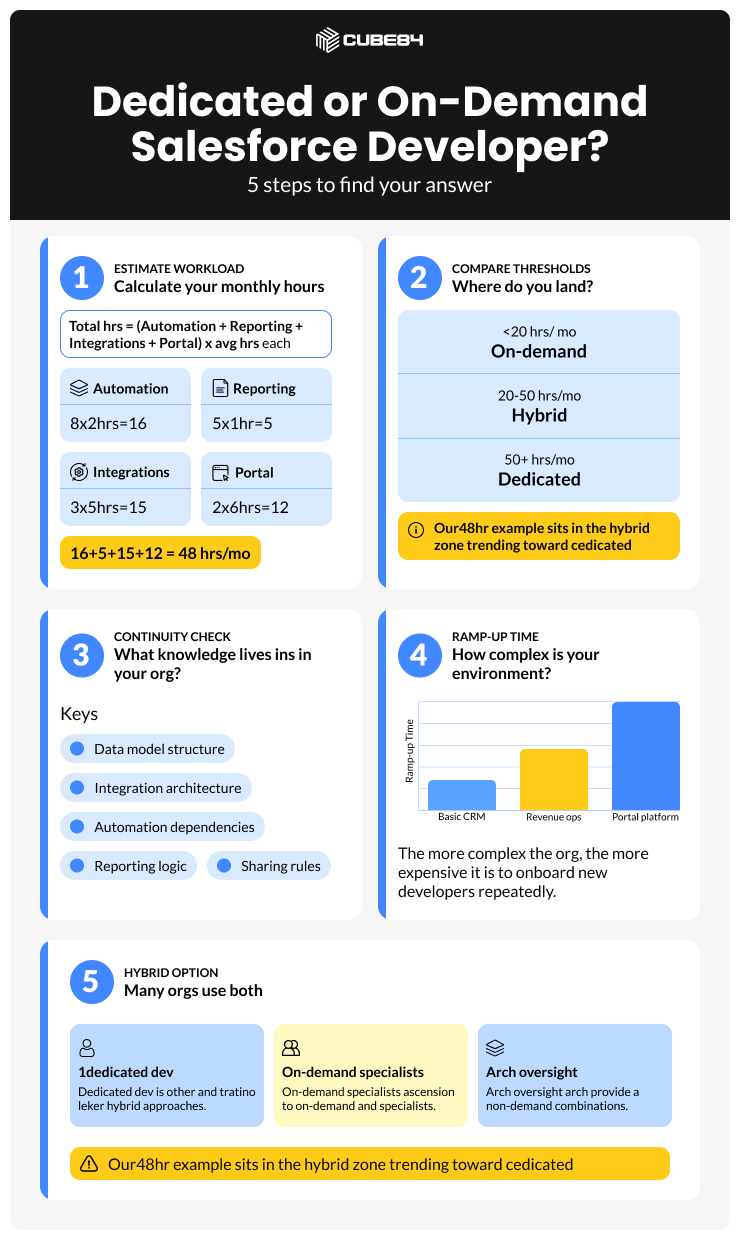
Step 1: Estimate Your Monthly Salesforce Workload
The most reliable way to determine the right model is to estimate your actual monthly development workload.
You can use the following formula:
Total Monthly Salesforce Hours =
(Automation Requests × Avg Hours)
+ (Reporting Changes × Avg Hours)
+ (Integration Tasks × Avg Hours)
+ (Portal Enhancements × Avg Hours)
Example calculation:
Work Type | Requests | Avg Hours | Total |
Automation | 8 | 2 | 16 |
Reporting | 5 | 1 | 5 |
Integration | 3 | 5 | 15 |
Portal Updates | 2 | 6 | 12 |
These thresholds are not strict rules, but they reflect how most organizations scale their Salesforce development support.
Small teams start with on-demand resources. As automation and integrations grow, hybrid models emerge. Eventually, mature environments require dedicated ownership.
Step 3: Evaluate Continuity and System Ownership
Capacity is only one side of the equation.
The second factor is continuity of system knowledge.
Salesforce environments accumulate significant institutional knowledge over time:
data model structure
automation dependencies
sharing rules
integration architecture
reporting logic
When development resources change frequently, that knowledge must be rediscovered repeatedly.
Dedicated developers reduce this friction because they already understand how the system behaves.
On-demand support works best when tasks are small and self-contained. Complex environments benefit from continuity.
Step 4: Consider Ramp-Up Time
Ramp-up time refers to the effort required for a developer to understand your Salesforce environment before beginning work.
This factor becomes more important as systems grow.
For example:
Environment Type | Ramp-Up Impact |
Basic CRM | Minimal ramp-up |
Automated revenue operations | Moderate ramp-up |
Portal-driven platform | Significant ramp-up |
Organizations running Experience Cloud portals often see the biggest impact here because portal logic depends on:
user roles
sharing rules
authentication flows
custom Lightning components
integration data
These systems require deeper familiarity with the environment.
Step 5: Decide If a Hybrid Model Makes Sense
Interestingly, many mature organizations do not choose between dedicated and on-demand models.
They combine both.
The hybrid model typically includes:
one dedicated Salesforce developer
specialist support available on demand
architecture oversight when required
This structure provides three advantages.
Continuity: a dedicated developer builds deep familiarity with the system.
Specialized expertise: architects or integration specialists can be brought in for complex work.
Flexibility: additional support can be added temporarily when project demand spikes.
The hybrid approach prevents another common risk: relying on a single developer who becomes the only person capable of maintaining the system.
A Question Worth Asking Internally
Before choosing a development model, leadership teams often benefit from asking one simple question.
If Salesforce stopped working tomorrow, what would happen?
The answer reveals how strategic the platform has become.
Scenario | Implication |
Sales teams continue using spreadsheets | Salesforce is a support tool |
Marketing automation stops | Salesforce is operational infrastructure |
Customer portals fail | Salesforce is a customer-facing platform |
The more critical Salesforce becomes to daily operations, the more valuable consistent development ownership becomes.
Why Many Companies Choose to Hire Salesforce Developers Through Vendors
Some organizations debate whether to build internal Salesforce teams or work with Salesforce consulting partners.
In practice, many companies choose to hire Salesforce developers through vendor teams for practical reasons.
Consulting partners often provide advantages such as:
access to architects and specialists
backup developers if resources change
faster onboarding
reduced HR overhead
Vendor teams also allow organizations to scale development capacity more easily as system complexity grows.
This flexibility is why many companies choose to hire Salesforce developers through consulting partners rather than expanding internal engineering teams.
Final Thought
Choosing between on-demand support and dedicated Salesforce developers is less about technology and more about operational maturity.
Organizations with light workloads benefit from flexible support models.
As Salesforce evolves into a platform powering revenue operations, integrations, and customer experiences, development ownership becomes more important.
Understanding your workload, system complexity, and operational dependence on Salesforce is the most reliable way to make the right decision.