
Introduction
Picking a Salesforce development partner is not like hiring a web designer or a general IT contractor. Done right, the right Salesforce development partner becomes the architect of how your business scales, how your teams operate, and how your data flows across every connected system. Done wrong, you inherit technical debt, broken integrations, and an org that needs a complete rebuild before it can grow.
We have spent the better part of a decade working across Salesforce implementations—from lean startups running a single Sales Cloud with 15 users, to mid-market enterprises juggling Service Cloud, Revenue Cloud (formerly known as CPQ), Experience Cloud, and a web of integrations with ERP and data warehouse systems. In that time, the single most consistent predictor of a successful Salesforce implementation is not the budget, and it is not the timeline. It is the quality of the development partner chosen to execute the work.
This guide distills everything we know into a clear, sequential path — written for the people who have to make this decision together.
Step 1 : Understand What a Salesforce Development Partner Actually Does
A Salesforce development partner is an external agency, consultancy, or managed services firm that specializes in building custom functionality on the Salesforce platform. The word 'development' is carrying real weight here — it signals code, custom logic, and technical architecture. Not configuration. Not clicks.
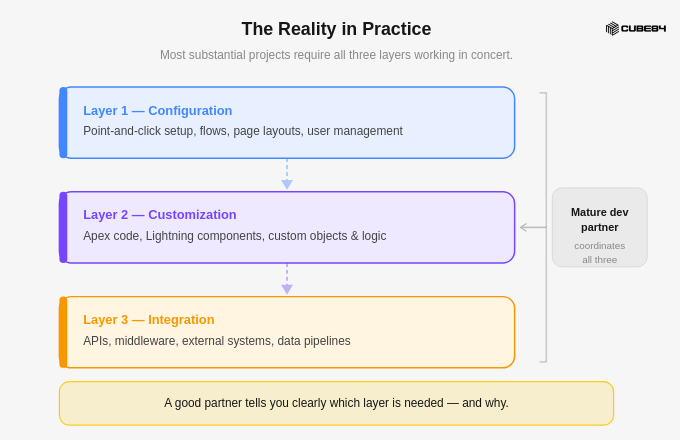
Salesforce, as a platform, is extraordinarily capable without a single line of code. Flows, validation rules, approval processes, and dynamic reports — all of this is achievable through declarative tools. But every organization with genuine complexity eventually hits a ceiling where declarative tools are not enough. The moment you cross that ceiling is the moment a Salesforce development partner becomes relevant to your business.
Why This Step Comes First Every misaligned vendor conversation we have ever seen traces back to one root cause: the buyer did not have a shared internal definition of what a development partner is — and is not. Before you open a single RFP, your executive and operations leads need to be looking at the same map. |
|---|
What a development partner is typically engaged to build:
Custom Apex classes, triggers, and batch jobs that execute complex server-side business logic
Lightning Web Components (LWC) for bespoke user interfaces embedded inside Salesforce pages
REST and SOAP API integrations connecting Salesforce to ERP, marketing platforms, and data warehouses
Custom Experience Cloud portals for customers, partners, or employees
DevOps pipelines for continuous delivery across sandbox environments and production
Data migration scripts, transformation logic, and validation frameworks.
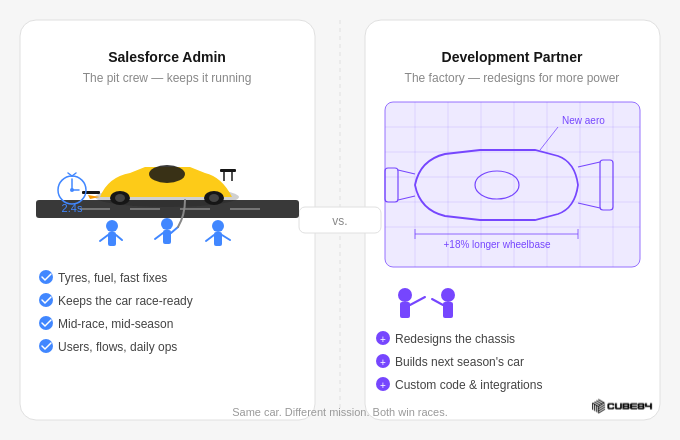
Step 2 : Determine Whether You Need a Development Partner at All — or a Skilled Admin
The diagnostic question is deceptively simple: is what we need to build expressible in Salesforce's declarative tools, or does it require logic only code can deliver? If your requirements document contains the words 'trigger', 'integration', 'API', 'custom UI', or 'batch processing' — you are in development partner territory.
Why This Step Matters One of the most expensive mistakes we see is hiring a development partner for work a skilled admin could handle — or the reverse: leaning on an admin for work that genuinely requires a developer. Both mismatches cost money, time, and organisational trust. This step is where IT, Operations, and the executive sponsor align on scope classification before any vendor is contacted. |
Admin vs. Development Partner: When Each Is the Right Choice
Dimension | Salesforce Admin | Development Partner |
Primary Work | Configuration, workflows, reports | Custom code, integrations, architecture |
Tools Used | Flow, Validation Rules, Reports, Page Layouts | Apex, LWC, REST APIs, DevOps pipelines |
When to Engage | Day-to-day ops, minor enhancements, user management | Complex automations, custom UI, system integrations |
Engagement Model | FTE hire or part-time contractor | Project-based or monthly retainer |
Cost Range | $70K–$120K/yr (FTE) | $150–$300/hr (project or retainer) |
Governance Risk | Low — works within platform limits | High — testing, code review, deployment controls are critical |
OUTPUT | Scope classification decision A signed-off internal decision: 'Admin', 'Development Partner', or 'Both' — with the requirements that drove the classification. This becomes the foundation for your RFP or vendor brief. |
Step 3 : Decide What to Build vs. Buy — AppExchange or Custom Development
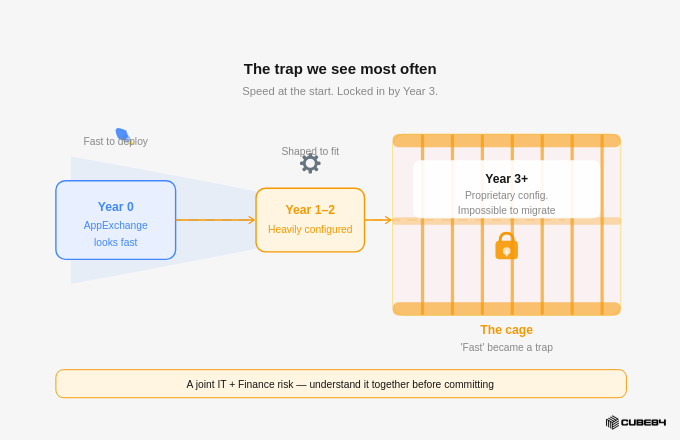
Some buyers arrive at this decision emotionally — pre-sold on AppExchange because it feels faster, or pre-sold on custom development because it feels more powerful. Neither impulse, when not grounded in evidence, leads to a good outcome. Run this four-question diagnostic before the conversation goes any further.
Why This Step Matters Before you brief any development partner on what to build, your IT and Finance leads need to have resolved the build-vs-buy question together. We have seen organisations commission expensive custom development for problems that a $150/month AppExchange product already solves — and we have seen organisations lock themselves into AppExchange products for requirements that genuinely needed custom logic. Both outcomes are avoidable with a structured decision at this step. |
The build-vs-buy diagnostic:
Is this a common business problem that many companies of our size share?
Does the AppExchange vendor's product cover 80%+ of our requirements out of the box?
Are we willing to adapt our process to the tool, rather than forcing the tool to fit our process?
Does the vendor have a proven track record with our Salesforce edition and current release?
AppExchange vs. Custom Development: Decision Criteria
Criteria | AppExchange App | Custom Development |
Time to Value | Days to weeks | Weeks to months |
Upfront Cost | Low–medium (subscription) | Medium–high (build + maintain) |
Customisability | Limited to vendor roadmap | Full control |
IP Ownership | Vendor retains IP | You own the code |
Long-term Flexibility | Constrained by vendor decisions | Architect for your own roadmap |
Best For | E-signature, CPQ, SMS, scheduling | Unique processes, competitive differentiation |
The Hybrid Reality
The most well-architected orgs we have seen combine AppExchange products for commodity functionality (CPQ, document generation, telephony) with custom Apex and LWC for the logic that makes the business unique. A good development partner will tell you, honestly, which is which.
OUTPUT | Build vs. Buy decision log A requirements-mapped decision identifying which elements go to AppExchange and which go to custom development. Owned by IT, reviewed by Finance, approved by the executive sponsor. |
Step 4 : Learn the Technical Language — Apex, LWC, and API Integration
When you evaluate a Salesforce development partner, three technical terms will appear in every proposal. Here is what they actually mean, and why each matters to your procurement decision.
Why This Step Matters You do not need to become a developer. But every buyer who walks into a vendor conversation without basic command of the technical vocabulary gets led — rather than leading. This step is about gaining enough fluency to ask the right questions, recognise evasive answers, and evaluate proposals intelligently. Executives and IT leads both need this grounding before they sit across from a vendor. |
Apex — Server-Side Logic
Salesforce's proprietary language for complex business logic running on their servers. Fires on record changes, runs batch jobs, enforces rules that Flow cannot handle. The critical concept for buyers: governor limits — strict execution caps that good developers architect around. Poor Apex collapses in production when data volumes grow.
LWC — Custom User Interface
Lightning Web Components — Salesforce's modern JavaScript framework for building custom front-end experiences. Custom record pages, step-by-step workflows, embedded search. Partners still building primarily in the older Aura framework are behind the curve. Worth asking directly.
API Integration — System Connectivity
The discipline of connecting Salesforce reliably to ERP, marketing platforms, data warehouses. Salesforce exposes REST, SOAP, Bulk, and Streaming APIs. The architecture of these integrations is where a partner's experience pays the highest dividends — a poorly designed integration is the most fragile point in your tech stack.
The Technical Stack: What Each Layer Does and What Buyers Should Scrutinise
Technology | Layer | Best For | Buyer's Concern |
Apex | Backend / Server | Complex logic, triggers, batch jobs | Governor limit architecture |
LWC | Frontend / UI | Custom pages, guided flows, portals | Modern framework (not Aura) |
API Integration | System-to-System | ERP sync, middleware, data warehouse | Integration architecture quality |
OUTPUT | Technical requirements brief A plain-language document mapping your business requirements to the technical layers they require — Apex, LWC, API, or a combination. Used directly to brief vendors and evaluate proposals. |
Step 5 : Map the Partner Landscape — Know What Type of Partner Fits Your Situation
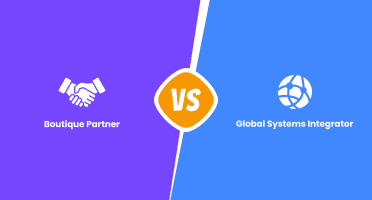
Why This Step Matters Comparing a boutique Salesforce consultancy to a global system integrator in the same RFP process is a category error. Understanding the categories before you open the market saves weeks of misaligned discovery calls. Finance needs this to frame procurement expectations; Operations needs it to calibrate delivery model expectations. |
Large System Integrators
Accenture, Deloitte, Cognizant and their Salesforce practices. Global scale, deep talent benches, appropriate for enterprise implementations with complex governance requirements. Risk: expensive, bureaucratic, and meaningful risk of junior resources doing delivery while seniors close the sale.
Mid-Market Boutiques
Dedicated Salesforce consultancies of 20–200 people. Deep platform expertise, agile engagement models, higher probability of senior involvement in delivery. For most mid-market organizations, this tier delivers the best value and outcomes.
Freelance Developers
Cost-effective for a single, isolated task. Risk: a single developer cannot cover project management, architecture, testing, deployment, and knowledge transfer. For anything beyond a small, contained scope, freelance carries disproportionate delivery risk.
Offshore Delivery Centres
Many partners deliver through offshore teams in India, Eastern Europe, or Latin America. Not inherently problematic — some of the best Salesforce developers in the world are offshore. Ask explicitly about communication structure, model transparency, and QA practices.
Step 6 : Apply the Vetting Checklist to Reduce Your Longlist to a Shortlist
Why This Step Matters Most organizations shortlist on the basis of a capabilities deck and a sales presentation. That is how you end up with a partner who looked great on paper and performed poorly in delivery. The vetting checklist is the mechanism by which IT, Finance, and Operations each apply their lens to the same candidate, surfacing incompatibilities before they become expensive post-signature discoveries. |
Move through the checklist systematically. Each criterion has a signal to look for and a red flag that should give pause. Any two red flags on a single candidate is grounds for removal from the shortlist.
On Certifications — A Word of Caution
Certifications are necessary but not sufficient. A team can hold impressive credentials and still write bad code. Use them as a baseline filter, not a final endorsement. The Platform Developer II certification signals genuine depth — it requires candidates to solve complex architectural problems under exam conditions, not just pass multiple choice.
Partner Vetting Checklist: Signals and Red Flags
Criterion | What to Look For | Red Flag |
Certifications | Platform Developer I/II, Application Architect, System Architect on delivery team | No certified developers on your project |
Industry Experience | 3+ completed projects in your vertical | Generic portfolio only |
Org Size Fit | Experience on orgs of similar complexity and user count | Only SMB experience for enterprise scope |
Testing Discipline | Code reviews, test coverage above 75%, static analysis | No structured testing methodology |
DevOps Practice | Named tool: Copado, Gearset, or SFDX CI/CD pipeline | Manual deployments to production in 2025 |
Scope Management | Clear SOW process, defined change control | T&M with no budget ceiling |
Reporting Cadence | Weekly sprint demos, named POC, structured status | No defined reporting rhythm offered |
Client References | 2–3 referenceable clients of similar size and complexity | Reference check deflected or deferred |
Post-Go-Live Support | Defined SLA, hypercare window post-launch | "We hand off at go-live" as default position |
OUTPUT | Scored shortlist of 3 candidates A completed vetting scorecard per candidate, reviewed jointly by IT and Operations, with Finance sign-off on commercial eligibility. Target: 3 candidates maximum entering the discovery process. |
Step 7 : Run The Discovery Call To Decode The Vendor
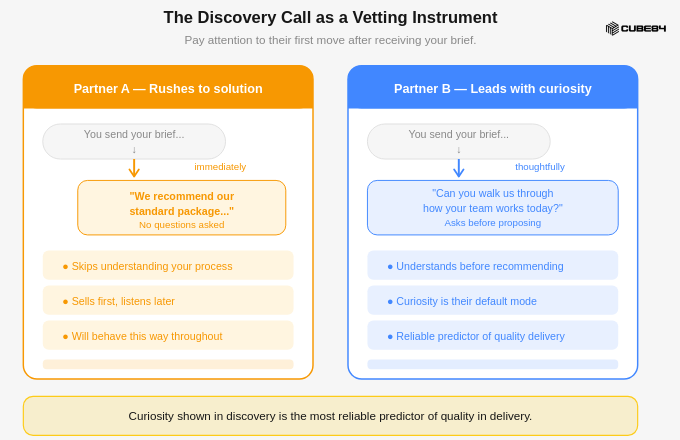
The discovery call is not a vendor presentation. It is your best opportunity to understand how a partner thinks under real conditions — before any contract is signed. IT and Operations should run these sessions together, with deliberate questions designed to surface how the partner reasons, not just what they claim to have built.
Pay close attention not just to what is said, but how it is said. Do they ask about your business before talking about technology? Do they challenge assumptions in your brief, or simply affirm everything? The best partners we have engaged are constitutionally curious — they want to understand the workflow before they propose a solution.
Two Must-Ask Questions
Ask: 'Can we speak directly with the developer assigned to our account — not just the engagement manager?' This prevents the bait-and-switch before it can occur.
And: 'How do you handle situations where you believe the client's requested approach is architecturally wrong?' Partners who always say yes are order-takers. You want a partner who pushes back constructively.
Discovery Questions and What Each Is Designed to Reveal
Question to Ask | What You Are Testing |
"Walk us through how you handled governor limit exceptions in a recent project." | Real-world Apex depth, not textbook knowledge |
"How do you manage deployments between sandboxes and production?" | DevOps maturity and risk management discipline |
"What is your test coverage standard before any deployment goes live?" | Salesforce requires 75% — good partners set higher |
"Describe a project that went off-track. What happened and how did you recover?" | Maturity, transparency, and accountability |
"How do you handle change requests that arrive mid-sprint?" | Scope management discipline |
"Who will be our day-to-day contact and what is their experience level?" | Prevents senior-to-junior bait-and-switch |
"Do you build code that we can hand off to another partner or in-house team?" | Lock-in risk and documentation standards |
"How do you approach org health assessments before building?" | Good partners assess the foundation before building on it |
OUTPUT | Discovery session notes and comparative assessment A structured debrief document for each candidate, capturing answers to the core questions above. Reviewed by IT and Operations jointly before proposals are requested. |
Step 8 : Evaluate Engagement Models and Protect Yourself Commercially
The engagement model is where the commercial risk lives. A poorly structured contract can turn a capable development partner into an adversarial relationship the moment scope shifts — which, in Salesforce projects, it always does. Finance and Operations need to evaluate these models together, because one optimizes for budget certainty and the other for delivery flexibility.
Fixed-Price
Scope is defined upfront and the partner commits to delivering for an agreed fee. Favours the buyer when scope is genuinely stable. The challenge: Salesforce development projects rarely have perfectly stable scope. Fixed-price contracts can create adversarial dynamics when change requests arise — the partner resists changes to protect margin; the client resists change fees to protect budget.
Time and Materials (T&M)
Gives the partner flexibility and the buyer agility, at the cost of budget predictability. Appropriate for exploratory or iterative work where requirements will evolve. Always negotiate a budget ceiling, even on T&M contracts. This is the Finance team's most important commercial intervention in the entire process.
Managed Service Retainer
A monthly retainer with a defined hours allocation — appropriate for organizations with ongoing development needs. Retainers build institutional knowledge. A partner who has worked in your org for 18 months understands your data model, your business logic, and your team dynamics in ways a new project team cannot replicate quickly.
Mid-tier boutique (N. America) $150 – $250 per hour | Senior Architect / Large SI $250 – $350+ per hour | Offshore (reputable firm) $60 – $120 per hour | Monthly retainer (20–40 hrs) $8K – $25K per month |
OUTPUT | Preferred engagement model and commercial guardrails Finance-approved engagement model preference and key commercial terms — including budget ceiling, change control trigger threshold, and payment milestone structure — to be embedded in the SOW negotiation. |
Step 9 : Run the Final Situation Matrix to Confirm Your Resource Decision
Before committing to a specific candidate, the executive sponsor, IT lead, and Finance lead should complete one final cross-check — mapping your specific situation against the resource options. This is the last gate before proposal evaluation, and it exists to prevent a final common error: selecting the right partner type but the wrong scope classification, which causes the SOW to be structured incorrectly from day one.
Situation Decision Matrix: Matching Your Scenario to the Right Resource Type
Your Situation | Admin | Freelance Dev | Dev Partner | ISV App |
Basic config, reports, user management | Best fit | Overkill | Overkill | Sometimes |
Single complex automation or trigger | May stretch | Good fit | Consider | Unlikely |
Multi-system integration project | Out of scope | Risky solo | Best fit | Partial |
Custom portal or customer-facing app | No | Possible | Best fit | Depends |
Ongoing governance + new features | Core role | Episodic | Retainer | N/A |
Full org re-architecture or migration | Not equipped | Too risky | Core expertise | N/A |
The most common failure mode we observe: organizations in the bottom two rows trying to manage with only an admin or a freelance developer, discovering two years later that the org has accumulated enough technical debt to require a complete rearchitecture. This matrix is your last structural protection against that outcome.
OUTPUT | Final resource decision — confirmed by all three stakeholders Executive, IT, and Finance each sign off on the resource type and scope classification. This document travels into the SOW negotiation as the foundational agreement on what is being purchased and why. |
Step 10 : Read the Signals — Green Flags and Red Flags That Only Show Up in Practice
After years in this space, we have developed a fairly reliable instinct for the difference between a partner that will serve you well and one that will cause you pain. The signals below are not theoretical — they are patterns drawn from real engagements. IT and Operations should review these together after discovery conversations, before final selection is made
Green Flags
| Red Flags
|
OUTPUT | Final candidate recommendation with signal log IT and Operations jointly produce a recommendation memo — citing the green and red flag signals observed per candidate — for the executive sponsor to approve the final selection. |
Step 11 : Set the Engagement Up for Success, From Day One
Choosing the right Salesforce development partner is the beginning, not the end. The organizations that extract the most value from their partner relationships are not passive buyers — they are active, engaged clients who create the conditions for the partnership to succeed. Every step in this guide gets you to the right door.
This step determines what happens after you walk through it.
What those conditions look like in practice, owned across all three functions:
Designate a single internal point of contact with authority to make decisions. Partner projects stall most frequently because of client-side indecision, not partner-side incompetence. Operations owns this role; the executive sponsor empowers it.
Commit to regular sprint reviews — and actually attend them. If your partner offers fortnightly demos and your team cannot prioritize them, you will arrive at go-live with surprises you could have caught in week three.
Treat the SOW as a living negotiation, not a legal cage. Scope evolves. The question is whether your engagement model handles it transparently or creates resentment. Finance should monitor this cadence, not just the invoice.
Invest in knowledge transfer from day one. Ask your partner to document decisions, not just deliverables. The architecture decision record — why a particular approach was chosen — is often more valuable than the code itself.
Do not measure partner success purely by delivery velocity. Code volume and sprint velocity are vanity metrics. What matters is whether the builds work, whether they scale, and whether your IT team can maintain them without calling the partner back for every change.
OUTPUT | Engagement governance framework A one-page internal governance document defining: the named internal POC, sprint review cadence, change request protocol, knowledge transfer expectations, and success metrics beyond velocity. Shared with the partner at project kickoff. |
Conclusion : The Right Salesforce Development Partner Changes What Your Business Can Build
A great Salesforce development partner does not just write code. They tell you when not to build, which AppExchange product will serve you better, where your org's technical debt is accumulating before it becomes a crisis, and how to structure your Salesforce investment so that it compounds in value rather than degrading over time.
Before you make a final selection decision, confirm your answer to each of these:
Does this partner's experience match the specific complexity of our Salesforce org?
Have they demonstrated the ability to challenge scope and propose alternatives — not just execute?
Is their delivery methodology transparent, documented, and appropriate for our risk tolerance?
Do the people who will actually do the work — not just the ones who sold the engagement — inspire confidence?
Is their pricing model aligned with how our requirements will realistically evolve?
All five yes? You are looking at a strong candidate. Two or more reservations? Keep evaluating. This decision is worth the patience.
Choose deliberately. Build strategically. Grow confidently.
Quick-Reference Glossary
Term | Definition |
Apex | Salesforce's proprietary server-side programming language for custom business logic. |
AppExchange | Salesforce's enterprise marketplace for pre-built applications by third-party vendors. |
Copado / Gearset | DevOps tools purpose-built for Salesforce CI/CD and environment management. |
Governor Limits | Salesforce runtime execution caps on queries, records processed, and CPU time per transaction. |
LWC | Lightning Web Components — Salesforce's modern JavaScript-based UI framework. |
REST API | Standard protocol for external systems to interact with Salesforce data over HTTP. |
Sandbox | A copy of a Salesforce org used for development and testing before production deployment. |
SFDX | Salesforce DX — developer toolset enabling source-driven development and CLI-based deployments. |
SOW | Statement of Work — contract defining scope, deliverables, timelines, and commercial terms. |
T&M | Time and Materials — billing model where work is charged at an hourly rate as incurred. |