
Should Agents really do what they do?
The work that you do for your organization is important. You matter and so does the work you do, but are your strengths and potential put to the best use in the hours of work you do?
Something that Henry David Thoreau said in the 1800s still makes a lot of sense even today, especially in this context.
He wrote, "It's not enough to be busy, so are the ants. The question is, what are we busy about?"
How true! Even after moving to Salesforce, we see a lot of sales teams spending more time inside Salesforce than actually selling, something that they’re extremely passionate about. Why are they still following up on leads, updating records, chasing context across emails, notes, and dashboards? All of this is time-consuming, considering you’ve got all the data on Salesforce. This might sound simple for just one lead, but as volume grows, it becomes overwhelming.
We’re all a little too acquainted with the AI that is everywhere now. We’ve used one to write, ask, learn, or even merely chat, but they’re capable of doing a whole lot more than most of us haven't even tried. And Agentforce is one of them!
So what does this look like in practice?
Instead of talking about AI in theory, or promising a future state that feels far away, this blog focuses on what sales teams can actually deploy in 2026.
We’re going to show you how Agentforce can act as an unlimited, entry-level assistant for every rep on the team, using real use cases and workflows drawn from situations that sales reps, managers, and RevOps teams deal with every single day.
Let’s see how it all pans out in real life.
CASE 1 : The Autonomous SDR (Inbound Lead Nurturing)

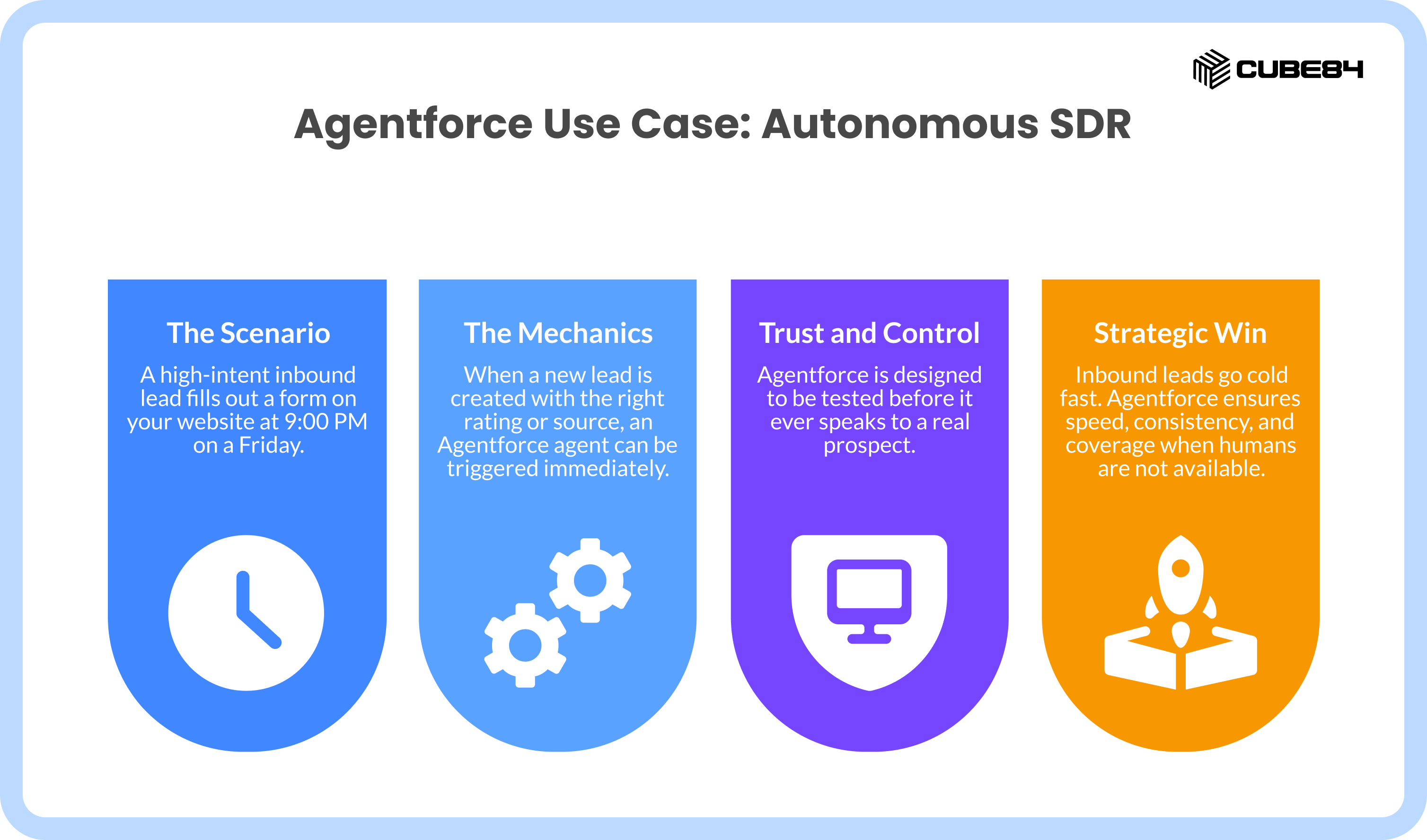
In most teams, nothing happens until Monday morning. It is a weekend off for you, but your client might be looking to get work done. So, by the time you reply to the lead, they have either gone cold or spoken to someone else. This is a problem we’re all too familiar with, but only a very few teams actually fix it.
This is one of the clearest, least controversial places to use Agentforce.
The Mechanics
When a new lead is created with the right rating or source, an Agentforce agent can be triggered immediately.
The agent does not improvise responses. It works from a grounded data library. This can include approved product FAQs, pricing guidelines, and case studies stored in Salesforce that were written by your team to suit the org’s style and tone. When the lead replies with questions, the agent pulls answers only from this trusted content.
Behind the scenes, the Atlas Reasoning Engine plans the interaction step by step. It does not guess what to say next, but only follows a structured plan to understand the intent, respond accurately, and decide what action to take.
Once the agent detects intent to meet, it can check the assigned account executive’s availability using Salesforce activity data and share a booking link with relevant time slots. This eliminates the usual manual follow-up delay.
Before the handoff, the agent can also summarize the conversation, so the AE walks in with full context on what the lead asked, what they care about, and why they booked the meeting.
Trust and Control
This is usually where sales leaders get skeptical. And fairly so.
Agentforce is designed to be tested before it ever speaks to a real prospect. Teams can run synthetic conversations in the Agentforce Testing Center to see how the agent responds across different scenarios.
For sensitive or high-value situations, human approval can be required before the agent sends a response or takes an action. Pricing questions, large deal indicators, or unusual language do not have to be automated without approvals.
Every action the agent takes is planned first, then executed within Salesforce guardrails. Nothing happens without visibility.
Strategic Win
Inbound leads go cold fast. Industry research shows that companies that respond within five minutes are 21x more likely to qualify a lead compared to those that wait longer. This is not a new insight. What is new is finally having a way to act on it without hiring more SDRs or asking reps to work weekends.
This use case does one thing well. It ensures speed, consistency, and coverage when humans are not available.
Time to value: Most teams can deploy this in 2 to 4 weeks, because it builds on existing lead processes and approved content.
CASE 2 : The Deal-Specific Role Play (Agentforce Sales Coach)
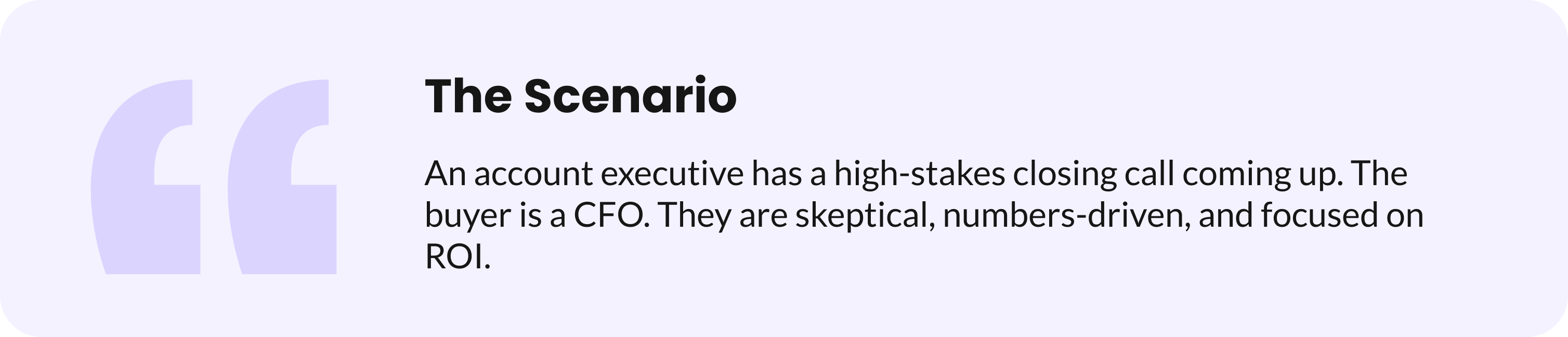
Here, your rep will know the product, but there’s a lot of chance they’re unsure about how this specific conversation will go. They wonder about the objections that will come up, whether the CFO will push back, or if the price will come up early. And what if they ask for a business case?
Most reps practice for moments like this in their head. Or worse, we’ve also seen cases where they do not practice at all. Either way, they walk into that critical call underprepared. This is where reps lose deals they should win and managers lose sleep.
This is where Agentforce Sales Coach becomes very useful.
The Mechanics
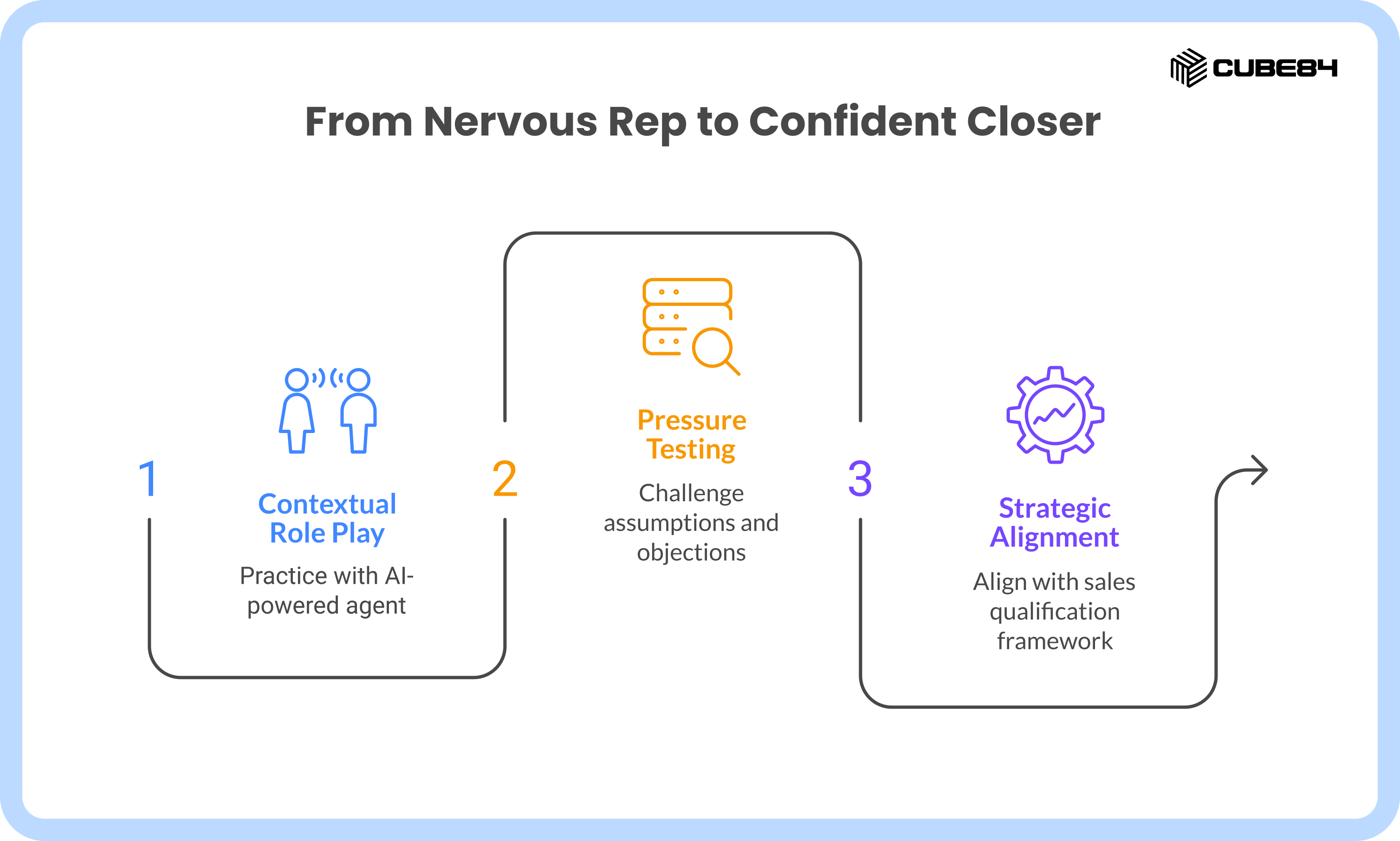
Agentforce Sales Coach uses ready-to-use coaching scenarios that are designed for real sales conversations, not generic role play.
What makes this different is grounding. It pulls context directly from the Opportunity record. Products in scope, competitors mentioned, notes from previous calls, and even past meeting summaries are used to shape the conversation.
When reps open the Agentforce Sales Coach in Slack or their Salesforce Mobile app, they can start a role play directly there and chat with the agent as if they were the buyer. The agent does not just nod along, but pushes back on price, asks for ROI justification, and challenges assumptions based on the actual deal context.
With this approach, you are not required to memorize anything, just pressure-test the conversation before it happens, very similar to how we take up mock interviews.
Trust and Control
Two things that we love about this are that, one, it is 100% internal, and two, the coaching scenarios are predefined and configurable. Sales leaders can align them to the qualification framework the team already uses, whether that is MEDDPICC, Sandler, or an internal methodology.
Like we mentioned, because the agent is grounded in CRM data and approved scenarios, it stays within the boundaries of how your team actually sells. It does not invent objections or go off script.
Every session gets logged (with rep opt-in), so managers see improvement trends across the team without sitting in on practices.
Strategic Win
This use case reduces first-call nervousness and last-call surprises. Reps walk into important conversations knowing clearly what questions are likely to come up and how to respond in a way that aligns with the company’s sales process.
Managers get team-wide visibility without sitting in every practice session and can ensure reps are consistently preparing for the conversations that matter most.
Time to value: Most teams can enable this in 1 to 2 weeks using existing Opportunity data and coaching scenarios.
CASE 3 : The Self-Healing Pipeline (Sales Management Agent)

Truly, most managers in a full-time role do not have the bandwidth to manually verify whether those fields reflect what is actually happening in conversations with buyers. And so, deals tend to stall, and close dates slip without being updated. Eventually, teams end up making assumptions in forecast calls.
The pipelines that are supposed to give you instant clarity start becoming the reason for your confusion and stress. This is where Agentforce becomes your second set of eyes, working 24/7 so you don't have to.
The Mechanics
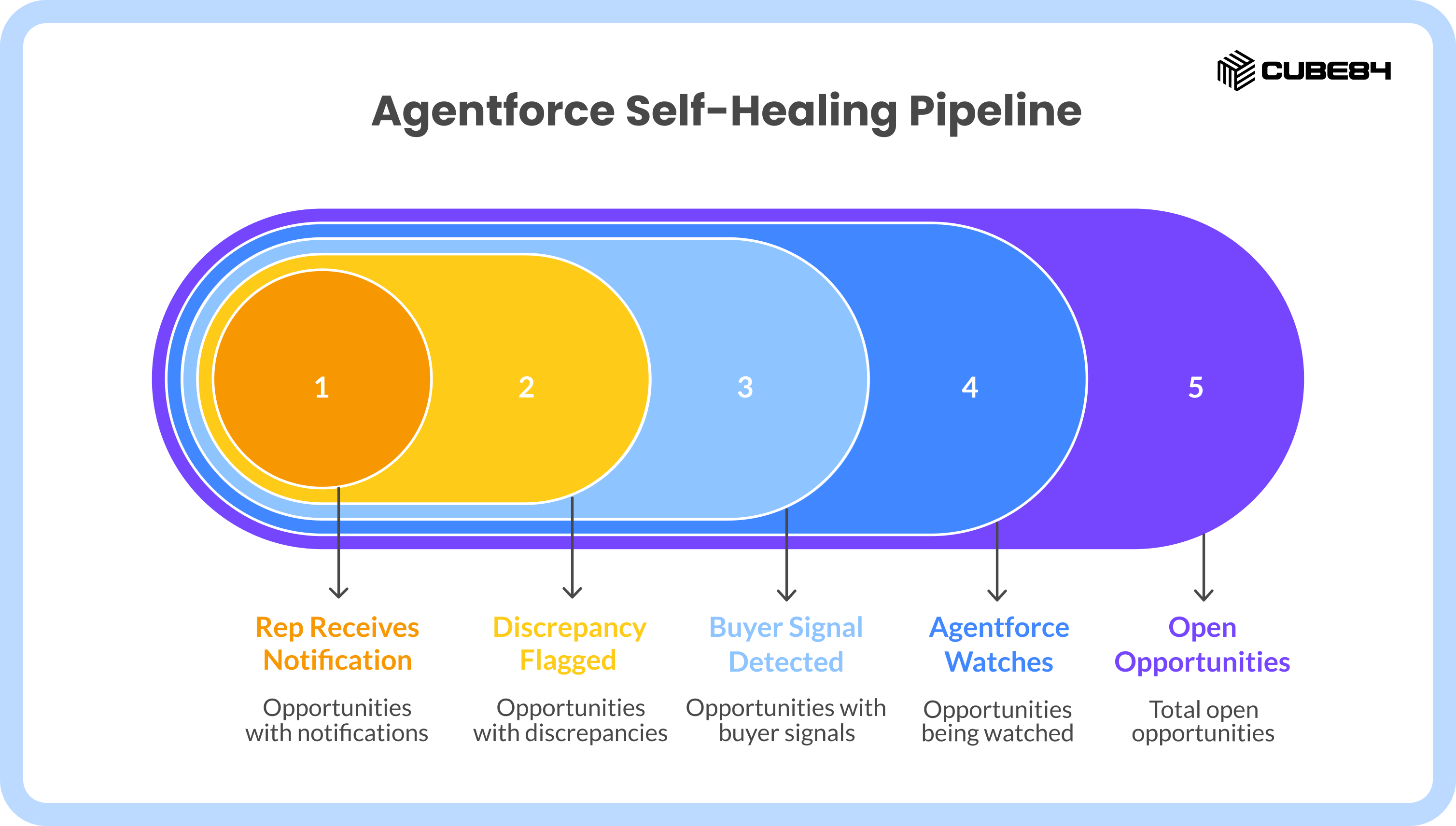
A Sales Management Agent practically lives in your pipeline and continuously watches it in the background, triggered by changes in activity, updates to opportunities, or periods of inactivity.
It analyzes unstructured data such as emails and call transcripts captured through Einstein Conversation Insights. Instead of relying only on fields being updated manually, the agent looks at what buyers are actually saying.
If a prospect says something like, “Let’s reconnect next month,” but the Close Date is still set for this week, the agent recognizes the mismatch, and the Atlas Reasoning Engine kicks in.
It then:
Classifies the buyer signal (delay, expansion, competitive threat)
Cross-references against Opportunity fields (stage, close date, next steps)
Calculates a risk score and recommended action
It does not change anything on its own. Instead, it flags the discrepancy.
The rep receives a notification that's more like a helpful nudge, rather than a system alert. Something along the lines of, “I noticed the buyer asked for more time. Should I update the Close Date and draft a follow-up for the 15th?”
You can see that the rep is still in charge. While the agent does the noticing, the rep makes the decision.
Trust and Control
From the above use case, we can see that this is designed to support the judgment reps make, but not replace it.
Nothing is updated automatically without reps’ awareness. Suggested changes are transparent, explainable, and tied back to actual customer conversations. Managers can approve high-value deals, and they also get visibility into pipeline health without micromanaging updates or chasing reps for hygiene.
Because the agent works inside Salesforce and uses existing conversation data, it fits naturally into how teams already work.
Strategic Win
By removing stale assumptions and outdated close dates, teams get a pipeline that is driven by data. Forecast conversations become more grounded, and managers spend less time correcting data and more time coaching deals that actually matter.
People often describe the pipeline as being built on hope. That may be true, but here we’re backing hope with evidence.
Time to value: Most teams can enable this in 3 to 5 weeks, especially if Einstein Conversation Insights is already in use.
CASE 4 : Meeting Intelligence & Automated Briefings

This is one of the classic cases where you have exactly zero minutes and so much to refresh your memory with. How are you going to dig through six months of account history before each meeting?
With this as the challenge, all that your reps get to do is pray mentally and jump from one call to the next with only a vague idea of what happened last time, hoping to crack it. All of the important details that are necessary for this call live across Salesforce notes, emails, service cases, and marketing touchpoints. No one intentionally ignores this context. It’s just that there isn’t enough time to piece it all together before every call.
So reps walk into meetings knowing just what's in the Opportunity record, which usually isn't much, so end up sounding generic. They ask questions that were already answered. And the conversation starts on the back foot.
This is where Agentforce delivers context at the perfect moment.
The Mechanics
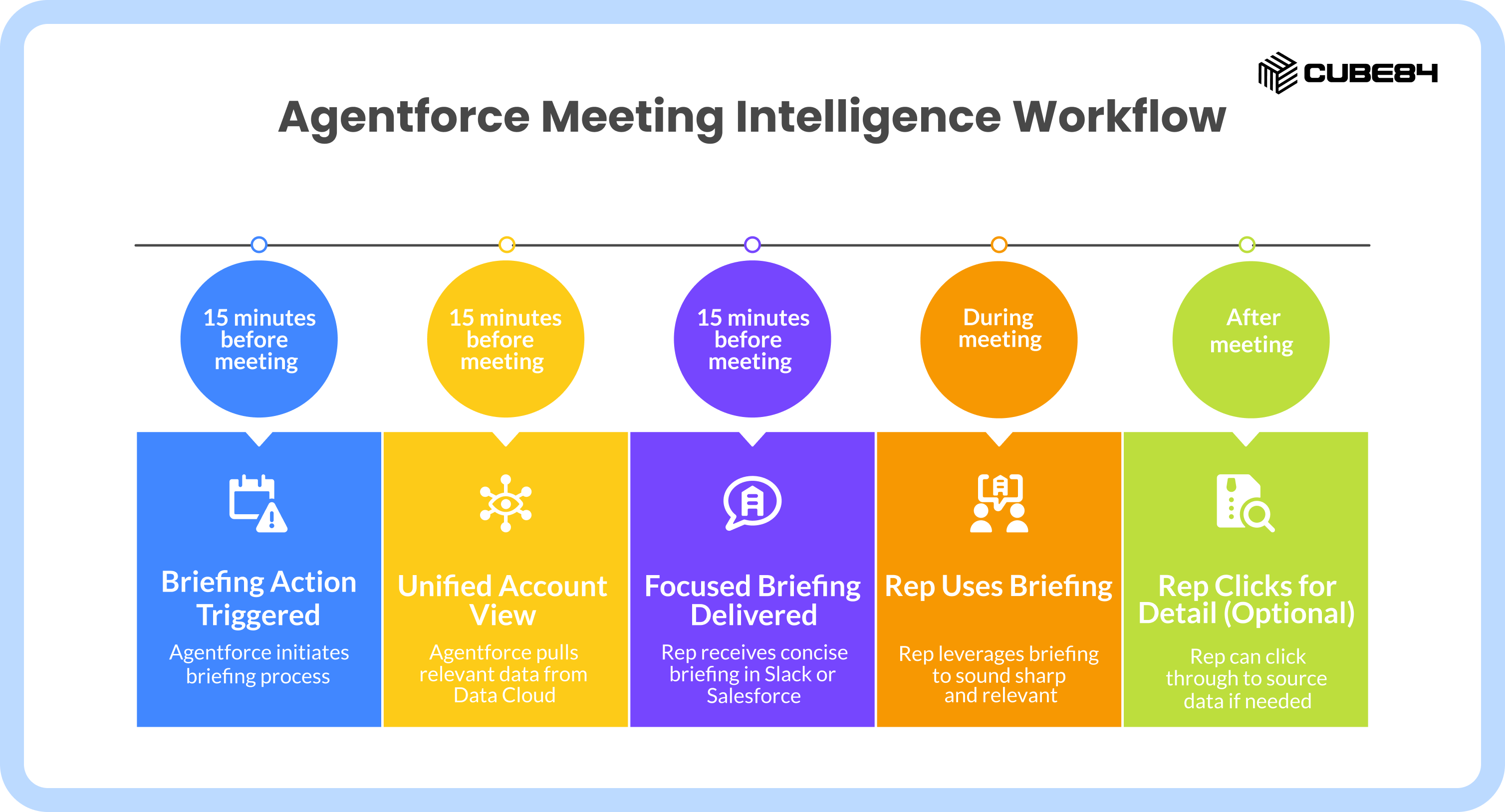
This use case turns Agentforce into your personal research assistant that prepares you for every conversation. Before each meeting, it pulls together a unified view of the account using Data Cloud. It looks across service tickets, recent marketing engagement, past sales emails, and CRM activity. Instead of surfacing everything, it focuses only on what is relevant for the upcoming conversation.
This is a focused briefing, not a raw summary. The agent decides what matters for that specific meeting and delivers it at the right moment without the rep having to ask for it.
Fifteen minutes before the meeting (time is customizable) , a Briefing Action is triggered. The rep receives a short message in Slack or Salesforce with exactly what they need to know.
Something like:
“Three things to know for today’s call:
There is an open support ticket related to Feature X.
Your primary contact was promoted last month.
In the last conversation, they mentioned a temporary budget freeze.”
Now you have those key points to sound sharp and relevant, without all that search.
Trust and Control
Like we mentioned earlier, Agents do not assume things here, this briefing does not introduce new information or assumptions. It only gathers information from your existing Salesforce data.
Reps can click through to the source if they want more detail, but they are not forced to. The agent summarizes context, it does not replace judgment.
Because this happens inside Salesforce and connected tools like Slack, it blends into the rep’s daily workflow instead of adding another dashboard to check.
Strategic Win
We now have reps walk into calls prepared with details that show real account understanding. They show up knowing what changed, what is sensitive, and where to steer the discussion. They sound prepared without spending extra time preparing.
Every rep gets this for every call. So managers, note that there are no more excuses about “not having time to prep” or missed context that loses deals.
Over time, this shifts how buyers experience your sales team. Conversations are more intentional, relevant, and grounded. That is how generic reps start showing up as strategic advisors, without requiring hours of manual research before every call. Not just the first impression. Every interaction is stronger, because an agent is continuously feeding reps the context they need, right when they need it.
Time to value: Teams can typically enable this in 2 to 3 weeks, especially if Data Cloud and core engagement data are already connected.
CASE 5 : Conversational Quoting (Agentforce for Revenue Cloud)

Specific questions from a prospect are usually considered a good sign. They indicate that the prospect is engaged, asking the right questions, and clearly interested. But then comes the moment that usually slows everything down.
This is the point where momentum often breaks.
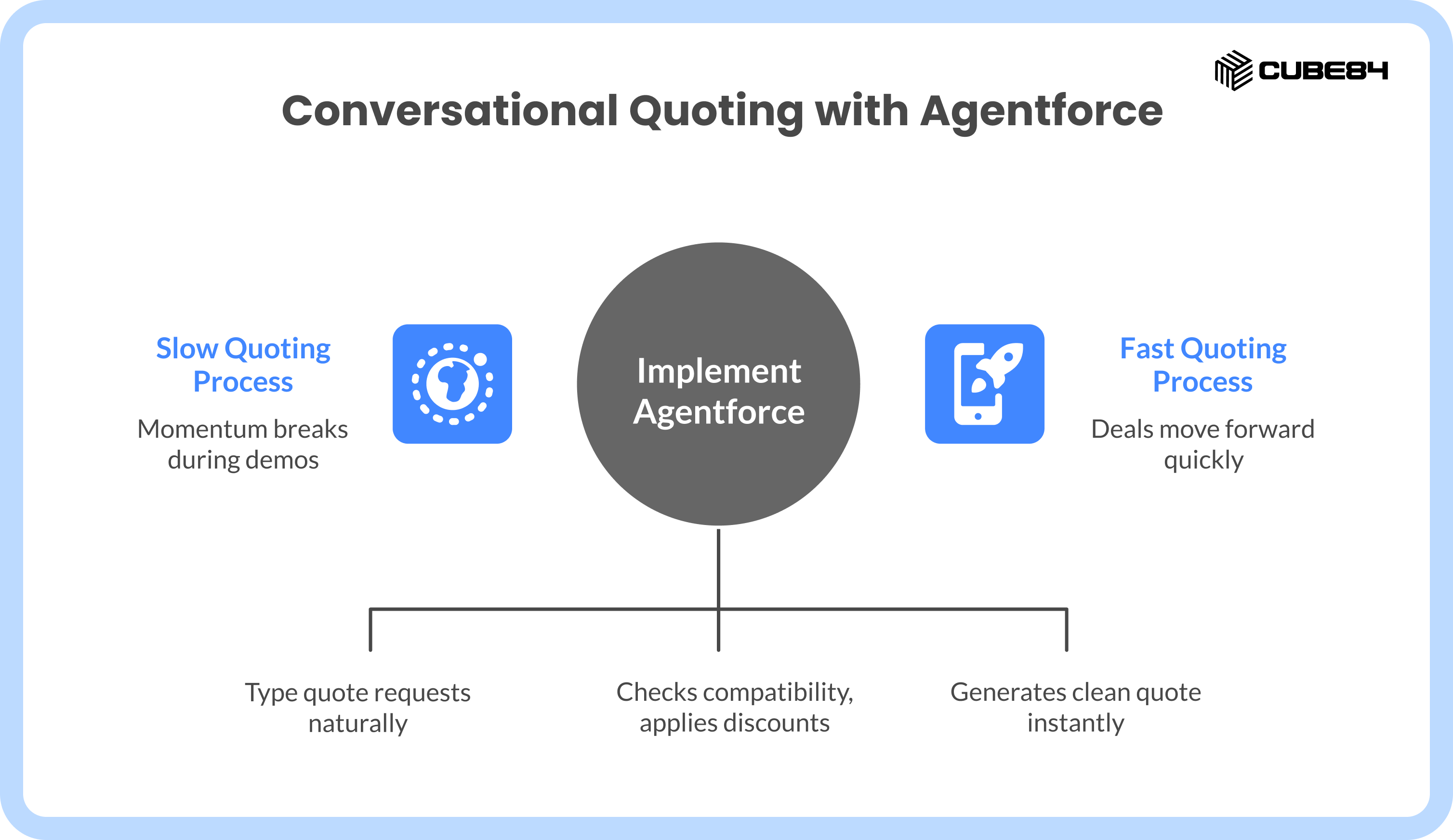
In most sales teams, the rep either says they will get back with pricing later, or they start awkwardly jumping between tools, spreadsheets, and CPQ screens while the prospect waits. The conversation loses its flow, and you’re out of the selling zone.
This is where Agentforce keeps you in the selling flow.
The Mechanics
With Agentforce for Revenue Cloud, quoting happens inside the conversation.
Using natural language through the Agentforce Sidebar, the rep can type what they’re looking for while on the call itself. For example, “Add 50 Sales Cloud licenses to this quote with a 10% discount starting next month.”
Agentforce translates that request into structured actions inside Revenue Cloud:
- Checks product compatibility (will Enterprise Edition work with their current seats?)
- Applies your discount rules (is 10% approved for this deal size?)
- Validates against contract terms and approval thresholds
- Generates a clean PDF quote instantly
The math happens in seconds while you're still on the call. It operates strictly within the rules your Revenue Cloud setup already enforces.
Trust and Control
The agent only does the math and does not bypass approvals or pricing governance.
All standard CPQ rules stay fully enforced. Discount limits, approval flows, and product constraints are respected. The agent can't override finance policy or create unapproved discounts.
The rep stays focused on the conversation, while Salesforce handles the complexity in the background.
Strategic Win
This use case shortens the gap between interest and action, eliminating the quote to cash from days to minutes, without cutting corners.
Reps stay in the selling zone instead of switching into calculator mode. Buyers get answers while intent is still high, and deals keep moving forward, without unnecessary pauses or follow ups.
Time to value: Teams already using Revenue Cloud can typically enable this in 4 to 6 weeks, depending on CPQ complexity and approval rules.
Implementation Reality Check
You’ve seen the five use cases, each one tackling a different flavor of CRM drudgery that steals selling time. These are deployable today, and to make that happen, teams need the right Salesforce foundations in place so agents can act with context, guardrails, and control.
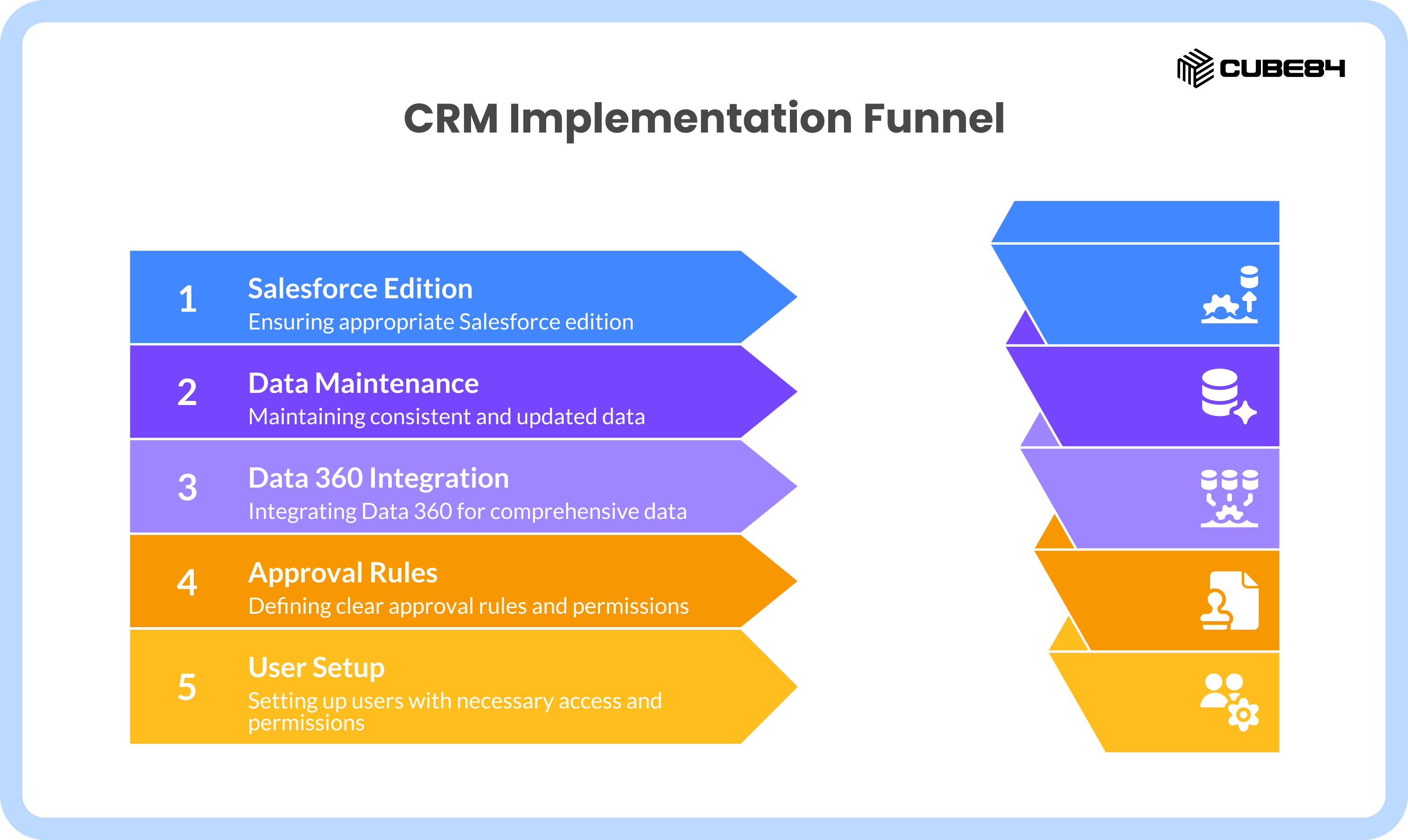
To make this work, teams need:
Appropriate Salesforce editions with Einstein 1 access, typically Enterprise Edition or higher
Core Salesforce data should be consistently updated and maintained. Agents rely on what is already in the system
Data 360 connected where needed, along with core Salesforce data
Defined approval rules and permissions, so agents know when to act and when to involve a human
Proper user setup, including Agentforce access and permission sets for relevant teams
Awareness of credit-based consumption, agents are not free, but they are not wallet-busting either
You do not need a 12-month roadmap or a massive R&D budget to deploy these, but this also cannot be done in a single day.
When the basics are set up correctly, teams can move fast without creating risk.
Wrapping Up
Our teams are exposed to a lot of tools and AI, but what they really need is time, the limited resource you can never get back. So it’s only wise to put your time to best use by cutting mundane work and shifting CRM-heavy tasks to digital coworkers that are available today.
The real opportunity in 2026 is operationalizing AI safely, intentionally, and exactly where it moves revenue.
You’ve read the cases and now have a fairly good idea of how they work. Next, start with one use case. Pick the area where time loss is most visible on your team, whether inbound leads, deal prep, pipeline hygiene, or quoting. Get the foundations right, deploy fast, and expand from there.
Start making Agentforce a part of your team, and your CRO will thank you. Your reps will love you. Buyers will close faster. The 2026 playbook shift starts now!
If you have any questions about how to get started with Agentforce, feel free to reach out to us.